


Vikram Das

Blog dedicated to Oracle Applications (E-Business Suite) Technology; covers Apps Architecture, Administration and third party bolt-ons to Apps
Updated: 1 week 3 days ago
Unable to locally verify the issuer's authority
Chuka pinged me when he got this error in Qualys logs after installation of qualys agent on a server
I suggested that we try setting http_proxy and https_proxy environment variables and check with wget and curl
We did that and got the error:
Unable to locally verify the issuer's authority
On access.redhat.com, I found https://access.redhat.com/solutions/37323 that described a similar issue on RHEL5, we are on OEL6:
Getting "Unable to locally verify the issuer's authority" error from wget in RHEL 5EnvironmentSo we compared the size of the file /etc/ssl/certs/ca-certificates.crt on a working server and this server. Sure enough the file size was different. On further investigation we found that there was a backup called ca-bundle.crt.newrpm that had the correct size. So we took a backup of ca-bundle.crt and replaced it with the newer file. The error stopped coming. Even though the ca-certificates rpm version was same on both servers, someone had replaced the ca-bundle.crt file with the older version. We would have to investigate, why that was done, before this solution can be implemented, as it is possible that the new certificates.crt file broke something, because of which it was replaced by the older version. We should always have the latest ca-bundle.crt, so that we have the latest root certificates from the Certificate Authorities.
2017-07-24 15:23:08.363 [qualys-cloud-agent][232147]:[Information]:Webservice uri: https://qagpublic.qg1.apps.qualys.com/CloudAgent/v1.1/customer/9c0e25de-0221-5af6-e040-10ac13043f6a/agent/e6ea9ca7-a662-4a4d-8412-2ec70077d7a9/CAPI
2017-07-24 15:23:08.497 [qualys-cloud-agent][232147]:[Information]:Finished curl request
2017-07-24 15:23:08.497 [qualys-cloud-agent][232147]:[Error]:Http request failed:Peer certificate cannot be authenticated with given CA certificates: SSL certificate problem: unable to get local issuer certificate
2017-07-24 15:23:08.497 [qualys-cloud-agent][232147]:[Error]:Http request failed: error code: 0
2017-07-24 15:23:08.497 [qualys-cloud-agent][232147]:[Error]:CAPI request failed:
2017-07-24 15:23:08.497 [qualys-cloud-agent][232147]:[Error]:CAPI event failed
2017-07-24 15:23:08.500 [qualys-cloud-agent][232147]:[Information]:Next event: INTERVAL_EVENT_CAPI, time left: 100 seconds
I suggested that we try setting http_proxy and https_proxy environment variables and check with wget and curl
We did that and got the error:
Unable to locally verify the issuer's authority
On access.redhat.com, I found https://access.redhat.com/solutions/37323 that described a similar issue on RHEL5, we are on OEL6:
Getting "Unable to locally verify the issuer's authority" error from wget in RHEL 5Environment
- Red Hat Enterprise Linux (RHEL) 5.5
- When downloading from certain SSL URLs, wget throws the error "Unable to locally verify the issuer's authority".
- This issue has been resolved as of RHEL 5.7 in
openssl-0.9.8e-20.el5, for more information see the following errata: http://rhn.redhat.com/errata/RHBA-2011-1010.html
- The openssl
/etc/pki/tls/certs/ca-bundle.crtfile in RHEL 5.5 is outdated.
Reproduction steps:
$ wget https://www.internetx.com/
--2010-07-24 15:30:14--  https://www.internetx.com/
Resolving www.internetx.com... 85.236.36.48, 2001:4178:2:10::54, 2001:4178:2:10::55, ...
Connecting to www.internetx.com|85.236.36.48|:443... connected.
ERROR: cannot verify www.internetx.com's certificate, issued by '/C=US/O=VeriSign, Inc./OU=VeriSign Trust Network/OU=Terms of use at https://www.verisign.com/rpa (c)06/CN=VeriSign Class 3 Extended Validation SSL SGC CA':
  Unable to locally verify the issuer's authority.
To connect to www.internetx.com insecurely, use `--no-check-certificate'.
Unable to establish SSL connection.
Categories: APPS Blogs
acroread on Linux 6
As per https://access.redhat.com/errata/RHSA-2013:1402 : Adobe Reader (acroread) allows users to view and print documents in Portable Document Format (PDF). Adobe Reader 9 reached the end of its support cycle on June 26, 2013, and will not receive any more security updates. Future versions of Adobe Acrobat Reader will not be available with Red Hat Enterprise Linux.
Some of our ERPs still use acroread for pasta printing. When we did the upgrade of OS to OEL 6, we had to reinstall adobe by getting the rpm from adobe site ftp://ftp.adobe.com/pub/adobe/reader/unix/9.x/9.5.5/enu/ that I got from https://www.reddit.com/r/linux/comments/2hsgq6/linux_version_of_adobe_reader_no_longer/ Fortunately, adobe still hosts it. It is also available from Red Hat if you have a subscription:
Red Hat Enterprise Linux Server 6SRPMx86_64acroread-9.5.5-1.el6_4.1.i686.rpmSHA-256: ac0934cfe887c6f49238ebff2c963adc33c1531019660bbfa4f8852d725136a2Downloadacroread-plugin-9.5.5-1.el6_4.1.i686.rpmSHA-256: 8116e41e4825f74478731a7e970482274db5c9d4b9489b9f70ca4e1a278e526bDownloadi386acroread-9.5.5-1.el6_4.1.i686.rpmSHA-256: ac0934cfe887c6f49238ebff2c963adc33c1531019660bbfa4f8852d725136a2Downloadacroread-plugin-9.5.5-1.el6_4.1.i686.rpmSHA-256: 8116e41e4825f74478731a7e970482274db5c9d4b9489b9f70ca4e1a278e526bDownload
After installing the rpm with rpm -ivh AdbeRdr9.5.5-1_i486linux_enu.rpm command, we got dependency error for libxml2.so. On installing libxml2.so, we got error for other missing dependencies. So eventually we did yum install AdbeRdr9.5.5-1_i486linux_enu.rpm which installed about 80 rpms that acroread needs to function.
After installation, we kept getting this error:
dirname: missing operand
The post on http://www.linuxquestions.org/questions/slackware-14/error-message-dirname-missing-operand-when-starting-acroread-827012/ recommended a fix:
The DBAs were getting this error when they used sudo to login as applmgr:
Adobe Reader does not need to be run as a privileged user. Please remove 'sudo' from the beginning of the command
The post on https://forums.freebsd.org/threads/17345/ recommended that we comment line 331,332,333 and 334:
# Do not allow launch using 'sudo'.
#if [ "${ACRO_ALLOW_SUDO+set}" != "set" -a \( "${SUDO_USER+set}" = "set" -o "${SUDO_UID+set}" = "set" -o "${SUDO_GID}" = "set" \) ]; then
# printf "%s\n" "Adobe Reader does not need to be run as a privileged user. Please remove 'sudo' from the beginning of the command."
# exit 1
#fi
That fixed the sudo issue.
I have asked the DBA team to reach out to the Developers to stop using acroread and migrate to an alternative that is natively supported in Linux. Here's more from Red Hat on their security advisory https://access.redhat.com/errata/RHSA-2013:1402 :
Some of our ERPs still use acroread for pasta printing. When we did the upgrade of OS to OEL 6, we had to reinstall adobe by getting the rpm from adobe site ftp://ftp.adobe.com/pub/adobe/reader/unix/9.x/9.5.5/enu/ that I got from https://www.reddit.com/r/linux/comments/2hsgq6/linux_version_of_adobe_reader_no_longer/ Fortunately, adobe still hosts it. It is also available from Red Hat if you have a subscription:
Red Hat Enterprise Linux Server 6SRPMx86_64acroread-9.5.5-1.el6_4.1.i686.rpmSHA-256: ac0934cfe887c6f49238ebff2c963adc33c1531019660bbfa4f8852d725136a2Downloadacroread-plugin-9.5.5-1.el6_4.1.i686.rpmSHA-256: 8116e41e4825f74478731a7e970482274db5c9d4b9489b9f70ca4e1a278e526bDownloadi386acroread-9.5.5-1.el6_4.1.i686.rpmSHA-256: ac0934cfe887c6f49238ebff2c963adc33c1531019660bbfa4f8852d725136a2Downloadacroread-plugin-9.5.5-1.el6_4.1.i686.rpmSHA-256: 8116e41e4825f74478731a7e970482274db5c9d4b9489b9f70ca4e1a278e526bDownload
After installing the rpm with rpm -ivh AdbeRdr9.5.5-1_i486linux_enu.rpm command, we got dependency error for libxml2.so. On installing libxml2.so, we got error for other missing dependencies. So eventually we did yum install AdbeRdr9.5.5-1_i486linux_enu.rpm which installed about 80 rpms that acroread needs to function.
After installation, we kept getting this error:
dirname: missing operand
The post on http://www.linuxquestions.org/questions/slackware-14/error-message-dirname-missing-operand-when-starting-acroread-827012/ recommended a fix:
The issue was fixed by commenting line 529 in the bash script /opt/Adobe/Reader/bin/acrobat
529 # [ -n "${MozPath}" ] || mozillaPath="`readlink "$MozPath" | xargs dirname`"
529 # [ -n "${MozPath}" ] || mozillaPath="`readlink "$MozPath" | xargs dirname`"
The DBAs were getting this error when they used sudo to login as applmgr:
Adobe Reader does not need to be run as a privileged user. Please remove 'sudo' from the beginning of the command
The post on https://forums.freebsd.org/threads/17345/ recommended that we comment line 331,332,333 and 334:
# Do not allow launch using 'sudo'.
#if [ "${ACRO_ALLOW_SUDO+set}" != "set" -a \( "${SUDO_USER+set}" = "set" -o "${SUDO_UID+set}" = "set" -o "${SUDO_GID}" = "set" \) ]; then
# printf "%s\n" "Adobe Reader does not need to be run as a privileged user. Please remove 'sudo' from the beginning of the command."
# exit 1
#fi
That fixed the sudo issue.
I have asked the DBA team to reach out to the Developers to stop using acroread and migrate to an alternative that is natively supported in Linux. Here's more from Red Hat on their security advisory https://access.redhat.com/errata/RHSA-2013:1402 :
Red Hat advises users to reconsider further use of Adobe Reader for Linux,
as it may contain known, unpatched security issues. Alternative PDF
rendering software, such as Evince and KPDF (part of the kdegraphics
package) in Red Hat Enterprise Linux 5, or Evince and Okular (part of the
kdegraphics package) in Red Hat Enterprise Linux 6, should be
considered. These packages will continue to receive security fixes.
as it may contain known, unpatched security issues. Alternative PDF
rendering software, such as Evince and KPDF (part of the kdegraphics
package) in Red Hat Enterprise Linux 5, or Evince and Okular (part of the
kdegraphics package) in Red Hat Enterprise Linux 6, should be
considered. These packages will continue to receive security fixes.
Red Hat will no longer provide security updates to these packages and
recommends that customers not use this application on Red Hat Enterprise
Linux effective immediately.
recommends that customers not use this application on Red Hat Enterprise
Linux effective immediately.
Categories: APPS Blogs
Demantra setup.exe does nothing on Windows 7
Last evening, Mukhtiar called me to assist in Demantra installation on Windows. By the time we got on screen share, he had already downloaded patch 2195481 and installed JDK 1.8.0_77. However, when he clicked setup.exe, nothing happened. We tried these :
1. Right click on setup.exe > Click Properties > Compatibility Tab > Run this program in compatibility mode for Windows XP
2. Run the program as Administrator
3. Tried changing registy settings as per some microsoft technotes
However nothing worked.
We located a file called setup.lax that was a configuration file for the installer and switched on stderr=console
However it showed a command window that used to disappear in a flash.
We tried uninstalling JDK 1.8.0_77 and installing JDK 1.7
Setting environment variable JAVA_HOME as described Demantra installation guide on https://docs.oracle.com/cd/E26401_01/doc.122/e22516/T573380T574948.htm
JAVA_HOME System Environment Variable
1. Right click on setup.exe > Click Properties > Compatibility Tab > Run this program in compatibility mode for Windows XP
2. Run the program as Administrator
3. Tried changing registy settings as per some microsoft technotes
However nothing worked.
We located a file called setup.lax that was a configuration file for the installer and switched on stderr=console
However it showed a command window that used to disappear in a flash.
We tried uninstalling JDK 1.8.0_77 and installing JDK 1.7
Setting environment variable JAVA_HOME as described Demantra installation guide on https://docs.oracle.com/cd/E26401_01/doc.122/e22516/T573380T574948.htm
JAVA_HOME System Environment Variable
If the client machine does not have JDK version 1.6 or 1.7 installed, the Installer prompts you to download and install it. After installation, set JAVA_HOME to the JDK installation directory (for example, C:\Program Files\Java\jdk1.6.0_16).
Nothing worked.
Mukhtiar located a blog that advised setting java heap size to 512m by setting this environment variable:
_JAVA_OPTIONS = -Xmx512M
The Java Virtual Machine takes two command line arguments which set the initial and maximum heap sizes: -Xms and -Xmx. You can add a system environment variable named _JAVA_OPTIONS, and set the heap size values there
As soon as this environment variable was set, setup.exe finally launched. All this time it was erroring out as the default 256MB was insufficient for starting the installer.
There was information about Out of Memory error on the installation guide too, but we had missed that:
Out of Memory Error Message
Verify memory settings:
- From the Windows Start menu, choose Settings, Control Panel, and then Java. The Java Control Panel dialog box appears.
- Click the Java Tab.
- From the Java Applet Runtime Settings section, click View.
- Verify that the value of the field Java Runtime Parameters is at least -Xmx256M and is based on the client machine hardware/RAM capacity. Oracle recommends value -Xmx512M for heavy-duty client side use.
Categories: APPS Blogs
Presenting in Collaborate 2016
I am presenting in OAUG Collaborate 2016 about our experiences with running E-Business Suite on Engineered Systems - Exadata, Exalogic, ZFS and PCA. Session Details:
https://collaborate.zerista.com/event/member/223628
Please attend, if you are coming to OAUG Collaborate.
https://collaborate.zerista.com/event/member/223628
Please attend, if you are coming to OAUG Collaborate.
Categories: APPS Blogs
Extranet login redirects to intranet URL
For an old 11.5.10.2 ERP, we are moving from the architecture of "EBS application server in DMZ" to the architecture of "Reverse Proxy in DMZ and EBS application server in intranet". After doing all configurations, we hit the classic issue where, you login through extranet url visible on public internet which redirects to intranet url.
So https://extranet.example.com asks for SSO details and after keying in SSO username and password goes to http://intranet.example.com.
The support.oracle.com article DMZ Configuration with Oracle E-Business Suite 11i (Doc ID 287176.1) has listed 4 checks which could be the reason for this issue:
H6: Redirection to an Incorrect Server During Login
---------------------------------------- --------------------------------
APPS_FRAMEWORK_AGENT SERVRESP
APPS_JSP_AGENT SERVRESP
APPS_PORTAL SERVRESP
APPS_SERVLET_AGENT SERVRESP
APPS_WEB_AGENT SERVRESP
ASO_CONFIGURATOR_URL SERVRESP
CZ_UIMGR_URL SERVRESP
HELP_WEB_AGENT SERVRESP
ICX_DISCOVERER_LAUNCHER SERVRESP
ICX_DISCOVERER_VIEWER_LAUNCHER SERVRESP
ICX_FORMS_LAUNCHER SERVRESP
QP_PRICING_ENGINE_URL SERVRESP
TCF:HOST SERVRESP
Whether the profile option values for the fnd profile options (APPS_FRAMEWORK_AGENT, APPS_WEB_AGENT, APPS_JSP_AGENT, APPS_SERVLET_AGENT) are pointing to the correct node. Replace the node_id with the node_id of the external and internal web tier. For example:
Whether the dbc file pointed to by the JVM parameter (JTFDBCFILE) in jserv.properties exists.
Whether the value of the parameter APPL_SERVER_ID set in the dbc file for the node is the same as the value of the server_id in the fnd_nodes table.
If you are getting redirected to an incorrect server during the login process, check the following:
- Whether the hirearchy type of the profile options mentioned in Section 5.1 is set to SERVRESP .
select PROFILE_OPTION_NAME,HIERARCHY_TYPE from fnd_profile_options where profile_option_name inPROFILE_OPTION_NAME HIERARCHY_TYPE
('APPS_WEB_AGENT','APPS_SERVLET_AGENT','APPS_JSP_AGENT','APPS_FRAMEWORK_AGENT' ,'ICX_FORMS_LAUNCHER','ICX_DISCOVERER_LAUNCHER','ICX_DISCOVERER_VIEWER_LAUNCHER','HELP_WEB_AGENT','APPS_PORTAL','CZ_UIMGR_URL','ASO_CONFIGURATOR_URL','QP_PRICING_ENGINE_URL','TCF:HOST');
---------------------------------------- --------------------------------
APPS_FRAMEWORK_AGENT SERVRESP
APPS_JSP_AGENT SERVRESP
APPS_PORTAL SERVRESP
APPS_SERVLET_AGENT SERVRESP
APPS_WEB_AGENT SERVRESP
ASO_CONFIGURATOR_URL SERVRESP
CZ_UIMGR_URL SERVRESP
HELP_WEB_AGENT SERVRESP
ICX_DISCOVERER_LAUNCHER SERVRESP
ICX_DISCOVERER_VIEWER_LAUNCHER SERVRESP
ICX_FORMS_LAUNCHER SERVRESP
QP_PRICING_ENGINE_URL SERVRESP
TCF:HOST SERVRESP
All good on this point
select fnd_profile.value_specific('APPS_FRAMEWORK_AGENT',null,null,null,null,) from dual;This query returned https://extranet.example.comwrapper.bin.parameters=-DJTFDBCFILE=This was incorrect. It was pointing to the intranet jdbc file location.
select node_name,node_id,server_id from fnd_nodes;This was overwritten in the dbc file, with appl_server_id of intranet when autoconfig was done on intranet and overwritten with appl_server_id of extranet when autoconfig was done on extranet, as the DBC file location and name were same for both intranet and extranet.
I asked the DBA team to manually correct the dbc file name inside $IAS_CONFIG_HOME/Apache/Apache/Jserv/etc/jserv.properties
and create a file of that name in $FND_SECURE/$CONTEXT_NAME.dbc on the extranet node and bounce services. Once that was done, we tested and it worked. No more redirection to intranet URL.
Then I asked them to correct the s_dbc_file_name variable in the context file of extranet node. Run autoconfig on extranet, verify the value of dbcfile in jserv.properties DJTFDBCFILE parameter, verify that the DBC file had the server_id of the extranet node. Restart all services.
Checked again, and it worked again.
So apart from checking the values of context file variables like s_webentryhost, s_webentrydomain, s_active_port, you also need to check the value of s_dbc_file while verifying the setups for extranet configuration. This can happen in 11i , R12.1 and R12.2 also.
Categories: APPS Blogs
Calling all Apps DBAs doing 11i to R12.x upgrades
At this time of the year during holidays, the Apps DBA community is busy doing upgrades as longer downtimes are possible. In case you are facing any issues, please feel free to write to me at my email: oracleappstechnology@gmail.com . I will be glad to hear from you and help you.
Categories: APPS Blogs
11i pre-upgrade data fix script ap_wrg_11i_chrg_alloc_fix.sql runs very slow
We are currently upgrading one of our ERP instances from 11.5.10.2 to R12.2.5. One of the pre-upgrade steps is to execute the data fix script ap_wrg_11i_chrg_alloc_fix.sql. However, this script has been running very very slow. After 4 weeks of monitoring, logging SRs with Oracle, escalating etc., we started a group chat today with our internal experts. We had Ali, Germaine, Aditya, Mukhtiar, Martha Gomez and Zoltan. I also invited our top notch EBS Techstack expert John Felix. After doing explain plan on the sql, Based on the updates being done by the query I predicted that it will take 65 days to complete.
John pointed out that the query was using the index AP_INVOICE_DISTRIBUTIONS_N4 that had a very high cost. We used an sql profile that replaced AP_INVOICE_DISTRIBUTIONS_N4 with AP_INVOICE_DISTRIBUTIONS_U1. The query started running faster and my new prediction was that it would complete in 5.45 days.
John mentioned that now another select statement was using the same index AP_INVOICE_DISTRIBUTIONS_N4 that had a very high cost.
After discussing among ourselves, we decided to drop the index, run the script and re-create the index. Aditya saved the definition of the index and dropped it.
DBMS_METADATA.GET_DDL('INDEX','AP_INVOICE_DISTRIBUTIONS_N4','AP')
--------------------------------------------------------------------------------------------------------------------------------------------------------------------------------------------------------
CREATE INDEX "AP"."AP_INVOICE_DISTRIBUTIONS_N4" ON "AP"."AP_INVOICE_DISTRIBUTIONS_ALL" ("ACCOUNTING_DATE")
PCTFREE 10 INITRANS 11 MAXTRANS 255 COMPUTE STATISTICS
STORAGE(INITIAL 131072 NEXT 131072 MINEXTENTS 1 MAXEXTENTS 2147483645
PCTINCREASE 0 FREELISTS 1 FREELIST GROUPS 1
BUFFER_POOL DEFAULT FLASH_CACHE DEFAULT CELL_FLASH_CACHE DEFAULT)
TABLESPACE "APPS_TS_TX_IDX"
1 row selected.
SQL> drop index AP.AP_INVOICE_DISTRIBUTIONS_N4;
Index dropped.
The updates started happening blazing fast. The whole thing got done in 39 minutes and we saw the much awaited:
SQL> set time on
16:34:16 SQL> @ap_wrg_11i_chrg_alloc_fix.sql
Enter value for resp_name: Payables Manager
Enter value for usr_name: 123456
-------------------------------------------------------------------------------
/erp11i/applcsf/temp/9570496-fix-16:34:40.html is the log file created
-------------------------------------------------------------------------------
PL/SQL procedure successfully completed.
17:13:36 SQL>
John pointed out that the query was using the index AP_INVOICE_DISTRIBUTIONS_N4 that had a very high cost. We used an sql profile that replaced AP_INVOICE_DISTRIBUTIONS_N4 with AP_INVOICE_DISTRIBUTIONS_U1. The query started running faster and my new prediction was that it would complete in 5.45 days.
John mentioned that now another select statement was using the same index AP_INVOICE_DISTRIBUTIONS_N4 that had a very high cost.
After discussing among ourselves, we decided to drop the index, run the script and re-create the index. Aditya saved the definition of the index and dropped it.
DBMS_METADATA.GET_DDL('INDEX','AP_INVOICE_DISTRIBUTIONS_N4','AP')
--------------------------------------------------------------------------------------------------------------------------------------------------------------------------------------------------------
CREATE INDEX "AP"."AP_INVOICE_DISTRIBUTIONS_N4" ON "AP"."AP_INVOICE_DISTRIBUTIONS_ALL" ("ACCOUNTING_DATE")
PCTFREE 10 INITRANS 11 MAXTRANS 255 COMPUTE STATISTICS
STORAGE(INITIAL 131072 NEXT 131072 MINEXTENTS 1 MAXEXTENTS 2147483645
PCTINCREASE 0 FREELISTS 1 FREELIST GROUPS 1
BUFFER_POOL DEFAULT FLASH_CACHE DEFAULT CELL_FLASH_CACHE DEFAULT)
TABLESPACE "APPS_TS_TX_IDX"
1 row selected.
SQL> drop index AP.AP_INVOICE_DISTRIBUTIONS_N4;
Index dropped.
The updates started happening blazing fast. The whole thing got done in 39 minutes and we saw the much awaited:
SQL> set time on
16:34:16 SQL> @ap_wrg_11i_chrg_alloc_fix.sql
Enter value for resp_name: Payables Manager
Enter value for usr_name: 123456
-------------------------------------------------------------------------------
/erp11i/applcsf/temp/9570496-fix-16:34:40.html is the log file created
-------------------------------------------------------------------------------
PL/SQL procedure successfully completed.
17:13:36 SQL>
From 65 days to 5.45 days to 39 minutes. Remarkable. Thank you John for your correct diagnosis and solution.
Categories: APPS Blogs
sqlplus core dumps with segmentation fault error in OEL 6.6 when you connect to DB
We have used OEL 6.6 image in our latest build. When we cloned an EBS R12.2 instance that was on OEL 5.7 to this new server that has OEL 6.6, During the clone, adcfgclone.pl was failing. On further checks, we discovered that sqlplus is crashing with segmentation fault error whenever we tried to connect to database:
sqlplus /nolog
conn apps/apps
Segmentation Fault
So, I suggested the DBAs to do strace sqlplus apps/apps. The strace revealed many missing libraries:
We had another working OEL 6.4 instance where we checked for these libraries, and all of them were present.
The locate command was used to locate the full directory paths of the missing libraries
sqlplus /nolog
conn apps/apps
Segmentation Fault
So, I suggested the DBAs to do strace sqlplus apps/apps. The strace revealed many missing libraries:
We had another working OEL 6.4 instance where we checked for these libraries, and all of them were present.
The locate command was used to locate the full directory paths of the missing libraries
locate libnss_sss.so.2
/lib/libnss_sss.so.2
/lib/libnss_sss.so.2
/lib/libnss_files.so.2
/lib/libociei.so
/lib/libc.so.6
/lib/libgcc_s.so.1
/lib/libnsl.so.1
/lib/libpthread.so.0
/lib/libnss_files.so.2
/lib/libociei.so
/lib/libc.so.6
/lib/libgcc_s.so.1
/lib/libnsl.so.1
/lib/libpthread.so.0
Then rpm -qf command was used to find out the rpm that would have the library:
$ rpm -qf /lib/libnss_sss.so.2
sssd-client-1.11.6-30.el6_6.3.i686
$ rpm -qf /lib/libnss_files.so.2
glibc-2.12-1.149.el6_6.9.i686
$ rpm -qf /lib/libociei.so
error: file /lib/libociei.so: No such file or directory
$ rpm -qf /lib/libc.so.6
glibc-2.12-1.149.el6_6.9.i686
$ rpm -qf /lib/libgcc_s.so.1
libgcc-4.4.7-3.el6.i686
$ rpm -qf /lib/libnsl.so.1
glibc-2.12-1.149.el6_6.9.i686
$ rpm -qf /lib/libpthread.so.0
glibc-2.12-1.149.el6_6.9.i686
$ rpm -qf /lib/libm.so.6
glibc-2.12-1.149.el6_6.9.i686
$ rpm -qf /lib/libdl.so.2
glibc-2.12-1.149.el6_6.9.i686
Since 10.1.2 home is 32-bit in EBS R12.1 and 12.2, all the libraries needed to be 32-bit.
Except for sssd-client, the other rpms were present. 64-bit version of sssd-client was present and whenver we tried to install the 32-bit rpm it would give this error, as the operating system thinks that it is already installed:
# yum install sssd-client.i686
Loaded plugins: security
Setting up Install Process
Resolving Dependencies
--> Running transaction check
---> Package sssd-client.i686 0:1.12.4-47.el6 will be installed
--> Finished Dependency Resolution
Error: Multilib version problems found. This often means that the root
cause is something else and multilib version checking is just
pointing out that there is a problem. Eg.:
1. You have an upgrade for sssd-client which is missing some
dependency that another package requires. Yum is trying to
solve this by installing an older version of sssd-client of the
different architecture. If you exclude the bad architecture
yum will tell you what the root cause is (which package
requires what). You can try redoing the upgrade with
--exclude sssd-client.otherarch ... this should give you an error
message showing the root cause of the problem.
2. You have multiple architectures of sssd-client installed, but
yum can only see an upgrade for one of those arcitectures.
If you don't want/need both architectures anymore then you
can remove the one with the missing update and everything
will work.
3. You have duplicate versions of sssd-client installed already.
You can use "yum check" to get yum show these errors.
...you can also use --setopt=protected_multilib=false to remove
this checking, however this is almost never the correct thing to
do as something else is very likely to go wrong (often causing
much more problems).
Protected multilib versions: sssd-client-1.12.4-47.el6.i686 != sssd-client-1.11.6-30.el6_6.4.x86_64
# rpm -qa | grep sssd-client
sssd-client-1.11.6-30.el6_6.4.x86_64
Eventually we installed it with force option
# rpm -Uvh --force /tmp/sssd-client-1.11.6-30.el6_6.3.i686.rpm
# rpm -qa | grep sssd-client
sssd-client-1.11.6-30.el6_6.3.i686
sssd-client-1.11.6-30.el6_6.4.x86_64
pam-ldap was one of the other rpms that was installed for other missing libraries. Surprisingly, sssd-client and pam-ldap rpms are not mentioned as pre-requisites in support.oracle.com article:
Oracle E-Business Suite Installation and Upgrade Notes Release 12 (12.2) for Linux x86-64 (Doc ID 1330701.1)
Categories: APPS Blogs
twm: unable to open fontset "-adobe-helvetica-bold-r-normal--*-120-*-*-*-*-*-*"
While launching twm, it gives this error and exits to unix prompt:
twm: unable to open fontset "-adobe-helvetica-bold-r-normal--*-120-*-*-*-*-*-*"
I found a solution on http://ubuntuforums.org/archive/index.php/t-1596636.html :
It was reported here for fedora: https://bugzilla.redhat.com/show_bug.cgi?id=509639. The workaround is to execute it with a specific shell variable:
$ LANG=C
$ export LANG
twm &
twm launches fine after this.
twm: unable to open fontset "-adobe-helvetica-bold-r-normal--*-120-*-*-*-*-*-*"
I found a solution on http://ubuntuforums.org/archive/index.php/t-1596636.html :
It was reported here for fedora: https://bugzilla.redhat.com/show_bug.cgi?id=509639. The workaround is to execute it with a specific shell variable:
$ LANG=C
$ export LANG
twm &
twm launches fine after this.
Categories: APPS Blogs
Oracle SSO Failure - Unable to process request Either the requested URL was not specified in terms of a fully-qualified host name or OHS single sign-on is incorrectly configured
Today, during a cutover when we were moving one of our ERP instance on Cisco UCS VMware VMs to Exalogic and Exadata, I got a call from Bimal. The extranet iSupplier URL had been configured, but whenever any user logged in, they were seeing the following error instead of the iSupplier OAF Home page:
Oracle SSO Failure - Unable to process request Either the requested URL was not specified in terms of a fully-qualified host name or OHS single sign-on is incorrectly configured
A search on support.oracle.com showed many hits. I went through a few of them and ruled out the solutions given. This article sounded promising: Oracle SSO Failure - Unable to process request Either the requested URL was not specified in terms of a fully-qualified host name or OHS single sign-on is incorrectly configured (Doc ID 1474474.1).
The solution suggested:
There is a hardware load-balancer for a multi-tier environment on place, as well as an SSL accelerator.
For R12, there is a context variable, s_enable_sslterminator, that was set to "#".
This should be null for e-Business R12 using specific hardwarementioned before.
1. Set context variable, s_enable_sslterminator to null,
2. Re-ran autoconfig,
3. Re-test Single sign-ons via IE and Firefox now works as expected.
I asked the DBAs to check the value of s_enable_sslterminator:
grep s_enable_sslterminator
and sure enough the value was #
As per article Enabling SSL or TLS in Oracle E-Business Suite Release 12 (Doc ID 376700.1), the value of s_enable_sslterminator should be made null if you are using an SSL accelerator. In our case we use SSL certificate on the Load Balancer and never on Web servers.
The DBAs removed the #
Ran autoconfig
Deregistered SSO
Registered SSO
The user was able to login after that.
Oracle SSO Failure - Unable to process request Either the requested URL was not specified in terms of a fully-qualified host name or OHS single sign-on is incorrectly configured
A search on support.oracle.com showed many hits. I went through a few of them and ruled out the solutions given. This article sounded promising: Oracle SSO Failure - Unable to process request Either the requested URL was not specified in terms of a fully-qualified host name or OHS single sign-on is incorrectly configured (Doc ID 1474474.1).
The solution suggested:
There is a hardware load-balancer for a multi-tier environment on place, as well as an SSL accelerator.
For R12, there is a context variable, s_enable_sslterminator, that was set to "#".
This should be null for e-Business R12 using specific hardwarementioned before.
1. Set context variable, s_enable_sslterminator to null,
2. Re-ran autoconfig,
3. Re-test Single sign-ons via IE and Firefox now works as expected.
I asked the DBAs to check the value of s_enable_sslterminator:
grep s_enable_sslterminator
and sure enough the value was #
As per article Enabling SSL or TLS in Oracle E-Business Suite Release 12 (Doc ID 376700.1), the value of s_enable_sslterminator should be made null if you are using an SSL accelerator. In our case we use SSL certificate on the Load Balancer and never on Web servers.
The DBAs removed the #
Ran autoconfig
Deregistered SSO
Registered SSO
The user was able to login after that.
Categories: APPS Blogs
How To Install Latest Verisign G5 Root Certificates
Dhananjay pinged me today and told me that for their Paypal integration, they had to upgrade to Verisign G5 root certificate. This was the message from Paypal:
There is a support.oracle.com article published on October 16, 2015 which has detailed steps for 11i and R12.1:
How To Install Latest Verisign Root Certificates For Use With Paypal SDK 4.3.X (Doc ID 874433.1)
The Verisign G5 root certificate can be downloaded from:
Paypal Microsite about this change: https://www.paypal-knowledge.com/infocenter/index?page=content&id=FAQ1766&expand=true&locale=en_US
Useful Links
Global security threats are constantly changing, and the security of our merchants continues to be our highest priority. To guard against current and future threats, we are encouraging our merchants to make the following upgrades to their integrations:
- Update your integration to support certificates using the SHA-256 algorithm. PayPal is upgrading SSL certificates on all Live and Sandbox endpoints from SHA-1 to the stronger and more robust SHA-256 algorithm.
- Discontinue use of the VeriSign G2 Root Certificate. In accordance with industry standards, PayPal will no longer honor secure connections that require the VeriSign G2 Root Certificate for trust validation. Only secure connection requests that are expecting our certificate/trust chain to be signed by the G5 Root Certificate will result in successful secure connections.
For detailed information on these changes, please reference the Merchant Security System Upgrade Guide. For a basic introduction to internet security, we also recommend these short videos on SSL Certificates and Public Key Cryptography.
There is a support.oracle.com article published on October 16, 2015 which has detailed steps for 11i and R12.1:
How To Install Latest Verisign Root Certificates For Use With Paypal SDK 4.3.X (Doc ID 874433.1)
The Verisign G5 root certificate can be downloaded from:
Paypal Microsite about this change: https://www.paypal-knowledge.com/infocenter/index?page=content&id=FAQ1766&expand=true&locale=en_US
Useful Links
- Download Symantec’s VeriSign G5 Root Certificate
- Download specific server SSL certificates, if required by your server
- Contact PayPal Technical Support
Categories: APPS Blogs
sftp failure due to newline character difference between windows and unix.
Recently I spent almost a full day struggling to make out, why an sftp connection would not work without password, after setting up ssh equivalence. The keys were correct, the permissions on the directories were correct. The authorized_keys file looked ok. I copied the authorized_keys file of another account that was working fine. When I replaced the authorized_keys after taking backup of original authorized_keys, it started working. So then I proceeded to check the contents in a hex editor
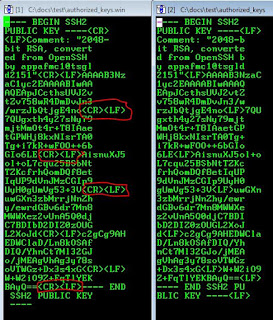
On the left side you have the authorized_keys file created in Windows.
On the right side you have the same authorized_keys file created in Unix.
If you notice the ends of the lines in the Windows file it shows CR LF, where as unix shows LF.
This difference is well described in the wikipedia article on newline character.
The one mistake I had done this time was create the authorized_keys file in Windows notepad, as I was teaching a Developer how to create authorized_keys file. Once I used vi on unix to create the authorized_keys file and pasted the same ssh key, sftp started working without prompting for password. I know that Windows/DOS and Unix have different newline characters. However, I was not able to apply that knowledge, till I compared the files in hex editor.
Whenever, a techie is able to get to the root cause of a problem, a deep sense of satisfaction is experienced. I am glad I got the opportunity to troubleshoot and fix the issue by getting to the root cause of the issue.

On the left side you have the authorized_keys file created in Windows.
On the right side you have the same authorized_keys file created in Unix.
If you notice the ends of the lines in the Windows file it shows CR LF, where as unix shows LF.
This difference is well described in the wikipedia article on newline character.
The one mistake I had done this time was create the authorized_keys file in Windows notepad, as I was teaching a Developer how to create authorized_keys file. Once I used vi on unix to create the authorized_keys file and pasted the same ssh key, sftp started working without prompting for password. I know that Windows/DOS and Unix have different newline characters. However, I was not able to apply that knowledge, till I compared the files in hex editor.
Whenever, a techie is able to get to the root cause of a problem, a deep sense of satisfaction is experienced. I am glad I got the opportunity to troubleshoot and fix the issue by getting to the root cause of the issue.
Categories: APPS Blogs
Copycat blog
While doing a google search today I noticed that there is another blog that has copied all content from my blog and posted it as their own content and even kept a similar sounding name: http://oracleapps-technology.blogspot.com . I have made a DMCA complaint to google about this. The google team asked me to provide a list of URLs. I had to go through the copycat's whole blog and create a spreadsheet with two columns. One column with URL of my original post and second column with the URL of the copycat's blog. There were 498 entries. I patiently did it and sent the spreadsheet to google team and got a reply within 2 hours:
Regards,
The Google Team
Hello,
In accordance with the Digital Millennium Copyright Act, we have completed processing your infringement notice. We are in the process of disabling access to the content in question at the following URL(s):
http://oracleapps-technology.blogspot.com/
The content will be removed shortly.
http://oracleapps-technology.blogspot.com/
The content will be removed shortly.
Regards,
The Google Team
Categories: APPS Blogs
Server refused public-key signature despite accepting key!
A new SFTP connection was not working, even though everything looked fine:
1. Permissions were correct on directories:
chmod go-w $HOME/
chmod 700 $HOME/.ssh
chmod 600 $HOME/.ssh/authorized_keys
chmod 600 $HOME/.ssh/id_rsa
chmod 644 $HOME/.ssh/id_rsa.pub
chmod 644 $HOME/.ssh/known_hosts
1. Permissions were correct on directories:
chmod go-w $HOME/
chmod 700 $HOME/.ssh
chmod 600 $HOME/.ssh/authorized_keys
chmod 600 $HOME/.ssh/id_rsa
chmod 644 $HOME/.ssh/id_rsa.pub
chmod 644 $HOME/.ssh/known_hosts
2. Keys were correctly placed
However, it still asked for password, whenever SFTP connection was done:
Using username "sftpuser".
Authenticating with public key "rsa-key-20150214"
Server refused public-key signature despite accepting key!
Using keyboard-interactive authentication.
Password:
I tried various things, none worked and I eventually went back to my notes for SFTP troubleshooting:
1. Correct Permissions
chmod go-w $HOME/
chmod 700 $HOME/.ssh
chmod 600 $HOME/.ssh/authorized_keys
chmod 600 $HOME/.ssh/id_rsa
chmod 644 $HOME/.ssh/id_rsa.pub
chmod 644 $HOME/.ssh/known_hosts
2. Make sure the owner:group on the directories and files is correct:
ls -ld $HOME/
ls -ld $HOME/.ssh
ls -ltr $HOME/.ssh
3. Login as root
chown user:group $HOME
chown user:group $HOME/.ssh
chown user:group $HOME/.ssh/authorized_keys
chown user:group $HOME/.ssh/id_rsa
chown user:group $HOME/.ssh/id_rsa.pub
chown user:group $HOME/.ssh/known_hosts
4. Check for user entries in /etc/passwd and /etc/shadow
5. grep user /etc/shadow
When I did the 5th step, I found that /etc/shadow entry for the user didn't exist. So I did these steps:
chmod 600 /etc/shadow
vi /etc/shadow
Insert this new line at the end
sftpuser:UP:::::::
Save File
chmod 400 /etc/shadow
It started working after that.
Categories: APPS Blogs
java.sql.SQLException: Invalid number format for port number
Jim pinged me with this error today:
on ./adgendbc.sh i get
Creating the DBC file...
java.sql.SQLRecoverableException: No more data to read from socket raised validating GUEST_USER_PWD
java.sql.SQLRecoverableException: No more data to read from socket
Updating Server Security Authentication
java.sql.SQLException: Invalid number format for port number
Database connection to jdbc:oracle:thin:@host_name:port_number:database failed
to this point, this is what i've tried.
clean, autoconfid on db tier, autoconfig on cm same results
bounced db and listener.. same thing.. nothing i've done has made a difference
I noticed that when this error was coming the DB alert log was showing:
Wed May 13 18:50:51 2015
Exception [type: SIGSEGV, Address not mapped to object] [ADDR:0x8] [PC:0x10A2FFB
C8, joet_create_root_thread_group()+136] [flags: 0x0, count: 1]
Errors in file /r12.1/admin/diag/rdbms/erp/erp/trace/erp_ora_14528.trc (incident=1002115):
ORA-07445: exception encountered: core dump [joet_create_root_thread_group()+136
] [SIGSEGV] [ADDR:0x8] [PC:0x10A2FFBC8] [Address not mapped to object] []
Incident details in: /r12.1/admin/diag/rdbms/erp/erp/incident/incdir_1002115/erp_ora_14528_i1002115.trc
Metalink search revealed this article:
Java Stored Procedure Fails With ORA-03113 And ORA-07445[JOET_CREATE_ROOT_THREAD_GROUP()+145] (Doc ID 1995261.1)
It seems that the post patch steps for a PSU OJVM patch were not done. We followed the steps given in above note were note completed. We completed these and adgendbc.sh completed successfully after that.
1.set the following init parameters so that JIT and job process do not start.
If spfile is used:
SQL> alter system set java_jit_enabled = FALSE;
SQL> alter system set "_system_trig_enabled"=FALSE;
SQL> alter system set JOB_QUEUE_PROCESSES=0;
2. Startup instance in restricted mode and run postinstallation step.
SQL> startup restrict
3.Run the postinstallation steps of OJVM PSU(Step 3.3.2 from readme)
If spfile is used:
SQL> alter system set java_jit_enabled = FALSE;
SQL> alter system set "_system_trig_enabled"=FALSE;
SQL> alter system set JOB_QUEUE_PROCESSES=0;
2. Startup instance in restricted mode and run postinstallation step.
SQL> startup restrict
3.Run the postinstallation steps of OJVM PSU(Step 3.3.2 from readme)
Postinstallation
The following steps load modified SQL files into the database. For an Oracle RAC environment, perform these steps on only one node.
- Install the SQL portion of the patch by running the following command. For an Oracle RAC environment, reload the packages on one of the nodes.
2. cd $ORACLE_HOME/sqlpatch/19282015
3. sqlplus /nolog
4. SQL> CONNECT / AS SYSDBA
5. SQL> @postinstall.sql
- After installing the SQL portion of the patch, some packages could become INVALID. This will get recompiled upon access or you can run utlrp.sql to get them back into a VALID state.
7. cd $ORACLE_HOME/rdbms/admin
8. sqlplus /nolog
9. SQL> CONNECT / AS SYSDBA
SQL> @utlrp.sql
4. Reset modified init parameters
SQL> alter system set java_jit_enabled = true;
SQL> alter system set "_system_trig_enabled"=TRUE;
SQL> alter system set JOB_QUEUE_PROCESSES=10;
-- or original JOB_QUEUE_PROCESSES value
5.Restart instance as normal
6.Now execute the Java stored procedure.
Ran adgendbc.sh and it worked fine.
Categories: APPS Blogs
R12.2 Single file system
With the release of AD and TXK Delta 6, Oracle has provided the feature of single file system on development instances for R12.2. Here's what they have mentioned in support.oracle.com article: Oracle E-Business Suite Applications DBA and Technology Stack Release Notes for R12.AD.C.Delta.6 and R12.TXK.C.Delta.6 (Doc ID 1983782.1)
4. New and Changed Features
http://docs.oracle.com/cd/E26401_01/doc.122/e22954/T202991T531065.htm#6169002
Support for Single File System Development Environments
A normal Release 12.2 online patching environment requires two application tier file systems, one for the run edition and another for the patch edition. This dual file system architecture is fundamental to patching of Oracle E-Business Suite Release 12.2, and is necessary both for production environments and test environments that are intended to be representative of production. This feature makes it possible to create a development environment with a single file system, where custom code can be built and tested. The code should then always be tested in a standard dual file system test environment before being applied to production.
You can set up a single file system development environment by installing Oracle E-Business Suite Release 12.2 in the normal way, and then deleting the $PATCH_BASE directory with the command:
The following restrictions apply to using a single file system environment:
Enhancements in AD and TXK Delta 6
Oracle E-Business Suite Technology Stack and Oracle E-Business Suite Applications DBA contain the following new or changed features in R12.AD.C.Delta.6 and R12.TXK.C.Delta.6.
4.1 Support for single file system development environments- A normal Release 12.2 online patching environment requires one application tier file system for the run edition, and another for the patch edition. This dual file system architecture is fundamental to the patching of Oracle E-Business Suite Release 12.2 and is necessary for production environments and test environments that are meant to be representative of production. This enhancement makes it possible to have a development environment with a single file system, where custom code can be built and tested. A limited set of adop phases and modes are available to support downtime patching of such a development environment. Code should then be tested in standard dual file system test environments before being applied to production.
http://docs.oracle.com/cd/E26401_01/doc.122/e22954/T202991T531065.htm#6169002
Support for Single File System Development Environments
A normal Release 12.2 online patching environment requires two application tier file systems, one for the run edition and another for the patch edition. This dual file system architecture is fundamental to patching of Oracle E-Business Suite Release 12.2, and is necessary both for production environments and test environments that are intended to be representative of production. This feature makes it possible to create a development environment with a single file system, where custom code can be built and tested. The code should then always be tested in a standard dual file system test environment before being applied to production.
You can set up a single file system development environment by installing Oracle E-Business Suite Release 12.2 in the normal way, and then deleting the $PATCH_BASE directory with the command:
$ rm -rf $PATCH_BASE· apply phase in downtime mode
· cleanup phase
Specification of any other phase or mode will cause adop to exit with an error.The following restrictions apply to using a single file system environment:
· You can only use a single file system environment for development purposes.
· You cannot use online patching on a single file system environment.
· You can only convert an existing dual file system environment to a single file system: you cannot directly create a single file system environment via Rapid Install or cloning.
· There is no way to convert a single file system environment back into a dual file system.
· You cannot clone from a single file system environment.
Categories: APPS Blogs
You Are Trying To Access a Page That Is No Longer Active.The Referring Page May Have Come From a Previous Session. Please Select Home To Proceed
Shahed pinged me about this error. It was coming after logging in. This R12.1.3 instance had just migrated from an old server to a new one. Once you logged in this error would be displayed:
You Are Trying To Access a Page That Is No Longer Active.The Referring Page May Have Come From a Previous Session. Please Select Home To Proceed
The hits on support.oracle.com were not helpful, but a gave a clue that it may have something to do with session cookie. So I used Firefox to check http headers. If you press Ctrl+Shift+K, you will get a panel at the bottom of the browser. Click on Network tab, click on the AppsLocalLogin.jsp and on the right side of the pane, you'll see a cookie tab.
The domain appearing in the cookie tab was from the old server. So I checked:
select session_cookie_domain from icx_parameters;
olddomain.justanexample.com
So I nullified it:
update icx_parameters set session_cookie_domain=null;
commit;
Restarted Apache
cd $ADMIN_SCRIPTS_HOME
adapcctl.sh stop
adapcctl.sh start
No more error. I was able to log in and so was Shahed.
You Are Trying To Access a Page That Is No Longer Active.The Referring Page May Have Come From a Previous Session. Please Select Home To Proceed
The hits on support.oracle.com were not helpful, but a gave a clue that it may have something to do with session cookie. So I used Firefox to check http headers. If you press Ctrl+Shift+K, you will get a panel at the bottom of the browser. Click on Network tab, click on the AppsLocalLogin.jsp and on the right side of the pane, you'll see a cookie tab.
The domain appearing in the cookie tab was from the old server. So I checked:
select session_cookie_domain from icx_parameters;
olddomain.justanexample.com
So I nullified it:
update icx_parameters set session_cookie_domain=null;
commit;
Restarted Apache
cd $ADMIN_SCRIPTS_HOME
adapcctl.sh stop
adapcctl.sh start
No more error. I was able to log in and so was Shahed.
Categories: APPS Blogs
Chrome and E-Business Suite
Dhananjay came to me today. He said that his users were complaining about forms not launching after upgrading to the latest version of Chrome. On launching forms they got this error:
/dev60cgi/oracle forms engine Main was not found on this server
I recalled that Google Chrome team had announced that they would not support java going forward. Googling with keywords chrome java brought this page:
https://java.com/en/download/faq/chrome.xml#npapichrome
It states that:
NPAPI support by Chrome
/dev60cgi/oracle forms engine Main was not found on this server
I recalled that Google Chrome team had announced that they would not support java going forward. Googling with keywords chrome java brought this page:
https://java.com/en/download/faq/chrome.xml#npapichrome
It states that:
NPAPI support by Chrome
The Java plug-in for web browsers relies on the cross platform plugin architecture NPAPI, which has long been, and currently is, supported by all major web browsers. Google announced in September 2013 plans to remove NPAPI support from Chrome by "the end of 2014", thus effectively dropping support for Silverlight, Java, Facebook Video and other similar NPAPI based plugins. Recently, Google has revised their plans and now state that they plan to completely remove NPAPI by late 2015. As it is unclear if these dates will be further extended or not, we strongly recommend Java users consider alternatives to Chrome as soon as possible. Instead, we recommend Firefox, Internet Explorer and Safari as longer-term options. As of April 2015, starting with Chrome Version 42, Google has added an additional step to configuring NPAPI based plugins like Java to run — see the section Enabling NPAPI in Chrome Version 42 and later below.
Enabling NPAPI in Chrome Version 42 and laterAs of Chrome Version 42, an additional configuration step is required to continue using NPAPI plugins.
- In your URL bar, enter:
chrome://flags/#enable-npapi - Click the Enable link for the Enable NPAPI configuration option.
- Click the Relaunch button that now appears at the bottom of the configuration page.
Developers and System administrators looking for alternative ways to support users of Chrome should see this blog, in particular "Running Web Start applications outside of a browser" and "Additional Deployment Options" section.
Once Dhananjay did the above steps, Chrome started launching forms again. He quickly gave these steps to all his users who had upgraded to the latest version of Chrome (version 42) and it started working form them too.
Oracle doesn't certify E-Business Suite forms on Chrome. Only self service pages of E-Business Suite are certified on Google Chrome.
Categories: APPS Blogs
opatch hangs on /sbin/fuser oracle
Pipu pinged me today about opatch hanging. The opatch log showed this:
[Apr 11, 2015 5:24:13 PM] Start fuser command /sbin/fuser $ORACLE_HOME/bin/oracle at Sat Apr 11 17:24:13 EDT 2015
I had faced this issue once before, but was not able to recall what was the solution. So I started fresh.
As oracle user:
/sbin/fuser $ORACLE_HOME/bin/oracle hung
As root user
/sbin/fuser $ORACLE_HOME/bin/oracle hung
As root user
lsof hung.
Google searches about it brought up a lot of hits about NFS issues. So I did df -h.
df -h also hung.
So I checked /var/log/messages and found many messages like these:
Apr 11 19:44:42 erpserver kernel: nfs: server share.justanexample.com not responding, still trying
[Apr 11, 2015 5:24:13 PM] Start fuser command /sbin/fuser $ORACLE_HOME/bin/oracle at Sat Apr 11 17:24:13 EDT 2015
I had faced this issue once before, but was not able to recall what was the solution. So I started fresh.
As oracle user:
/sbin/fuser $ORACLE_HOME/bin/oracle hung
As root user
/sbin/fuser $ORACLE_HOME/bin/oracle hung
As root user
lsof hung.
Google searches about it brought up a lot of hits about NFS issues. So I did df -h.
df -h also hung.
So I checked /var/log/messages and found many messages like these:
Apr 11 19:44:42 erpserver kernel: nfs: server share.justanexample.com not responding, still trying
That server has a mount called /R12.2stage that has the installation files for R12.2.
So I tried unmounting it:
umount /R12.2stage
Device Busy
umount -f /R12.2stage
Device Busy
umount -l /R12.2stage
df -h didn't hang any more.
Next I did strace /sbin/fuser $ORACLE_HOME/bin/oracle and it stopped here:
open("/proc/12854/fdinfo/3", O_RDONLY) = 7
fstat(7, {st_mode=S_IFREG|0400, st_size=0, ...}) = 0
mmap(NULL, 4096, PROT_READ|PROT_WRITE, MAP_PRIVATE|MAP_ANONYMOUS, -1, 0) = 0x2b99de014000
read(7, "pos:\t0\nflags:\t04002\n", 1024) = 20
close(7) = 0
munmap(0x2b99de014000, 4096) = 0
getdents(4, /* 0 entries */, 32768) = 0
close(4) = 0
stat("/proc/12857/", {st_mode=S_IFDIR|0555, st_size=0, ...}) = 0
open("/proc/12857/stat", O_RDONLY) = 4
read(4, "12857 (bash) S 12853 12857 12857"..., 4096) = 243
close(4) = 0
readlink("/proc/12857/cwd", "11.2.0.4/examples (deleted)"..., 4096) = 27
rt_sigaction(SIGALRM, {0x411020, [ALRM], SA_RESTORER|SA_RESTART, 0x327bc30030}, {SIG_DFL, [ALRM], SA_RESTORER|SA_RESTART, 0x327bc30030}, 8) = 0
alarm(15) = 0
write(5, "@\20A\0\0\0\0\0", 8) = 8
write(5, "\20\0\0\0", 4) = 4
write(5, "/proc/12857/cwd\0", 16) = 16
write(5, "\220\0\0\0", 4) = 4
read(6,
It stopped here. So I did Ctrl+C
#
# ps -ef |grep 12857
oracle 12857 12853 0 Apr10 pts/2 00:00:00 -bash
root 21688 2797 0 19:42 pts/8 00:00:00 grep 12857
Killed this process
# kill -9 12857
Again I did strace /sbin/fuser $ORACLE_HOME/bin/oracle and it stopped at a different process this time that was another bash process. I killed that process also.
I executed it for 3rd time: strace /sbin/fuser $ORACLE_HOME/bin/oracle
This time it completed.
Ran it without strace
/sbin/fuser $ORACLE_HOME/bin/oracle
It came out in 1 second.
Then I did the same process for lsof
strace lsof
and killed those processes were it was getting stuck. Eventually lsof also worked.
Pipu retried opatch and it worked fine.
Stale NFS mount was the root cause of this issue. It was stale because the source server was down for Unix security patching during weekend.
Categories: APPS Blogs
adoafmctl.sh hangs
Rajesh and Shahed called me about this error where after a reboot of the servers, adoafmctl.sh wouldn't start. It gave errors like these:
You are running adoafmctl.sh version 120.6.12000000.3
Starting OPMN managed OAFM OC4J instance ...
adoafmctl.sh: exiting with status 152
adoafmctl.sh: check the logfile
$INST_TOP/logs/appl/admin/log/adoafmctl.txt for more information
If one finds any, kill these processes.
You are running adoafmctl.sh version 120.6.12000000.3
Starting OPMN managed OAFM OC4J instance ...
adoafmctl.sh: exiting with status 152
adoafmctl.sh: check the logfile
$INST_TOP/logs/appl/admin/log/adoafmctl.txt for more information
adoafmctl.txt showing:
ias-component/process-type/process-set:
default_group/oafm/default_group/
Error
--> Process (index=1,uid=349189076,pid=15039)
time out while waiting for a managed process to start
Log:
$INST_TOP/logs/ora/10.1.3/opmn/default_group~oafm~default_group~1
07/31/09-09:14:28 :: adoafmctl.sh: exiting with status 152
================================================================================
07/31/09-09:14:40 :: adoafmctl.sh version 120.6.12000000.3
07/31/09-09:14:40 :: adoafmctl.sh: Checking the status of OPMN managed OAFM OC4J instance
Processes in Instance: SID_machine.machine.domain
-------------------+--------------------+---------+---------
ias-component | process-type | pid | status
-------------------+--------------------+---------+---------
default_group | oafm | N/A | Down
default_group/oafm/default_group/
Error
--> Process (index=1,uid=349189076,pid=15039)
time out while waiting for a managed process to start
Log:
$INST_TOP/logs/ora/10.1.3/opmn/default_group~oafm~default_group~1
07/31/09-09:14:28 :: adoafmctl.sh: exiting with status 152
================================================================================
07/31/09-09:14:40 :: adoafmctl.sh version 120.6.12000000.3
07/31/09-09:14:40 :: adoafmctl.sh: Checking the status of OPMN managed OAFM OC4J instance
Processes in Instance: SID_machine.machine.domain
-------------------+--------------------+---------+---------
ias-component | process-type | pid | status
-------------------+--------------------+---------+---------
default_group | oafm | N/A | Down
Solution:
1. Shutdown all Middle tier services and ensure no defunct processes exist running the following from the operating system:
# ps -ef | grep If one finds any, kill these processes.
2. Navigate to $INST_TOP/ora/10.1.3/opmn/logs/states directory. It contains hidden file .opmndat:
# ls -lrt .opmndat3. Delete this file .opmndat after making a backup of it:
# rm .opmndat4. Restart the services.
5. Re-test the issue.
5. Re-test the issue.
This resolved the issue.
Categories: APPS Blogs