


Joel Kallman

The APEX Journey Continues
Today, Oracle formally launched the Oracle APEX Application Development Service. This is a brand new service on Oracle Cloud, squarely targeted at application developers. You can read all about it in this blog post, and here is the press release.
Oracle APEX is unique among frameworks and even low code platforms. The architecture is "radical", as an Oracle executive described it. Using just a little SQL, you can build wonderfully rich applications against virtually any type of data, and your apps can scale to thousands and thousands of users.
This all started back in 1999, and I was fortunate to be employee #1 under Michael Hichwa. It was Mike's vision and ingenuity which launched Oracle APEX, and it began with just the two of us. After 5 years of proving it with real-world applications, both inside of Oracle and outside, it was launched as Oracle HTML DB in 2004 - as a feature of Oracle Database. It took a lot of work and a little executive nudging to make this happen. Over the past 17 years, we've added some of the smartest people in the world to the team, and they have helped evolve Oracle APEX to what it is today. Another brilliant team at Oracle delivered on a vision which is realized today in Oracle REST Data Services (ORDS), and this is what powers APEX everywhere. ORDS is a powerful and enabling technology. We've developed numerous internal applications at Oracle, and we've also helped thousands of others at Oracle to develop their own solutions too. We've made mistakes along the way, but we've learned from them too. We became the advocate of our customers within Oracle, and we also developed a close, personal relationship with our community - hundreds if not thousands of them.
During the pandemic of 2020, our team was called upon to quickly deliver solutions using Oracle APEX. In conjunction with hundreds of other employees, and utilizing Oracle Cloud and Oracle engineered systems, we delivered solutions in record time. I'm convinced no other organization on the planet could have achieved this. I believe it was through these efforts that Oracle fully realized what they had in APEX. The work on these and other new systems continues, and you'll see even more Oracle Cloud solutions from Oracle developed with APEX in the future. What other low code vendor on the planet can claim that their platform is used to quickly develop SaaS solutions for literally millions of end users?
That brings us to today. The APEX Application Development Service is a culmination of years of research, development, and real-world usage. It is a perfect confluence of technologies, of Oracle Autonomous Database, Oracle Exadata engineered systems and Oracle Cloud Infrastructure, combined with the proven Oracle APEX framework. There are problems to be fixed, features to be added, and functionality to broaden, but it's still a great achievement. Everyone on the Oracle APEX team should be very proud - they have all worked so very hard to get here.
I must also give credit to you, the Oracle APEX community, for the Oracle APEX Application Development Service. Without your support, guidance, and enthusiasm, APEX would not be where it is today. So many people in the APEX community have contributed to APEX - in immeasurable ways, both big and small. There have been a great number of bug reports, feature suggestions, marketing recommendations and requested enhancements from the community. We've also had many meetings with our customers and partners seeking their architectural advice. Everyone has always been so helpful and gracious with their time and talent.
This has been an amazing journey. The Oracle APEX Application Development Service is a huge milestone in that journey. We look forward to the next 20 years and what that will bring. And we look forward to doing it hand-in-hand with our amazing Oracle APEX community.
Seek where you can help. Now.

I have a simple request of the global Oracle APEX Community, please:
These are interesting times we're living in, unlike anything I've witnessed in my lifetime. And people are rapidly understanding that they have many information needs, which they needed fulfilled yesterday. I said this earlier about Brexit and I see the same thing unfolding for COVID-19. People need information management applications that they've never even dreamed of, but they need them immediately. This is a classic case of opportunistic applications. And who better to understand how to design and deliver applications in hours or days than the global Oracle APEX community? That's you!
If you're on social media, you may have seen Oracle APEX used in a number of interesting scenarios. Here are a few I'm aware of:
- In China, Buling Zhang the director of IT at a hospital, wrote an APEX app to gather information about patients (travel history, symptoms, etc.). He subsequently shared this app with 6 other hospitals.
- In United Arab Emirates, Muhammad Rehan Javed wrote an APEX application to track attendance. It was developed in 2 hours and rolled out to 10,000 users. As he said, it "facilitated in avoiding contact with biometric devices".
- In the United Kingdom, Dave Waghorn and his team at University Hospital Southampton developed APEX apps in 3 days to help support the handling of COVID-19.
I'm sure you're aware of many more. I encourage you to find where you can help...not tomorrow, but today.
We have offered our team's services to a couple large organizations, and I strongly encourage you to do the same. Be proactive about it. Don't wait for someone to approach you. Contact your ministry of public health or clinic or hospital at the national, state or local level. Tell them what you can do and help them manage the information needs they're being overrun with. Better yet, show them what you can do. You are talented and experienced to help solve problems exactly like these.
This isn't about Oracle or APEX or even the community. I'd be satisfied if they never knew what you used to provide a solution for them. This is about helping people who desperately need your help and expertise, and they are currently unaware of you and what you can deliver. Please contact someone today.
How to show dates in a given time zone when the value is stored in a DATE data type
"How can I show dates in a given timezone when the date value is stored in a DATE datavtype? I would like display a calendar in my time zone not GMT. I don’t want to change my default data type in my table and the CREATED column to be a time stamp with local time zone; I want to keep it as DATE."
I typed out a reply in email tonight, and I thought I would share this here, as I imagine this answer has general applicability.
Two things are necessary to make this happen.
- Firstly, you must know the time zone of the server where you're running at. On a system like apex.oracle.com, it's UTC, but this can be confirmed via to_char(systimestamp, 'TZR'). This is important, because this would tell you the correct implicit time zone for your system-generated DATE values like SYSDATE. If your program hasn't done any other ALTERs of the time zone in your session, then this should be equal to SESSIONTIMEZONE.
- Once you have the base time zone (which you know is the implicit time zone of all of your system-generated data values), you can now easily convert this to another time zone via AT TIME ZONE.
The syntax is:
from_tz(cast({date_value} as timestamp), to_char(systimestamp,'TZR')) at time zone {preferred_time_zone}What this says:- Convert your date to a timestamp using CAST
- Use FROM_TZ to convert it to a timestamp with time zone, and specify the time zone region of the server
- Use AT TIME ZONE to convert it to your preferred time zone
Here's a good example on apex.oracle.com, to take SYSDATE and convert it to my US East Coast time zone:
select from_tz( cast( SYSDATE as timestamp ), to_char(systimestamp, 'TZR')) at time zone 'US/Eastern', to_char(sysdate,'MM/DD/YYYY HH24:MI:SS') from dualI executed this just now and it gave me the results:
07-MAR-20 09.06.45.000000 PM US/EASTERN

03/08/2020 02:06:45
which makes perfect sense. The SYSDATE is already tomorrow (Sunday, March 8), but converting it to my local time zone, I got 9:06 PM on March 7, which was exactly the time of day in Ohio when I was testing this.
If I were designing a new application, I would most often take advantage of the time zone-aware data types like TIMESTAMP WITH TIME ZONE and TIMESTAMP WITH LOCAL TIME ZONE. But most people store dates as type DATE, and this is an easy way to convert it to another time zone.
The Global Oracle APEX Community Delivers. Again.

Oracle was recently recognized as a November 2019 Gartner Peer Insights Customers’ Choice for Enterprise Low-Code Application Platform Market for Oracle APEX. You can read more about that here.
I personally regard this a distinction for the global Oracle APEX community. We asked for your assistance by participating in these reviews, and you delivered. Any time we've asked for help or feedback, the Oracle APEX community has selflessly and promptly responded. You have always been very gracious with your time and energy.
I was telling someone recently how I feel the Oracle APEX community is unique within all of Oracle, but I also find it to be unique within the industry. It is the proverbial two-way partnership that many talk about but rarely live through their actions. We remain deeply committed to our customers' personal and professional success - it is a mindset which permeates our team. We are successful only when our customers and partners are successful.
Thank you to all who participated in the Gartner Peer Insights reviews - customers, partners who nudged their customers, and enthusiasts. You, as a community, stand out amongst all others. We are grateful for you.
ā·pěks 10 Years Later

Exactly 10 years ago today, I wrote a succinct blog post with the intent of clarifying how to properly pronounce and abbreviate Oracle APEX. I decided to use the phonetic spelling, ā'pěks, to avoid all ambiguity with the pronunciation. Was I successful?
- I still encounter many people who spell this Apex (and not the correct APEX)
- I routinely hear people pronounce this as ah·pěks or ap·ěks (and not the correct ā'pěks)
Obviously, we still have a ways to go. However, this hasn't been a complete loss. With many thanks to the global APEX community, this simple phonetic spelling has resulted in:
- stickers
- hoodies
- umbrellas
- 3D-printed keychains
- cutting boards
- bottle openers
- coffee mugs
- challenge coins
- T-shirts
- fan shop
What I especially love is that all of this was created by the Oracle APEX community. Instead of Oracle providing merchandise and branding for Oracle APEX, the community embraced this and ran with it themselves. This has been wonderfully organic and authentic, and completely community-driven.
Going forward, if you come across someone who misspells or mispronounces Oracle APEX, please feel free to direct them to this blog post. It is:
Oracle APEX
and it's pronounced ā·pěks.
My Personal Thanks to the Chicago Police Department - the First Real Proving Ground for Oracle APEX

In 2001, the Chicago Police Department took a chance on APEX. And with all thanks to them for the opportunity they provided us, Oracle APEX is what it is today. We owe them a big debt of gratitude. Let me explain.
As many people know, the genesis of Oracle APEX was an internal development project that began in 1999, to build a Web-based HTML calendar for use by Oracle employees. My manager, Mike Hichwa, was the inventor of Oracle Web DB. And when faced with the assignment of creating a new HTML calendar application for the company, the choices were a) WebDB, b) a lovingly hand-crafted PL/SQL application from scratch, or c) a yet-to-be-created application metadata framework (using Mike's lessons learned from WebDB). We went with the latter, and Mike began the creation of the APEX framework while I developed a calendar application which was "programmed" to use this new framework. Mocked and doubted by many at Oracle, we went live with the first production application in 3 months, rolled out to thousands of employees. Having Tom Kyte to help us was instrumental in our success.
Over the next 18 months, we evolved this framework and created a number of other internal applications. We thought we were ready to offer this framework for customers to use. But one of the best things happened for APEX at that time. When Larry Ellison was visiting New York City, Mike traveled to meet with him and brief him on the state of the framework, as well as Mike's aspirations to offer this framework as another tool from Oracle. The advice offered by Larry to Mike - prove the framework with 30 real-world customers before you consider taking this live. Invaluable guidance.
In 2001, Mike and I had an internal meeting in Chicago with Oracle Consulting. The back-end information system for the Chicago Police Department (CPD), the Criminal History Record Information System (CHRIS), was written in Oracle Forms. It had been developed over many years, and was a joint effort between Oracle Consulting and the Chicago Police Department. The purpose of this meeting, at the time, was to discuss possible alternatives to the next state of CHRIS. This meeting was ultimately precipitated by the estimated hardware requirements to run the next version of Oracle Forms. They had estimated that the backend database server requirements alone would require 4 very large and very expensive new Sun Enterprise 10000 servers. This was a lot of money to be spent on hardware with effectively no net gain in functionality for their end users. We proposed APEX ("Flows", at the time), and they went with it.
Over a period of more than a year, a number of today's APEX product development team members worked directly, onsite, with Oracle Consulting and Chicago Police Department to move the functionality of their Oracle Forms applications to APEX. It wasn't a 1-to-1 mapping, and it required a level of application and UI redesign. But we were able to capitalize on the existing data structures and business logic, already present in the database. The Oracle Forms applications and APEX apps were able to easily co-exist, because they were built on the same foundation. There were also new systems developed as part of this effort, named CLEAR. You can still read about CLEAR from this article from 2004.
This entire exercise was hugely beneficial to us. We thought we were ready to go to market. But once we dug into the requirements of a large-scale enterprise system like CHRIS, it uncovered many significant gaps in the functionality of the APEX framework. Fortunately, we owned the framework and were able to simultaneously fill those functional gaps in APEX. As a simple example, at the time there was no way to manage vectors of information in APEX session state. This real-world requirement resulted in today's APEX collections. When you own the framework and you are concurrently building the app, you can do anything!
Scalability was another concern. While the original calendar application we wrote for Oracle had more than 25,000 users, let's face it - the use of a calendar is occasional throughout the day. Contrast this with CHRIS, which had more than 10,000 total users, the vast majority who would interact with CHRIS frequently throughout the day. The heavy concurrent usage of these applications provided us numerous opportunities to tune and optimize the APEX execution engine. And talk about mission-critical applications - "business" slows to a crawl if you can't look up information about a person or log evidence. And when business slows to a crawl, public safety is jeopardized.
Fast forward to 2019, and here we are with a large global community of hundreds of thousands of developers. There are dedicated conferences, stickers, bloggers, videos, meetup groups, awards, books, podcasts, webinars, hosting providers, cloud services, partners & consulting companies, and thousands upon thousands of real-world successes from around the globe. Much of our success can be traced to this proving ground, which was afforded us by the Chicago Police Department.
The purpose of this blog post is simple - I wish to offer my personal, sincere thanks to the Chicago Police Department for the gamble they took on us. There was no true guarantee that APEX was going to exist beyond a "skunkworks" project, but they still forged ahead, given some assurances from Oracle and the alternatives. They banked on us and they won. Their real-world use cases stretched us and the technology in ways we had never imagined. We learned so many valuable lessons during this project, and all of it resulted in a much more scalable, hardened, proven system by the time APEX was first offered as an Oracle Database feature in 2004. We will forever be grateful to them.
For the record, these internal systems still run on Oracle APEX today, and are used by thousands of Chicago Police Department employees every day. Now that is longevity, and a great investment. Amidst today's rapid technology churn, this remains an extraordinary success story.
Patch by City of Chicago - http://www.publicsafetypatches.org/IL/Police/, Public Domain, Link
Should the Oracle APEX Community Care About Autonomous Database?

This past week, Oracle announced the availability of Oracle APEX, SQL Developer Web and Oracle REST Data Services on Oracle Autonomous Database. If you're in the APEX community, should you care? I say "absolutely yes!", but not for the reasons you might suspect.
Autonomous Database is strategic to Oracle. Just read the transcript from the recent Oracle quarterly earnings conference call and it will be obvious to you. Autonomous is an advancement in technology that has significant investment from Oracle and very real benefits for customers. It's a clear market differentiator - I do truly believe this, it's not merely my marketing spin. And now, with the addition of Oracle APEX & SQL Developer Web & Oracle REST Data Services, I think this combination of technologies provides even more capabilities to this platform and even greater differentiation. What other service provides elastic, autonomous capabilities, application design and proven low code application development, out-of-the-box? Did I mention that this also happens to include the world's most popular database, Oracle Database?
The benefits of low code application development are real. And Low Code + Autonomous Database is the ideal combination. Low code is about reducing costs, delivering faster, with greater consistency, and being usable by a broader range of skill sets. Some of the benefits of Autonomous Database are equivalent - less cost, instant availability, usable by others who may not be world-class experts. It has been a long multi-year confluence of events that has brought us together here.
The APEX community is the envy of others at Oracle. Even people who aren't APEX fans recognize the APEX community's passion. But where did this come from? Do people really get excited about a tool? No. They get excited about what they can do with a tool - how it helps them deliver a solution, and be successful. A carpenter doesn't get passionate about his dual-slide compound miter saw because it's a cool tool. He gets satisfaction about what he can actually do with that tool versus a hand saw. When you get a pay raise or praise or a promotion because of what you've been able to deliver with APEX and ORDS and Oracle Database, that's a reason to get excited! And I think that is ultimately the real story behind the enviable, tangible energy in the APEX community. Countless people have had many great successes with this combination of technologies, and success begets success.
Let's say you're in the APEX community, you saw this announcement about APEX on Autonomous, but you're not interested in cloud. Or, as Andre de Souza so eloquently stated on Twitter, "I know it’s big news, just does not affect 99,9% of current #orclapex developers I’m guessing." Should you care? I say yes, and here's why. The great APEX community that I mention above, which has been so successful with APEX & ORDS & Oracle Database over the years, has become very large across the globe, and with not a lot of help from Oracle. Make no mistake - Oracle does invest in APEX, millions of dollars every year. But I still come across Oracle Database customers who have simply never heard of APEX. This is because there has not been much promotion from Oracle marketing or public relations or even sales. All of this is about to change. Why? Because APEX is on Autonomous Database, and Autonomous Database is strategic to Oracle. You will probably see more communication and discussion from Oracle about APEX than probably the last 20 years combined. Low code resonates with customers, APEX is proven, and everyone has application development needs.
How does this benefit someone in the APEX community? Simple:
- Awareness and interest will rise by people who have never heard about APEX before, both existing on-premises customers and net new customers.
- There will be greater demand for APEX and database development talent. If you have experience with APEX, with a proven track record of delivering solutions with APEX, you're a very attractive person. Perhaps the rate you charge has now gotten a bit higher. You'll certainly gain upward mobility.
- You'll no longer have to introduce someone to APEX for the very first time, or counter the claim that "it's not strategic."
- As our friends from Explorer UK say, with APEX, they "develop cloud ready applications". And you've been doing this for years. Don't be afraid to make this claim. When and if you're ready for cloud, you're already out of the gate. The same APEX apps you developed on-premises run and look and feel exactly the same in the cloud. Who has been developing cloud-ready apps for years? You!
So. Even if you're not into "cloud" but into APEX, this announcement and these capabilities on Autonomous Database has material impact on you and everyone else in the APEX community. Your skills and experience will become more valued, and we should expect the market and interest and demand to grow.
Everything is not perfect, and we on the APEX team still have a lot of very hard work ahead of us. But these are exciting times and it's what we've labored on for the past 20 years, to get to this point. For those who have been with the APEX community for so many years, congratulations! You've bet on the right horse. Just fasten your seat belt.
APEX World 2019: Het gaat weer los!

The very first and still the largest Oracle APEX-focused conference in the world, APEX World 2019, is happening again this year on March 25/26 2019 in Rotterdam, Netherlands. Incredibly, it's the 10th year for this conference, and like the global Oracle APEX community, it's still growing!
If you've never been to a user group conference, then you should consider attending one this year, and APEX World is an excellent choice. There is something very organic and authentic about user group conferences. It is a collection of enthusiasts, professionals, students, partners, business leaders, citizen developers, and full-stack developers, all there for a common purpose. The APEX community is unique, certainly at Oracle, and probably within the industry too. You will find this common spirit of sharing and camaraderie ever-present at APEX World. It helps that the Dutch are naturally kind people, too (and very direct). ;)
This year at APEX World, there are a number of important additions, including:
- A business seminar "The Future of APEX"
- A separate track with real customers presenting their real success stories. This is ideal for someone who is curious about APEX and the large variety of problems being solved with APEX today
- Numerous deep-dive sessions for those who are experienced APEX developers
- A special student track
- Workshops for students from academies/ universities so they can build their first Low Code Oracle APEX app
There is honestly something for everyone. And the vast majority of sessions will be in English, so there's no reason not to attend. Did I mention that the Dutch are super nice?
I am honored to attend APEX World 2019, and I will be there, along with product development team superstars Hilary Farrell, Shakeeb Rahman and Jason Straub. Personally, I relish the opportunity to engage with our many customers and partners, understand what you're doing, understand what your pain points are, and get your advice how we can help you in the future. The APEX team is invested in your success. We look forward to seeing you there!
The job where I learned the most valuable lessons was...

Often times, when people reflect on who shaped them the most in life, it's usually a coach or a high school teacher or a university professor. In my case, it was Louis Stallman, Jr. - the general manager of a McDonald's franchise in Wadsworth, Ohio, where I worked at in high school and in the summer breaks between my years at university.
I'm second-generation American, the product of Polish and German immigrants. I'm the youngest of 7 children (my Mom was also also the 7th child in her family). My parents grew up during the Depression and passed their life lessons onto us - waste nothing, speak when you're spoken to, and always work & do your best. My Dad was in the US Army Air Corps and flew on B-29s during World War II. He was the disciplinarian. At the time, my friends thought that I grew up in an overly strict household, but I can say today with certainty that this disciplined household provided complete structure. There was a lucid difference between doing something right and doing something wrong.
When I started at McDonald's in high school, I wasn't sure what to expect. It probably was a bit more rigid than what most kids were used to, but having grown up in a disciplined family, it was pretty easy to adapt to. I certainly wasn't perfect - I was the typical crass teenager who thought he knew everything. But it was a very structured environment and there was always a right and a wrong way to do something.
The general manager of this McDonald's was Louis Stallman, Jr. While he was a kind man, he was also a bit of a disciplinarian. There was no slouching about. This is where I learned the infamous phrase "if you have time to lean, you have time to clean". I made a whopping $3.35 an hour and we were put to task and earned every cent of it. I worked a number of years there, in the summers, over holidays, in some cases even on holidays. I had the good fortune to interact with a lot of people, some nice, some not so nice. Lou Stallman coached everyone who interacted with a customer, and when you would fail or omit something, he was always there to remind you. What I learned from Lou Stallman and what I've carried forward into my professional life:
- Greet the customer with a smile, always.
- When talking to a customer, look at them directly in the eye.
- Talk clearly and repeat back to the customer what they told you.
- Treat the customer (and really everyone) with respect and dignity.
- Genuinely thank the customer and wish them farewell.
That's it. Seems obvious, right? It is, but I see countless people forego these very basic courtesies when interacting with any customer.
I'll greet anyone at any time. It's the kind thing to do. Where I live in the USA (Ohio), it's generally considered rude not to greet someone, to put on a smile and say "good morning" while waiting for an elevator or say "hello" while passing them on the street. I always enjoy going to Oracle HQ in California and greet everyone I pass on the sidewalk - they look at me like I'm from Mars.
In a disconnected, smartphone crazy-world, I find people are a bit afraid to engage someone and look them in the eye while talking to them or listening to them. There couldn't be a better way to say "you have my full attention" than looking at them directly, without distractions.
When listening to a customer, pay careful attention to what they're asking, and repeat back to them what you think they said. Maybe they're complaining and need to vent some steam. Maybe what they really want isn't accurately expressed in the words they're using, so repeat back to them what you think they want. That's the perfect time to ensure you have a mutual understanding. And people like to know that someone has truly listened to them.
The customer (and really everyone) should always, always, always be treated with respect and dignity. At all times. The customer may not always be right, but they are deserving of respect and dignity.
Always thank the customer. Always. You may have killed yourself for your customer and you might think that they owe you something. But still thank them. They're the reason why you're able to feed your family. Competition is everywhere, and an easy way to stand out is through a personal connection. Something is wrong if you can't extend a simple courtesy to your customer, thanking them for their business.
There you have it - the simple lessons I learned from McDonald's general manager Louis Stallman, Jr. They're not technical and they're not difficult to grasp. But they have broad applicability to almost any job in any field anywhere in the world. They have served me well and I encourage you to try them yourself.
How do I add an image to a page in Oracle APEX?
Gerald Venzl, a highly respected Oracle Database product manager, was recently participating in a hackathon with a team of people, and they were using Oracle APEX as part of their solution. They produced a QR code for the URL to their app, they saved this QR code image to a local file, and they wanted to include the image on a page in their APEX application. As Gerald stated, it took more than 30 minutes for this learned and competent group of people to figure out how to do this. This is not a criticism of Gerald and his colleagues, it's a criticism of APEX. Gerald and his team were expecting a simple upload to a page item of type Image and they would be done, right? Well, not so simple.
This blog post is not intended to cover the case where you have images in BLOB columns in a database table (we'll cover that in the future), or the case where the image can already be referenced via a URL. I am presenting the simple case of you having an image on the file system on your local computer, and you want to reference it in your APEX page.
From a high-level, the steps are:
- Upload the file as a static application file.
- Using the HTML IMG tag, reference the static application file in your application.
Now, for the more detailed explanation.
Before you can reference an image in your APEX application, it has to be in a location which can be "served" by your Web server. With APEX, you have access to the back-end Oracle Database, but you don't have access to the Web server file system. Fortunately, there is an easy way to upload the image into the Oracle Database and have it served by your Web server when used within an APEX application. These are called Static Application Files.
The steps are really quite simple:
- Edit your application in the Application Builder
- Click Shared Components
- Click Static Application Files
- Click Upload File
- Choose the file from your local computer
- Click the Upload button

In the picture above, this is the list of Static Application Files in the APEX Application Builder, after uploading file Three_Stooges.jpg. Under the Reference column, there is the string #APP_IMAGES#Three_Stooges.jpg. This is how you can reference the file when used in an HTML context in your APEX application. This reference means nothing when used outside of an APEX application. When someone is running your application, the APEX engine will replace the substitution string #APP_IMAGES# with an absolute URL reference to an embedded REST endpoint which will return the stored image.
To reference this image in your application, you just need to include a reference to it from an HTML IMG tag on your APEX page. This image reference would have to be entered into the attributes of your APEX application wherever it's appropriate to embed HTML. This includes the headers and footers of page regions, templates, and even the Source attribute of certain region types. An easy way to get started is to reference an image in a region of type Static Content.
As an example, edit a page in Page Designer. In the gallery at the bottom of the page, drag a region of type Static Content onto your page. In the Source attribute of this region, enter the HTML string to reference the image:
<img src="#APP_IMAGES#Three_Stooges.jpg">
Obviously, reference your file and not the name of the file in my example (Three_Stooges.jpg). Save your page and run. That's all there is to it!

One last point. If you do have access to the web server file system, and you wish to include static file references in your application, then definitely put them on your web server file system and simply serve them from there. It will always be more efficient to have these served by a web server instead of having to fetch them out of the database.
Automating service creation in Oracle APEX
Oracle Application Express (APEX) has been hosted by Oracle Academy and used for many years to facilitate the delivery of curriculum for database design and programming, SQL, PL/SQL and even APEX. To facilitate their business requirements, they had custom extensions written (in part, by our team) into the core APEX product. But this type of solution becomes difficult to maintain, because every release of APEX requires migration and rewrite of these custom extensions.
A number of months ago, I met with the Oracle Academy team to try and encourage them to move the service creation of APEX workspaces into their own custom interfaces. I told them that everything is provided to easily and programmatically create APEX workspaces, create database users (schemas), create administrators and developers within each workspace, and even pre-load APEX applications and custom database objects in each workspace, at the time of service creation.
Naturally, they asked for an example script to accomplish all of these tasks, which I authored and shared with them. Because this type of logic is very relevant for many other purposes, e.g., testing, continuous integration, DevOps, I wish to share these same annotated scripts here. If you are someone who has been using APEX for 10 years, you won't learn anything new here. But for those just getting started with APEX, I hope you find it fruitful.
Starting with an empty Oracle database, the requirements are to develop a single script which will:
- Create a tablespace (storage) for each workspace
- Create and associate multiple database users (schemas) with each workspace
- Create an APEX workspace
- Create an administrator and developer account in each workspace, restricting the access of each developer to only one of the schemas mapped to the workspace.
- Create custom database objects in each schema
set define '^' verify on
set concat on
set concat .

Rem
Rem    Title:  Demo_of_Provisioning.sql
Rem
Rem    Description:  This script will demonstrate use of all of the APIs and SQL statements necessary
Rem                  to create tablespaces, data files, database users, and APEX workspaces.  From this
Rem                  example, it is assumed that the Academy team will be able to develop their own custom
Rem                  provisioning process and no longer rely upon custom extensions to the
Rem                  Oracle Application Express software.
Rem
Rem    Notes:  It is assumed that this script is run as user SYSTEM.
Rem
Rem
Rem    MODIFIED   (MM/DD/YYYY)
Rem    jkallman    08/19/2018 - Created


column foo1 new_val LOG1
select 'Demo_of_Provisioning_'||to_char(sysdate,'YYYY-MM-DD_HH24-MI-SS')||'.log' as foo1 from sys.dual;
spool ^LOG1

timing start "Create demonstration tablespaces, schemas and workspaces"


--
-- Predefine the path used for tablespace datafile creation.  If you're using Oracle Managed Files
-- or grid infrastructure, then this isn't necessary and you'll remove the 'datafile' portion of
-- the CREATE TABLESPACE statements
--
define DATAFILE_PATH='/u01/app/oracle/oradata/'


--
-- Step 1:  Create the Tablespaces
--
-- Since Oracle Academy will want to group multiple database users/workspaces into a single tablespace, we'll need to
-- first create the tablespaces, and then the database users in step 2
--
create tablespace OACADEMY_DATA1 datafile '^DATAFILE_PATH.iacademy_01.dbf'
 size 50M autoextend on next 50M maxsize 2G extent management local
 autoallocate segment space management auto;

create tablespace OACADEMY_DATA2 datafile '^DATAFILE_PATH.iacademy_02.dbf'
 size 50M autoextend on next 50M maxsize 2G extent management local
 autoallocate segment space management auto;


--
-- Step 2:  Create the Database Users (Schemas)
--
-- It's up to you how you wish to group database users/schemas into different tablespaces.
-- You can do it by total number or free space or ratio of users to tablespaces.  It's all up to you.
--
begin
 -- DB users in DATA1 tablespace
    execute immediate 'create user OACADEMY_DB10 identified by "' || sys.dbms_random.string('X',30) ||
                      '" default tablespace OACADEMY_DATA1 quota unlimited on OACADEMY_DATA1 temporary tablespace TEMP account lock password expire';

    execute immediate 'create user OACADEMY_DB11 identified by "' || sys.dbms_random.string('X',30) ||
                      '" default tablespace OACADEMY_DATA1 quota unlimited on OACADEMY_DATA1 temporary tablespace TEMP account lock password expire';

 -- DB users in DATA2 tablespace
    execute immediate 'create user OACADEMY_DB20 identified by "' || sys.dbms_random.string('X',30) ||
                      '" default tablespace OACADEMY_DATA2 quota unlimited on OACADEMY_DATA2 temporary tablespace TEMP account lock password expire';

    execute immediate 'create user OACADEMY_DB21 identified by "' || sys.dbms_random.string('X',30) ||
                   '" default tablespace OACADEMY_DATA2 quota unlimited on OACADEMY_DATA2 temporary tablespace TEMP account lock password expire';

end;
/


--
-- Step 3:  Create the APEX Workspaces
--
-- Create the APEX workspaces and associate a default schema with each
--
begin
    apex_instance_admin.add_workspace(
     p_workspace_id   => null,
     p_workspace      => 'OACADEMY1',
     p_primary_schema => 'OACADEMY_DB10');
end;
/

begin
    apex_instance_admin.add_workspace(
     p_workspace_id   => null,
     p_workspace      => 'OACADEMY2',
     p_primary_schema => 'OACADEMY_DB20');
end;
/


--
-- Step 4:  Add additional schemas to the existing workspaces
--
--
begin
    apex_instance_admin.add_schema(
     p_workspace      => 'OACADEMY1',
     p_schema         => 'OACADEMY_DB11');
end;
/

begin
    apex_instance_admin.add_schema(
     p_workspace      => 'OACADEMY2',
     p_schema         => 'OACADEMY_DB21');
end;
/


--
-- Show a quick summary of the workspaces and schemas
--
column workspace_name format a50
column schema         format a40
select workspace_name, schema from apex_workspace_schemas;


--
-- Step 5:  Create an administrator account and a developer account in each worskpace
--
--
begin
    -- We must set the APEX workspace security group ID in our session before we can call create_user
    apex_util.set_security_group_id( apex_util.find_security_group_id( p_workspace => 'OACADEMY1'));

    apex_util.create_user(
        p_user_name               => 'BOB',
        p_email_address           => 'bob@bob.com',
        p_default_schema          => 'OACADEMY_DB10',
        p_allow_access_to_schemas => 'OACADEMY_DB10',
        p_web_password            => 'change_me',
        p_developer_privs         => 'ADMIN:CREATE:DATA_LOADER:EDIT:HELP:MONITOR:SQL' );  -- workspace administrator

        apex_util.create_user(
        p_user_name               => 'JUNE',
        p_email_address           => 'june@june.com',
        p_default_schema          => 'OACADEMY_DB11',
        p_allow_access_to_schemas => 'OACADEMY_DB11',
        p_web_password            => 'change_me',
        p_developer_privs         => 'CREATE:DATA_LOADER:EDIT:HELP:MONITOR:SQL' );  -- developer

    commit;
end;
/

begin
    -- We must set the APEX workspace security group ID in our session before we can call create_user
    apex_util.set_security_group_id( apex_util.find_security_group_id( p_workspace => 'OACADEMY2'));

    apex_util.create_user(
        p_user_name               => 'ALICE',
        p_email_address           => 'alice@alice.com',
        p_default_schema          => 'OACADEMY_DB20',
        p_allow_access_to_schemas => 'OACADEMY_DB20',
        p_web_password            => 'change_me',
        p_developer_privs         => 'ADMIN:CREATE:DATA_LOADER:EDIT:HELP:MONITOR:SQL' );  -- workspace administrator

    apex_util.create_user(
        p_user_name               => 'AUGUST',
        p_email_address           => 'august@august.com',
        p_default_schema          => 'OACADEMY_DB21',
        p_allow_access_to_schemas => 'OACADEMY_DB21',
        p_web_password            => 'change_me',
        p_developer_privs         => 'CREATE:DATA_LOADER:EDIT:HELP:MONITOR:SQL' );  -- developer

    commit;
end;
/

--
-- Show a quick summary of the APEX users
--
column workspace_name           format a30
column user_name                format a20
column email                    format a25
column is_admin                 format a10
column is_application_developer format a10
select workspace_name, user_name, email, is_admin, is_application_developer from apex_workspace_apex_users order by 1,2;


--
-- Install custom database objects in each schema by simply running one more SQL scripts.  Note that the
-- script below is something that you author and maintain.  It will do all DML and DDL you have in it,
-- and we simply iterate through the schemas and run the script each time.
--
alter session set current_schema = OACADEMY_DB10;
@custom.sql

alter session set current_schema = OACADEMY_DB11;
@custom.sql

alter session set current_schema = OACADEMY_DB20;
@custom.sql

alter session set current_schema = OACADEMY_DB21;
@custom.sql

timing stop
spool off
And to complete the lifecycle, I also authored a simple SQL script which will cleanup everything created above - removing the APEX workspaces, database users and tablespaces.
set define '^' verify on
set concat on
set concat .

Rem
Rem    Title:  Demo_of_Cleanup.sql
Rem
Rem    Description:  This script will cleanup all objects created by script Demo_of_Provisioning.sql
Rem
Rem    Notes:  It is assumed that this script is run as user SYSTEM.
Rem
Rem            **** THIS SCRIPT IS DESTRUCTIVE **** - It will drop tablespaces, data files, workspaces, schemas, etc.
Rem
Rem
Rem    MODIFIED   (MM/DD/YYYY)
Rem    jkallman    08/19/2018 - Created


column foo1 new_val LOG1
select 'Demo_of_Cleanup_'||to_char(sysdate,'YYYY-MM-DD_HH24-MI-SS')||'.log' as foo1 from sys.dual;
spool ^LOG1


timing start "Remove all workspaces, schemas and tablespaces"

--
-- Step 1:  Remove the APEX Workspaces
--
--
begin
    apex_instance_admin.remove_workspace(
        p_workspace      => 'OACADEMY1' );
end;
/

begin
    apex_instance_admin.remove_workspace(
        p_workspace      => 'OACADEMY2' );
end;
/


--
-- Step 2:  Drop the database users
--
--
drop user OACADEMY_DB10 cascade;
drop user OACADEMY_DB11 cascade;
drop user OACADEMY_DB20 cascade;
drop user OACADEMY_DB21 cascade;


--
-- Step 3:  Drop the tablespaces
--
--
drop tablespace oacademy_data1 including contents and datafiles;
drop tablespace oacademy_data2 including contents and datafiles;

timing stop
spool off
In the British APEX Community? Then UKOUG Tech18 is where you need to be!

In 2003, even before Oracle APEX had a real name (even before HTML DB), I had the good fortune of presenting APEX at the UKOUG Tech conference in Birmingham, England. I was with my good friend Sergio Leunissen, the original Product Manager of APEX. Tom Kyte had kindly given us a few minutes on stage during his session to present Project Marvel. We were able to demonstrate marvel.oracle.com, a free, browser-based, hosted, multitenant, declarative (low code) development and runtime environment. This ultimately became today's https://apex.oracle.com, which gets just around 2,000 new signups every week!
Later that day, I also distinctly remember talking with an Oracle sales rep from the UK. I had explained that there were plans to include APEX (née Project Marvel) with Oracle Database and not charge any additional fee for it. He told me he thought it was a big mistake that Oracle wasn't planning on charging a customer for use of APEX, and unless there was a cost associated with it, there would be no perceived value and no one would use it. Here we are 15 years later. The industry has changed in extraordinary ways, and APEX and the APEX community continues to grow and expand at an accelerated rate. And in 2018, when everyone expects tools and frameworks to be "free", I remain convinced that we made the right decision to include APEX with Oracle Database and not make it a for-cost option.
I am looking forward to returning to UKOUG Tech18 this year, where a lot of the original APEX community outreach began for us. Some of my favorite customers are in the United Kingdom, and I've known and worked with a large number of them for many years. The fine folks at UKOUG have graciously given me the opportunity to present the APEX Community Keynote on Monday, December 3, 2018. It will be "Oracle APEX: State of the Union", and this will be a presentation on both what is happening for APEX inside of Oracle and also across the APEX community globally. We will be in Liverpool Sunday through Wednesday, and we look forward to meeting as many customers as possible. You have a story to tell and we'd like to hear it, and how we can help.
See you in Liverpool in December 2018!
Jürgen Schuster: APEX Distinguished Community Member

I just got back from the ODTUG Kscope18 conference in Orlando, Florida where, once again, the global APEX community descended. During the Sunday Symposium at this conference, I had the privilege of honoring Jürgen Schuster, who has been the catalyst and engine for so many positive things in this wonderful APEX community.
For the past few months, I was unsure of what words I could use to introduce this award to Jürgen, which accurately and humbly conveyed the breadth of his impact. But the words just came to me late one evening in early May, and I used them almost verbatim during the Sunday Symposium. I would like to share these words here, for everyone else in our global community to appreciate the impact he has had, along with the sacrifices he has personally made.
To quote Jürgen: live APEX and prosper.
ODTUG Kscope18 Conference
Sunday Symposium, June 10, 2018
The APEX Community is awesome, and it's awesome to be here and be a part of this conference. This is my 12th Kscope and I firmly believe that this is where the APEX community really got its start. Additionally, some of my greatest friends in the world are in this room, and I’m really grateful to be here.
There are really so many people who have made this community special: from the many plug-in developers, people who record training videos, members who write blog posts and books, create presentations with technical content and share them, manage and organize meetups, organize entire conferences or technical days or user group meetings or organize tracks at Kscope! There are those who create Web sites: builtwithapex.com, translate-apex.com, for example. There are open source sites dedicated to APEX and the Oracle Database. There are testing frameworks and security analysis tools. And the list goes on and on.
Many of these people who have worked so hard on all of these contributions are here in this room today. But among the many people who have given of their time and talent to the APEX community, there is one person who stands out. And I have two words to describe this person: passionate and selfless.
This person has spent a lot of time and a lot of their own personal money to carry the message of APEX across the globe. It's pretty extraordinary.
I'm sure everyone is going to know this person when I start citing some of their amazing work.
I’m sure you've seen these coveted APEX stickers before. It was the genius of this person to create a sticker for the APEX community. And instead of using some low-quality, cheap-looking, shoddy sticker, he opted for something classy, high-quality, enduring. At a personal cost of more than $1 per sticker, this person has supplied them and shipped them all over the globe to anyone who asks. At his own personal expense.
The next challenge? This person, with the help of others in this room, created apex.world - the APEX community site - being your one-stop portal for all things related to the APEX community - Slack channels, jobs, plug-ins, news, newsletters, awards, tweets, and more. There are more than 3,300 members today on apex.world. It’s the central starting point for the APEX community.
How many of you know how to create your own podcast and host it on iTunes? I don't. Neither did this person. Out of his own pocket, he paid a professional to educate him and show him everything you need to know to prepare and publish on iTunes. And since that time, he has recorded, edited and published 20 episodes of the Oracle APEX Talkshow.
The contributions go on - ODTUG APEX On Air Webinars, APEX Meetup organizer, he created a web site dedicated to APEX dynamics actions, and on. And almost all of these contributions has cost him his own money and he’s done it for no real personal gain.
Remember the two words I started with: passionate and selfless.
The person I’m proudly referring to is Jürgen Schuster, an energetic and passionate freelance consultant from Munich Germany. We wanted to recognize Jürgen and his many generous contributions to the community.
Please join me in congratulating Jürgen Schuster, as we proudly honor him with the first ever APEX Distinguished Community Member Award.

Is APEX Suitable for an Enterprise Setting?
A long-time Oracle tools analyst and consultant recently published a backhanded compliment to APEX. In a blog post, he said:
"Among Oracle tools, APEX has been the old-school, monolithic holdout, together with Oracle Forms. Much modern application architecture is based on REST web services, and other Oracle tools like JET, VBCS and ADF have long had the ability to consume and/or produce REST web services."Before I go on, let's correct a few points. Firstly, APEX has long had the ability to produce REST and consume both REST and SOAP Web Services for years. I know, because I authored the first support for SOAP Web Services for APEX in 2002. Also, you can't produce REST with JET. It's a toolkit. There is no back-end data store, no ability to "host" a REST Service. The JET product managers themselves use RESTful Services from apex.oracle.com when doing their demonstrations of JET! Lastly, Oracle JET was released in October 2015 and ABCS (now VBCS) was first announced in June 2015. If that constitutes "long had the ability", then so be it.
So back to the statements - old-school, monolithic holdout. Not modern. In response to Morten Braten (a luminary in the APEX community), this consultant replied that "monoliths are rarely a good choice in an enterprise setting." In response to my request for a definition of "enterprise setting", the consultant kindly authored a blog post stating why monolithic tools are bad for the enterprise.
One of his arguments against an APEX architecture is that "data must be committed to the database before it can be seen by anybody else", which I think is an odd conclusion to reach. Last time I checked, most business applications deal with data. And 30 years from now, the interfaces and access methods to your data will change 10 times, but you will still have...your data. As long-time APEX expert Billy Verreynne ranted in 2005, "What does any business application deal with? DATA! That is the core. That is what drives the business. Applications come and go. Data is forever. Where does the data live? In the database. The database is the core. The database has been that since the 80's. Is still that. Focus on the core. Design for the core. Leverage the core."
I often tell people that the intersection point with APEX and many other technologies is the Oracle database - it's a wonderfully rich, very capable database and application development environment. It's an engine with interfaces, just like the many boxes this consultant showed in his enterprise architecture diagrams. Concurrency, transactional integrity, durability - these problems were solved in the Oracle database many years ago. And as a bonus, you get zero latency data access for free! Committing data to the database before it can be seen by anybody else should be considered a feature and not a deficiency.
Back to the term "enterprise setting", every enterprise, large and small, has a variety of application needs, from tactical to enterprise. You could consider it on a scale like this:

At the bottom of the scale are completely simplistic, tactical applications. These would be very easy to build, low in complexity, developed by one or two people, and often with a finite lifespan. These are often opportunistic applications. At the opposite end are enterprise applications. These have large teams (10, 20 or more developers), a project manager, a dedicated budget, are high in complexity (and cost), and are truly mission-critical to the enterprise.
On this scale, where would APEX be an appropriate fit for a certain class of applications? This is where I believe this consultant and I differ. I believe APEX is ideal for the bottom 90% of this scale. Sure, APEX can be and is used by customers for large ERP, HR and CRM systems serving thousands of end users, but the sweet spot for APEX is in the bottom 90% of this application scale.

Every enterprise has "gaps" in their corporate systems. Oracle, "the information management company ©" has gaps. I see it every day. No corporate system or enterprise system can solve all problems for all business needs. And the question is, how will you solve those problems, or will they remain unsolved? Corporate architects prefer to have a blessed, supportable technology stack, but that stack is often times unapproachable to most developers. Why do you think Excel has proliferated in the enterprise and continues to do so today?
The enterprise architecture that this consultant espouses is most likely perfect for legitimate enterprise applications. But at what point on the scale is that architecture and associated technology stack unnecessarily complex or too costly for more tactical applications? How many truly enterprise applications are there in an enterprise versus non-enterprise? 10 or 20 or 30 enterprise applications, versus hundreds if not thousands of non-enterprise applications? I'll gladly pitch the benefits of APEX to solve the bottom 90% of this scale and the thousands of application needs which every large enterprise has.
At Oracle, I see this bottom 90% being solved with APEX every day, from applications which track hardware allocation & utilization to applications designed to manage the collateral associated with blockchain use cases to applications for submitting questions to the payroll team - the "bottom" 90% is very large, and the question is, how will you solve them? With paper? With a spreadsheet? Or with a proven, scalable, low-code framework on the Oracle database that takes care of all of the important aspects of Web app development and lets you focus on the business problem to be solved? That, my friends, is APEX.
The top 3 reasons to attend malagAPEX!

The explosion and adoption of Oracle APEX continues across the globe, and clear evidence of this is the introduction of not one but two new all-APEX conferences. At the end of May 2018 is the latest APEX conference, malagAPEX. If you're looking for an opportunity to get connected with the growing APEX community, this is an excellent place to start.
Here are the top 3 reasons why you should consider attending malagAPEX:
- The collection of speakers they have assembled for this conference is extraordinary. They are all highly-respected and well-known luminaries in the Oracle APEX and Oracle application development communities. Many of them are Oracle ACEs, recognized experts by Oracle and community champions. Appdev is what they do for a living, and they will share their real-world experience with you.
- The agenda and topics covered at this conference are cutting edge - cloud, Docker, machine learning, Oracle JET, REST and more. And of course, there will be plenty of APEX too!
- The location is breathtaking. For those who may not be familiar with Málaga (or if you're American!), it is located in southern Spain, in Costa del Sol (Coast of the Sun) at the northern side of the Mediterranean Sea. It will be beautiful, sunny and hot. After the winter many of us recently endured, it sounds idyllic.
As I recently posted on Twitter this past week, one of the best things about APEX is...the APEX community! Others have told me this, and I believe it too. A community member Denis Savenko recently blogged about his first time experience in the Oracle APEX community at a new conference, and he said "awesomeness was in the air - everybody was extremely positive and ready to share their thoughts when it came to a discussion of any sort of a problem. I met a lot of interesting people from different countries, improved my professional contacts list dramatically and also had a chance to speak to really important people." I can't state it any better than that. This is representative of the awesome Oracle APEX community. If you're looking for an opportunity to get plugged in, consider malagAPEX.
APEX Alpe Adria - A New APEX Conference That You Should Attend

Have you heard of APEX Alpe Adria? It's the latest "All APEX" conference, joining APEX World and APEX Connect as high-quality conferences dedicated to Oracle APEX developers and related technologies.
APEX Alpe Adria is a very modestly-priced one-day conference occurring on April 20, 2018 in Graz, Austria. The list of speakers that they have organized is unbelievably impressive - they are all very knowledgeable & experienced, as well as very polished presenters. All presentations will be in English. Also, the evening before the conference, there will be an Ask an ACE session, where you can ask any question to a panel of highly experienced Oracle ACEs.
APEX Alpe Adria is the creation of three different Oracle partners, Dario Bilić from BiLog d.o.o., Aljaž Mali from Abakus Plus d.o.o., and Peter Raganitsch from FOEX Gmbh. As Peter told me, they are not organizing this conference for commercial purposes. Instead, their primary goal is to bring a high-quality dedicated APEX conference to a region where there is significant demand. And they've developed a 100% APEX Conference - everyone and everything is driven by Oracle APEX: the conference Web site, abstract submission, abstract voting, the back-end administration apps, everything. The conference is already a great testament of what is possible with the Oracle Database & Oracle APEX.
While the location primarily caters to Austria, Slovenia and Croatia, the appeal stretches far beyond the immediate region. As you can see in the map below, Graz is a short 500 miles (1.5 hour flight) from many places in central Europe. And even though it may be a bit longer to travel for those outside the circle, I'm hoping that this conference will attract many of our other customers and partners from Eastern Europe and the Middle East. Tickets have already been sold to conference attendees from Austria, Czech Republic, Germany, United Kingdom, Croatia, Macedonia, Russia, Slovenia, and the USA. If you want an easy way to get connected and immersed into the global APEX community, please attend APEX Alpe Adria. It's that simple.
Patrick Wolf & Christian Neumueller from the Oracle APEX Development team will be joining me to kick off this inaugural conference and show our support for this growing APEX community. We hope to see you there!

How do I Refresh a Region or Report after a Dialog is Closed?
I received this question from an internal employee today:
"When I edit the page and update the row and save and close the modal page, existing report doesn't refresh the page with revised value. It was working on another page, but not working on this new page (I built last week). Couldn't find a way to refresh it as soon as I close the modal window with saved data."He has a report and a form in his application, and the form opens up in a modal dialog. He simply wants the report on the parent page to refresh after the modal dialog is closed. Simple, right?
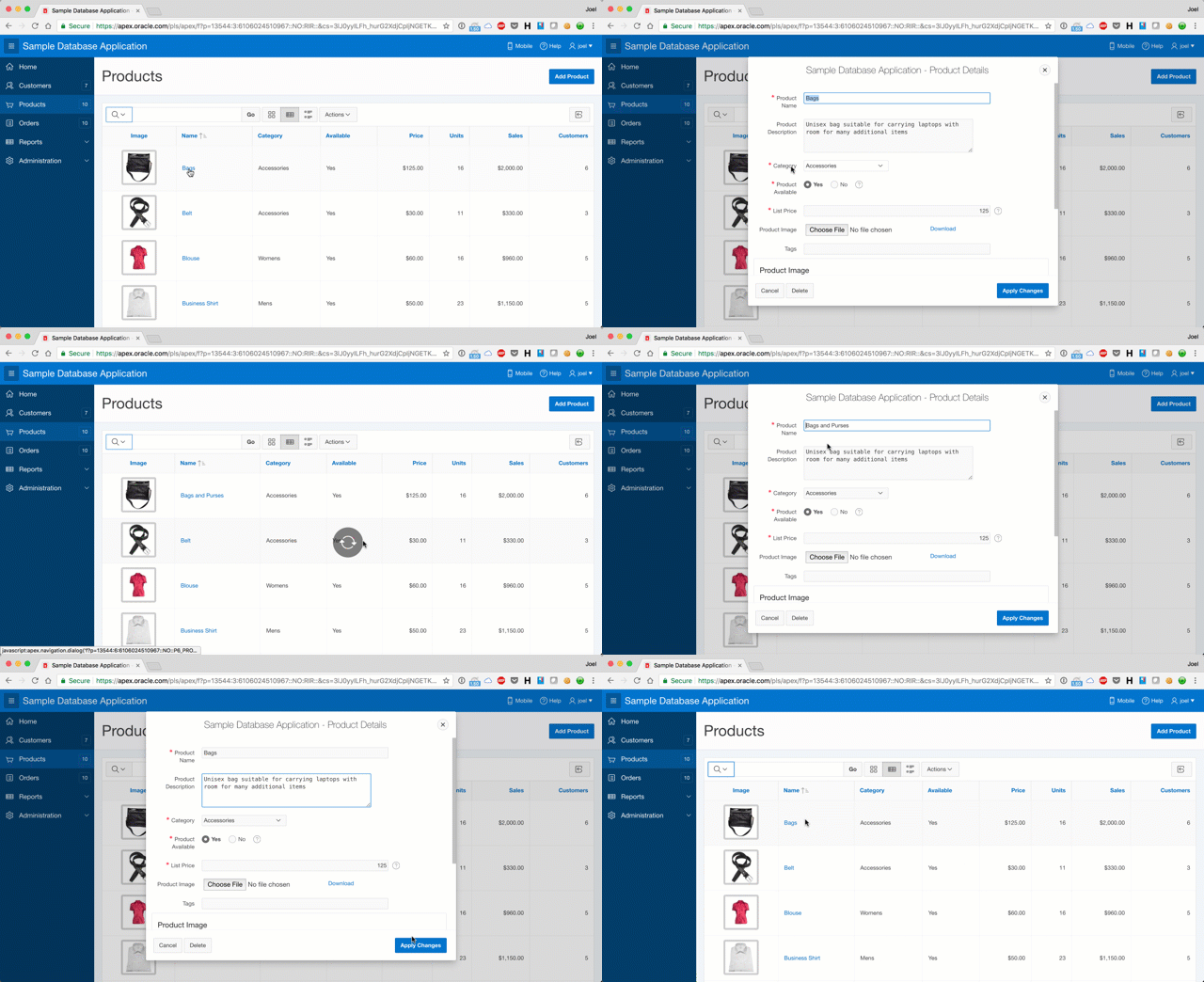
For anyone well-versed in APEX, you'll find this blog post superfluous. But for everyone else who is looking for the quick explanation, as I've received this question 3 times in the past couple months, here it is.
- On the report page, create a new Dynamic Action and enter the following attributes:
- Name: <provide a meaningful name>
- Event: Dialog Closed
- Selection Type: Region
- Region:<choose your report region>
- Select the True action of the Dynamic Action and enter the following attributes:
- Action: Refresh
- Selection Type: Region
- Region: <choose your report region>
For example, if you're converting a non-modal form and report to use a modal form, and you wish to refresh the report after the modal dialog is closed (after creating a new record), you'll need to associate the triggering event with the button. The steps would be:
- On the report page, create a new Dynamic Action and enter the following attributes:
- Name: <provide a meaningful name>
- Event: Dialog Closed
- Selection Type: Button
- Region:<choose your button, for example, your Create button>
- Select the True action of the Dynamic Action and enter the following attributes:
- Action: Refresh
- Selection Type: Region
- Region: <choose your report region>
If you install the Sample Database Application, you'll find numerous examples of this dynamic action refresh operation after the close of a modal dialog. And it is briefly documented in this tip.
APEX World 2018: Het gaat los!
When I first had the opportunity to present at APEX World in 2014, it was a one-day event in the quaint city of Zeist. Since that time, APEX World has blossomed into a large, international, multi-track 2-day conference with more than 400 attendees expected in 2018. Even better, the conference itself is on board the cruise ship SS Rotterdam, which is very historic and beautiful. The theme of this years conference is "A Deep Dive into Low Code", and it will be on March 22nd and 23rd in Rotterdam, Netherlands.
Four members of the Oracle APEX product development team will be at APEX World 2018 - John Snyders, Anthony Rayner, Shakeeb Rahman and David Peake. We are all very open, we would love to understand what you're doing, and we also want to learn how we can help you be successful. I encourage you to come to this great event and join the large and growing international community at APEX World 2018.
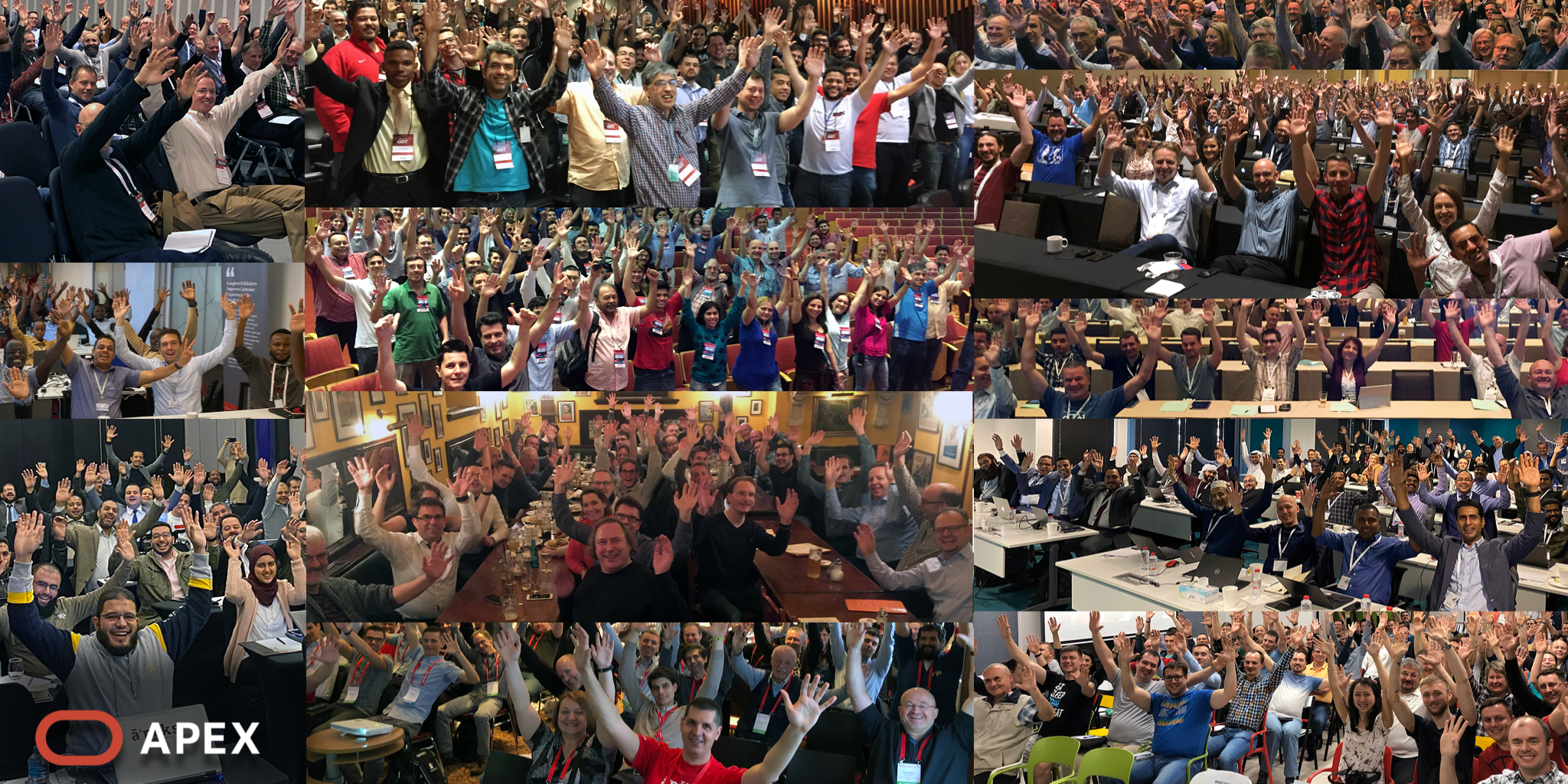
 Infographic from APEX World 2017. 2018 will be even bigger and better!
Who used apex.oracle.com in 2017?
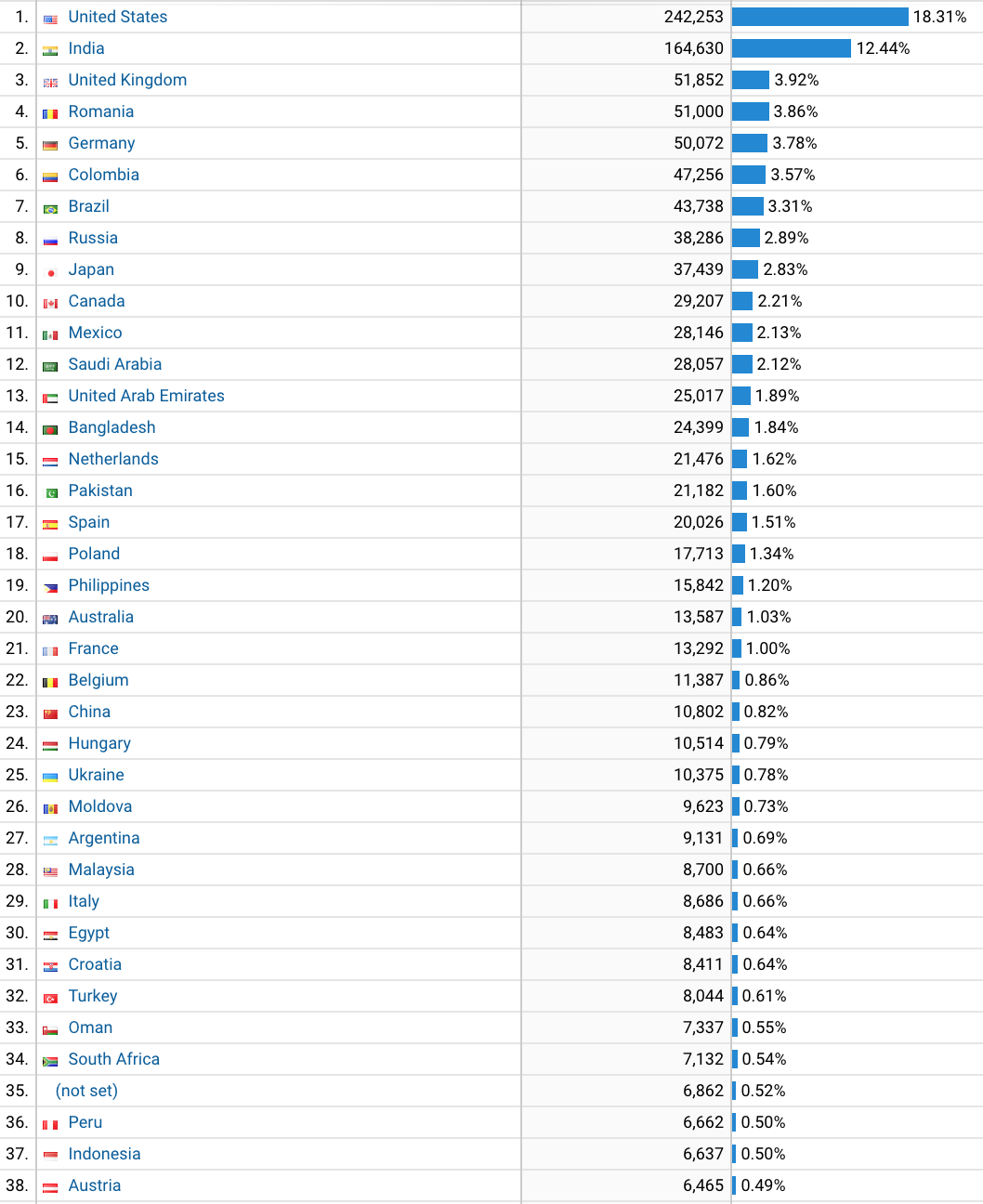
I've included a graphic of the top 30 and the full report below, and here are my observations:
- Since 2008, the number of visitor sessions to apex.oracle.com increased 280 times! That's not percentage, but times. Percentage-wise, that's 27,985 % growth from 2008 to 2017.
- In 2008, there were 1 or more visitor sessions from 122 countries/territories. In 2017, that number increased to 212 countries/territories
- The USA, India and United Kingdom remain in the top 3. But the UK is barely hanging onto the #3 position.
- Colombia vaulted from #11 in 2011 to #6 in 2017. Bangladesh jumped from #26 to #14. Japan jumped from #19 to #9. Wow!
Usage of apex.oracle.com doesn't necessarily translate into usage of APEX. These statistics are only a measurement of who is logging into apex.oracle.com - the actual usage of APEX is far greater. Also, I fully anticipate the comment "...but as a percentage of population size, our country has the top usage in the world!" (here's looking at you, Netherlands). But just because someone's country has declined in the rankings doesn't mean that APEX isn't growing there....it's just growing in other countries too!
Lastly, the statistics presented below are sessions, not to be confused with activity. At the time of this writing, there are 36,133 workspaces on apex.oracle.com. In the past 7 days, there were 4,643,958 page views, and 1,808 new workspaces requested and approved.
Not only is usage of APEX growing on a global basis, but that growth is accelerating.
The top 5 reasons why you should submit an abstract for APEX at the Great Lakes Oracle Conference (GLOC)
 APEX Developer Day at Great Lakes Oracle Conference 2017
The Northeast Ohio Oracle User's Group (NEOOUG) is easily one of my favorite user groups on the planet. They've been graciously hosting me at their user group events since 2004 (when I first gave a demonstration on Oracle HTML DB 1.5!). They are a large, active and passionate user group. In the past 14 years, I've seen them grow from simple user group events to "Training Days" at the Cleveland State University campus to a nicely sized regional conference named Great Lakes Oracle Conference.
If you're into Oracle APEX, either on-premises, or in the Oracle Cloud, I encourage you to submit an abstract to speak at the Great Lakes Oracle Conference. Here are my top 5 reasons why you should strongly consider this:
- There is a real hunger for Oracle APEX content at this conference. There are countless customers in the immediate region who use Oracle APEX. Last year, they had the first ever Oracle APEX Developer Day in advance of the conference, and it was sold out (100 attendees)!
- It's the largest Oracle user's conference in the Midwest US. It draws people from all over Ohio, Michigan, Indiana, Kentucky and Pennsylvania. There will be over 500 attendees at the conference in 2018.
- The Great Lakes Oracle Conference routinely gets world-class speakers from all over the world, both Oracle employees and Oracle ACEs. As a speaker, you would be able to attend any session in any track.
- There are numerous tracks at the Great Lakes Oracle Conference, including APEX, Oracle Applications, Business Intelligence, DBA, Database Developer and Data Warehousing.
- Cleveland, Ohio is on the North Coast of the US. There, you can visit Great Lakes Brewing Company, Market Garden Brewery, Platform Beer Company, and the Rock & Roll Hall of Fame.
I come across so many people who say "why would anyone want to hear me talk about that?" From case studies to lessons learned to best practices in your environment, it's all interesting and valuable. Not everyone who attends the APEX sessions at GLOC are experts, so entry-level sessions are also welcome!
I encourage you to submit an abstract today. The deadline for abstract submission is February 2, 2018.