


David Peake

Product Manager for Oracle Application Express (APEX), formerly HTML-DB.
Updated: 4 hours 9 min ago
Extending EBS R12.1 and above using APEX White Paper Released
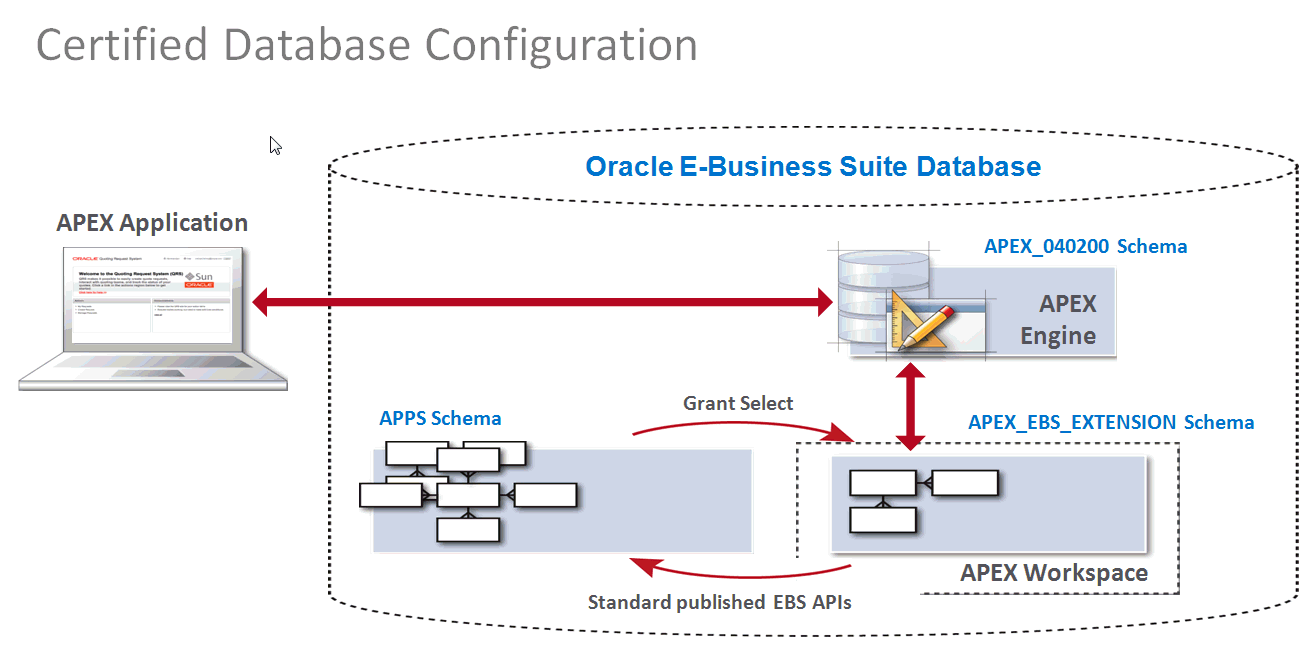
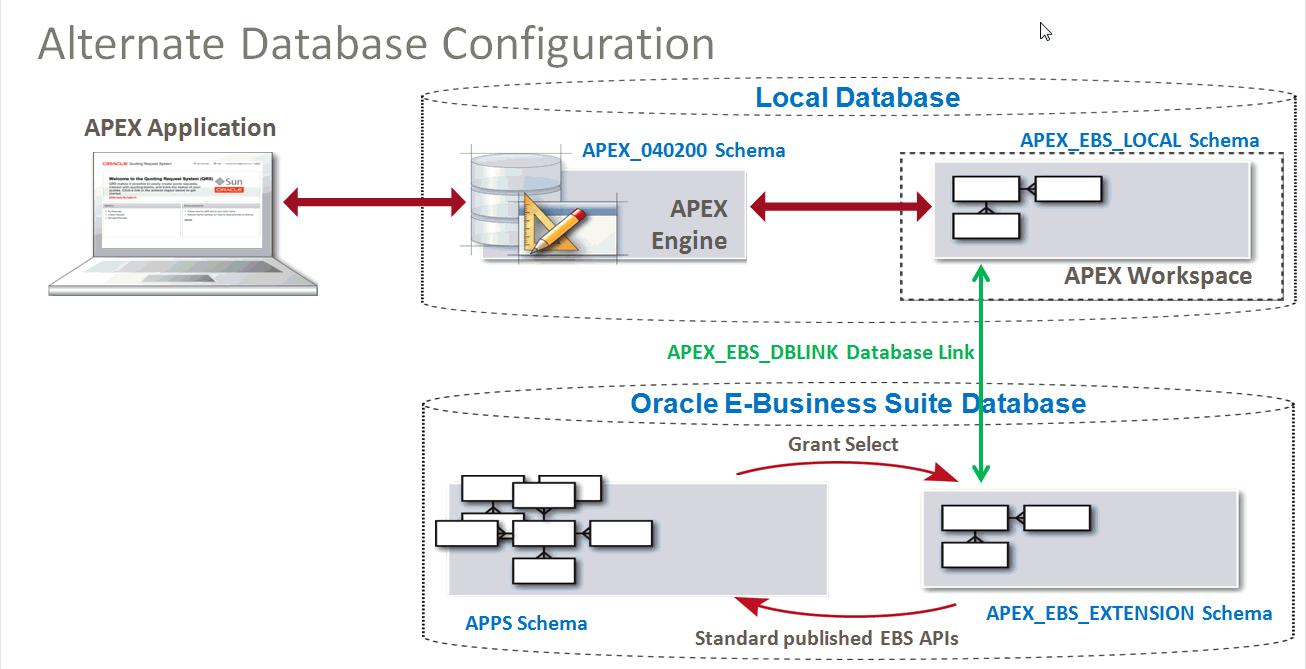
Extending Oracle E-Business Suite Release 12.1 and above using Oracle Application Express Revision 2 has just been released.
This paper is a major revision which now includes certification for Oracle E-Business Suite Release 12.2 and also an alternate database architecture using Oracle Database links. You can download the paper from OTN: http://www.oracle.com/technetwork/developer-tools/apex/learnmore/apex-ebs-extension-white-paper-345780.pdf
This paper is a major revision which now includes certification for Oracle E-Business Suite Release 12.2 and also an alternate database architecture using Oracle Database links. You can download the paper from OTN: http://www.oracle.com/technetwork/developer-tools/apex/learnmore/apex-ebs-extension-white-paper-345780.pdf

UKOUG Tech14 Call for Papers ... Better Hurry!!!

I have submitted a few sessions for Tech14 and also a session for Apps14, given they are co-located in Liverpool this year. My Apps14 session is on integrating EBS with APEX, a subject that is near and dear, and one that is gaining significant traction among EBS customers.
Tech14 Call for Papers has just been extended until Tuesday, 27th May @ 10:00 am!
For all you procrastinators out there, you have this weekend to crank out a title and abstract and enter it.
I generally extend my trip by a few days and head down to London to visit with customers and partners. Both Joel and myself will be available for meetings Thursday 11th and Friday 12th December. Let me know if you would like to meet with us.
Cheers,
David
New APEX Certification Exam BETA Now Running
How does a prospective employer or customer know that you are any good at developing with Oracle Application Express?
One of the best credentials, to prove you have APEX chops, is to obtain Oracle Application Express Certification!
Much of the content being rewritten / improved as part of this effort.
The new exam is currently running a BETA program until 10-May-2014.
Testing centers are available worldwide.
Help us by taking the BETA Exam and help yourself by saving significant cost over sitting for the exam once published.
The "published" exam will be the exact same questions you take in the BETA exam.
If the question ranks poorly during the beta it may be rewritten or removed.
If the question ranks poorly during the beta it may be rewritten or removed.
What are the Long-Term Prospects for Oracle Application Express?
This is a very common question that I’m regularly asked in one form or another. The simple answer is that Oracle is committed to the ongoing development and support of Application Express. There are a number of key factors for Oracle’s commitment including the strong community support, the continued uptake from customers, the products standing within Oracle, and the passion of the Application Express Development Team.
The main reason I believe that the future looks very positive for Oracle Application Express is that the product delivers. An ever increasing number of organizations have successfully deployed applications with exceedingly good ROI, due to the very high productivity the tool delivers for developing and enhancing applications. It is becoming increasingly important to very rapidly iterate solutions to meet the ever-changing business demands, and this is where Application Express excels.
One of the big factors leading to the popularity of Application Express is the almost evangelical community of Oracle APEX developers worldwide. The community is very active on the OTN APEX Forum. There are approximately 150 blogs listed on the ODTUG APEX Blogroll. To date there have been over 25 books published on Application Express, six of which have been published in 2013 alone. There are over 130 consulting companies who cover Oracle Application Express consulting services listed on the APEX Community and Partners application. The customer evaluation instance of Oracle Application Express, at http://apex.oracle.com, which we provide to the public, has over 18,000 workspaces and gets over 5 million page views / week.
All of these statistics only talk to the health of the community and the activity, but doesn’t address the passion. One of the great things about being an active participant in this community is how enthused and motivated the APEX community is as a whole. My job takes me around the world presenting at conferences. As such I get to interact with a large number of people, and I’m regularly taken aback by the extensive networking, collaboration, and camaraderie amongst APEX community members.
Application Express is not generally pushed by Oracle’s sales force, and we don’t receive the same marketing, as other “for-cost” products. However, the strengths of the tool have led to sustained organic growth within a growing number of organizations. One of the windows into this is reviewing the support calls, which reveals a plethora of large well-known organizations. Since releasing the Extending Oracle E-Business Suite Release 12 using Oracle Application Express white paper there has been significant uptake within the EBS community. I regularly receive emails from Oracle Sales Consultants who want me to talk to their customer about Application Express. The email will generally say something to the effect of “Customer x has been using APEX for years and they need someone to talk to them about y”. This growth is further supported by the fact that Application Express is downloaded from Oracle Technology Network (OTN) more than 100,000 times a year.
I define “mission critical” as those applications that would have a large negative impact on business operations, productivity, or profitability should they become unavailable to the business for extended periods. I have countless examples of where supposedly “quick and dirty” APEX applications, with only a few pages and/or a small user community, have matured and are now considered critical to the business. On the other end of the spectrum, there are also more and more very large APEX deployments with sizable development communities and company-wide usage. Application Express is viewed more as a strategic development tool than a simple RAD tool for building simple Web-based applications. It is still very much a RAD tool, but gone are the days when the tool is pigeon-holed as only capable of developing spreadsheet and Access replacements. More recently a number of organizations are focusing on establishing and growing Application Express “Private Cloud” environments and communities within their organization, rather than simply building APEX applications. Just last month at OOW, Joel Kallman and I met with Solution Architects from three different organizations about this very matter.
Why is Application Express important to Oracle? When I first started developing custom applications against the Oracle Database there was one choice – Oracle Forms. Today Oracle has a myriad of different development tools to allow developers the freedom to develop using a range of languages and tools, one of which is still Oracle Forms. Oracle Application Express is Oracle’s primary tool for developing applications with SQL and PL/SQL. For Java developers, Oracle’s primary tool is Oracle JDeveloper and Application Development Framework (ADF), but we also provide support for Eclipse and NetBeans.
The importance to Oracle extends far beyond how important it is to our customers. Oracle itself utilizes Application Express extensively to meet business requirements and improve business processes. One of the best examples available externally is the Oracle Storewhich interfaces with over 10 back-end systems. Oracle Application Express is also tightly integrated into the Oracle Database Cloud Service, whereby when you request a database service you are provided with access to the Oracle Application Express builder environment to define and deploy your applications.
Other Oracle products such as Audit Vault and Database Firewall have integrated Application Express to reduce the number of reports they need to develop. They have replaced 300 SQL based reports with 30 APEX Interactive Reports, while providing significantly enhanced capabilities to their users. Oracle Database 12c Mutitenant allows for numerous Pluggable Databases (PDBs) to be defined in a single Container Database (CDB). The Multitenant Self- Service Provisioning system provides an interface to allow for the self-service provisioning of PDBs. This system was developed in under two months, from inception to delivery of the BETA product, using Application Express.
There is an extensive range of APEX solutions available to Oracle employees. For example, the Aria People application allows employees to search our organizational hierarchy and get contact details for any employee. This application is one of the most actively used applications within Oracle with over 1.2 million page views / day. Applications Technical Services, who are responsible for customizing Oracle’s Global Single Instance (GSI), use Application Express to extend EBS and then feed the requirements back to the EBS Development team. To realize operating efficiencies when we acquired Sun it was imperative that Sun’s operations be integrated rapidly into Oracle. To help facilitate this integration a number of key APEX applications were developed.
One of the key resources for Oracle employees is our hosted internal APEX instance, http://apex.oraclecorp.com. This service has over 2,000 workspaces, with over 12,000 applications, and over 2 million page views / week. More than 20,000 distinct employees from almost every line of business in Oracle use this service regularly. There is a huge variety of applications, from simple to complex, and from limited to critical importance for that business unit. Many of these applications are built and maintained by “citizen” developers.
Since it’s improbable inception, coming out of a skunk works project within Oracle Pre-Sales, by Mike Hichwa and Joel Kallman in 1999, Oracle Application Express has continued to evolve, improving both developer productivity and application capabilities. The Application Express Development Team is very adept at analyzing trends in the IT landscape and incorporating the best attributes of these, such as HTML5 and CSS, into Application Express to ensure the tool remains modern. The continued success of the tool is largely due to this dedicated team that interacts extensively with, and genuinely listens to, the APEX community. To facilitate community input we have implemented the APEX Feature Requests application and established a Feature Advisory Board, consisting of leaders from the APEX community. The board helps us identify the most important requests to consider for upcoming releases. New versions of Application Express are released approximately once a year. We also provide numerous patch sets to ensure bug fixes are available in a timely fashion.
In conclusion, I can’t guarantee that Oracle Application Express will always continue to have the incredible popularity, inside and outside Oracle, which it enjoys today. However, the above should give you confidence that Application Express has a very solid and promising future, and that Oracle will continue to invest in the tool’s ongoing development.
Once again APEX helps ORACLE TEAM USA win the America's Cup

Found some interesting pieces on how ORACLE TEAM USA used Application Express to help them win the 34rd America's Cup in San Francisco.
- Oracle Magazine Article: Faster
- Video: Oracle TEAM USA Taps Real-Time Mobile Data with Oracle
- Web Page: Defending the Cup: Embracing a New Era

APEX 5.0 - Page Designer
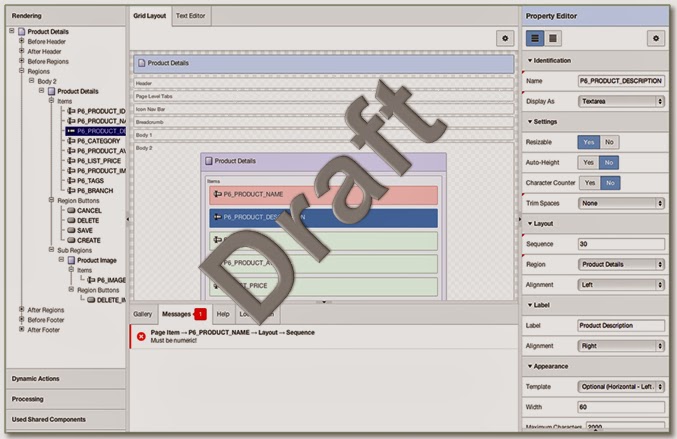
Ever since we started showing off the new Page Designer scheduled for release with Application Express 5.0 almost everyone has been hounding me for screen shots. Generally I never make future functionality public as it changes often and sometimes in very dramatic ways between feature conception, initial implementation, and final deliverable. However, given how much of a "game-changer" this feature will be for all current APEX Developers I have released a slide deck on OTN: Application Express 5.0 - Page Designer.
 Please review Oracle's Safe Harbor within the slide deck.
 Please review Oracle's Safe Harbor within the slide deck.
 APEX OOW 2013 Schedule and Developer Challenge
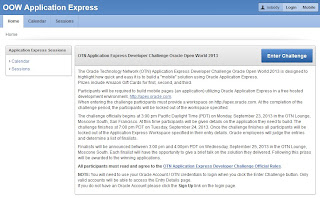
For all of you attending Oracle OpenWorld 2013 then you should check out http://apex.oracle.com/oow.
This application will run on both desktop and mobile*
{* The mobile application requires you to sign with your OTN credentials. The desktop application only requires logging in when you enter the challenge}
OTN APEX Developer Challenge
This year, in conjunction with OTN, we are proud to be running a developer challenge.
Entrants will be required to build a mobile application using Application Express.
The challenge starts at 3:00 pm PDT on Monday of OOW in the OTN Lounge (Moscone South). Official Rules and specifics of the challenge will be released at that time and entrants will be allowed to sign-up for the challenge. Entrants have until Tuesday 7:00 pm PDT to complete their submission. Then at 3:00 pm on Wednesday the winners will be announced in the OTN Lounge.
You could win one of three Amazon gift cards!
Simply go to http://apex.oracle.com/oow to learn more (and to enter once the challenge begins).
Last year OTN and Oracle Social Network ran a similar type challenge. Top honors went to two people well known in the APEX community, Martin Giffy D'Souza and Dimitri Gielis.
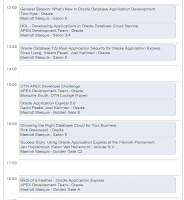 OOW Calendar and Schedule
This same site also lists all of the Application Express sessions, and related sessions, you may have overlooked in the official OOW Content Catalog. As with the last several years there will also be an APEX Meetup which of course is listed in the schedule complete with the address.
This application will run on both desktop and mobile*
{* The mobile application requires you to sign with your OTN credentials. The desktop application only requires logging in when you enter the challenge}
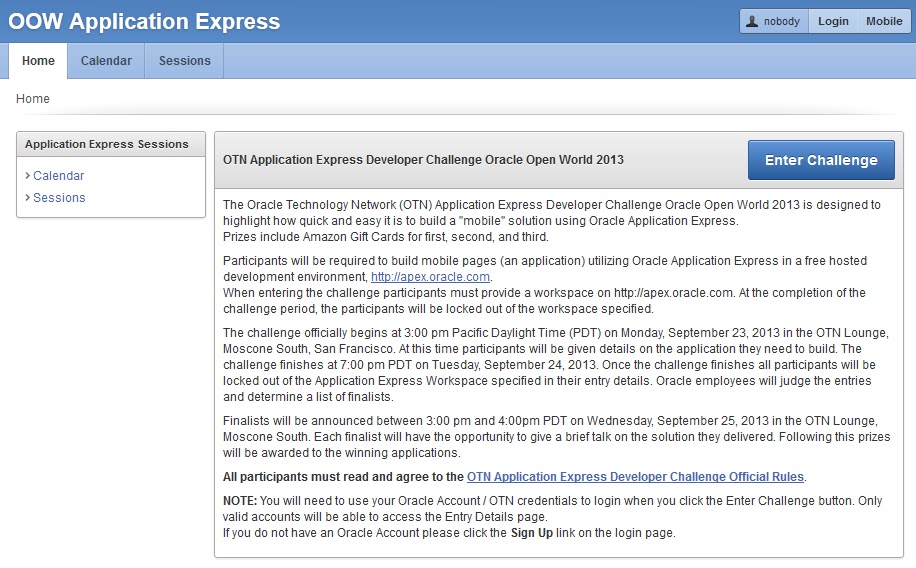
OTN APEX Developer Challenge
This year, in conjunction with OTN, we are proud to be running a developer challenge.
Entrants will be required to build a mobile application using Application Express.
The challenge starts at 3:00 pm PDT on Monday of OOW in the OTN Lounge (Moscone South). Official Rules and specifics of the challenge will be released at that time and entrants will be allowed to sign-up for the challenge. Entrants have until Tuesday 7:00 pm PDT to complete their submission. Then at 3:00 pm on Wednesday the winners will be announced in the OTN Lounge.
You could win one of three Amazon gift cards!
Simply go to http://apex.oracle.com/oow to learn more (and to enter once the challenge begins).
Last year OTN and Oracle Social Network ran a similar type challenge. Top honors went to two people well known in the APEX community, Martin Giffy D'Souza and Dimitri Gielis.
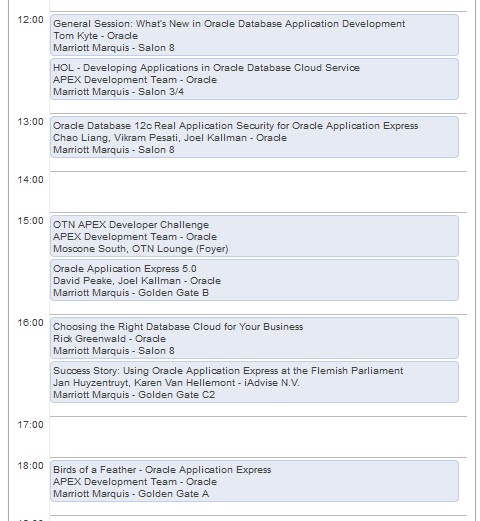
This same site also lists all of the Application Express sessions, and related sessions, you may have overlooked in the official OOW Content Catalog. As with the last several years there will also be an APEX Meetup which of course is listed in the schedule complete with the address.
APEX 4.2.1 Patch Set Released
Today we released APEX 4.2.1 on the APEX OTN Download page.
This is a cumulative patch set for APEX 4.2.0.
If you already have APEX 4.2.0 installed then you will need to download the patch from My Oracle Support , Patch # 14732511 {Filename will be p14732511_420_Generic.zip until Oracle Support has 4.2.1 loaded at which time the name will change to p14732511_421_Generic.zip}
There were quite a number of APEX 4.2.0 Known Issues, the majority of which have been incorporated into APEX 4.2.1.
It is important to read the APEX 4.2.1 Patch Set Notes and also the APEX 4.2 Release Notes when installing APEX 4.2.1.
... But Wait - That's Not All
On the APEX OTN Home Page I have added a new button :

.. Still More
On the Collateral - White Papers Page the Extending Oracle E-Business Suite Release 12 using Oracle Application Express white paper has been revised to include some corrections and include OAM which is the new Oracle standard for single-sign on integration across Oracle Applications.
... And Last But Not Least
On the OTN APEX Home Page there are a number of new Case Studies. One of the best case studies I have seen for Application Express comes from APEX Consulting Partner Inoapps, who delivered a system for INEOS in Scotland: INEOS Group Cuts 80% off Application Design and Build Costs for Managing Hydrocarbon Accounting and Refinery Information.
There is also a new book listed - Oracle APEX Best Practices.
APEX 5.0 Statement of Direction
We have published an updated Statement of Direction for Application Express and plan on calling out next major release APEX 5.0.
This outlines the major features we *plan* on delivering, however, as always there is also a large number of other features we have listed in Team Development for this release. These are covered under the "Numerous functional improvements" bucket. Many of the features we are planning to deliver come from the APEX Feature Request Application.
As always our disclaimer (as listed at the bottom of the Statement of Direction page) in relation to such forward looking statements applies.
Looks like our team is going to busy ... again!!!
This outlines the major features we *plan* on delivering, however, as always there is also a large number of other features we have listed in Team Development for this release. These are covered under the "Numerous functional improvements" bucket. Many of the features we are planning to deliver come from the APEX Feature Request Application.
As always our disclaimer (as listed at the bottom of the Statement of Direction page) in relation to such forward looking statements applies.
Looks like our team is going to busy ... again!!!
Application Express 4.2 Goes Production
New release and new look for our http://apex.oracle.com page
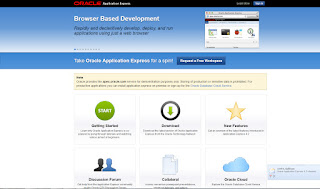
Also our APEX OTN Page(s) at http://otn.oracle.com/apex
Of course the most active page will be the updated Downloads page on OTN where you can download Release 4.2. But don't forget to look at all of the other great content we've been working on.
There is still some work to do such as updating the latest Presentations so don't be a stranger!
Enjoy building Mobile Applications declarativiely and playing with all the other great features we have introduced or enhanced.
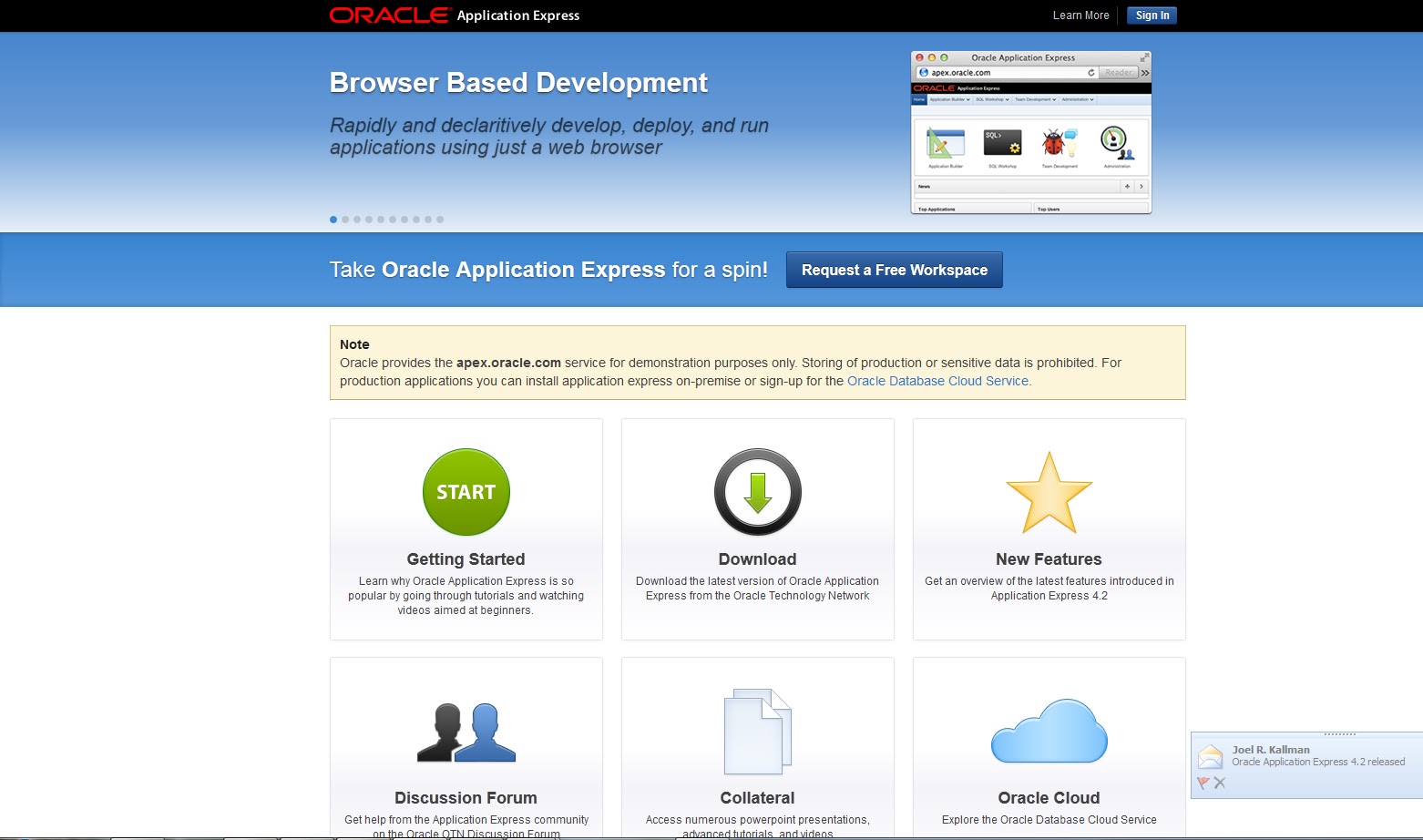
Also our APEX OTN Page(s) at http://otn.oracle.com/apex
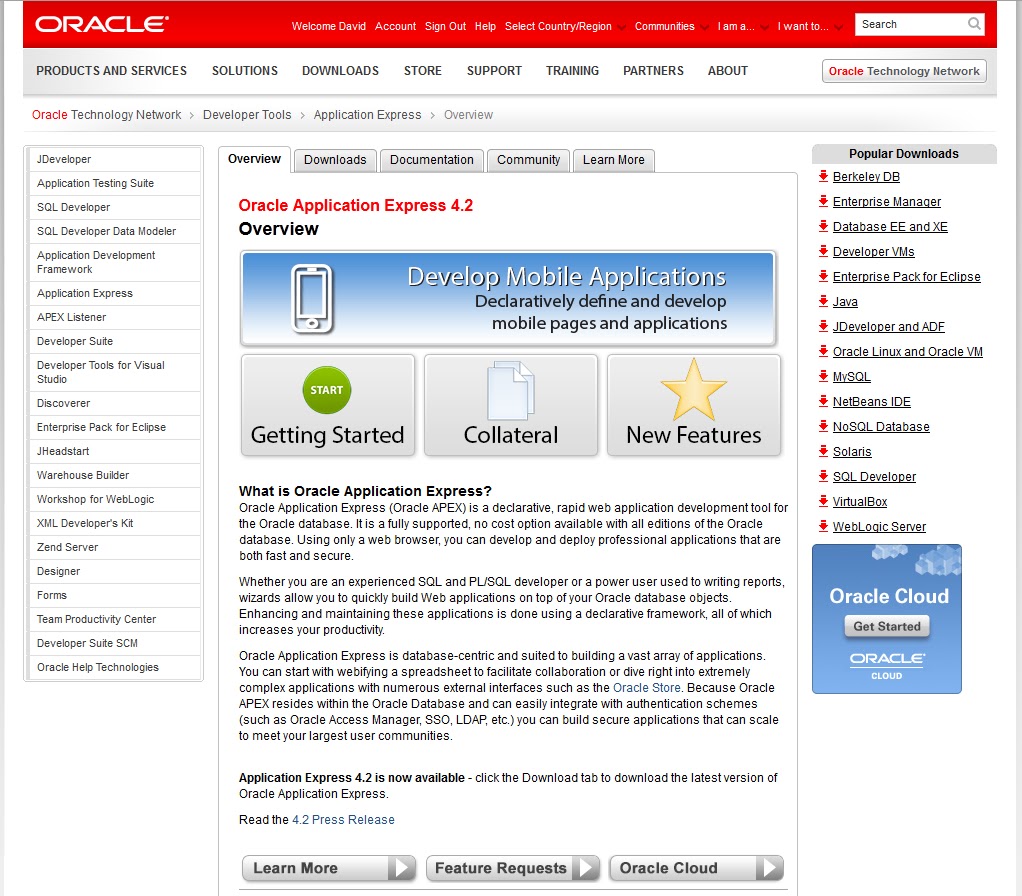
Of course the most active page will be the updated Downloads page on OTN where you can download Release 4.2. But don't forget to look at all of the other great content we've been working on.
There is still some work to do such as updating the latest Presentations so don't be a stranger!
Enjoy building Mobile Applications declarativiely and playing with all the other great features we have introduced or enhanced.
Application Express 4.2 Early Adopter 1
Following on from Joel's post this morning (http://t.co/HW9dflZC) the first Early Adopter for APEX 4.2 is now available @ https://apexea.oracle.com.
A list of Feature Descriptions and Known Issues is also available @ http://apex.oracle.com/pls/apex/f?p=38997:1:0
One of the main features we are introducing in APEX 4.2 are the Packaged Applications.
Instead of having to download them from OTN and install them they are now part of the APEX installation.
Simply go to the Application Builder and click on one of the many packaged applications.
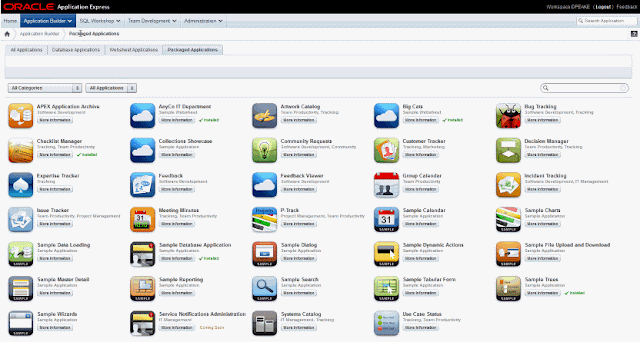
There are two main types of applications, Productivity Applications and Sample Applications.
The productivity applications are locked by default and in their locked state are fully supported. However, these applications can also be unlocked to allow developers to customize the application or simply look at how it was made.
The sample applications are unlocked by default. You can also download the sample applications for installation into an APEX 4.1 environment from OTN: http://www.oracle.com/technetwork/developer-tools/apex/application-express/packaged-apps-090453.html.
If you have any Feature Requests then we have made one of the new productivity applications {Community Requests} available for the APEX community to use: https://apex.oracle.com/pls/apex/f?p=55447:1
Please provide feedback from within the EA Application Builder.
Regards,
David
A list of Feature Descriptions and Known Issues is also available @ http://apex.oracle.com/pls/apex/f?p=38997:1:0
One of the main features we are introducing in APEX 4.2 are the Packaged Applications.
Instead of having to download them from OTN and install them they are now part of the APEX installation.
Simply go to the Application Builder and click on one of the many packaged applications.
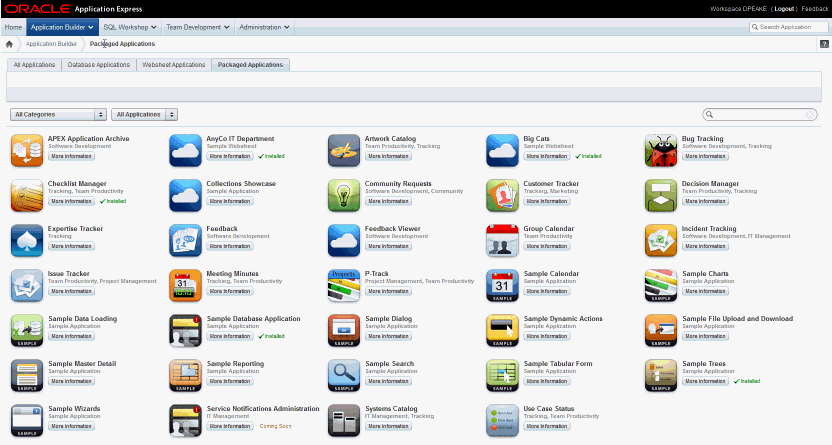
There are two main types of applications, Productivity Applications and Sample Applications.
The productivity applications are locked by default and in their locked state are fully supported. However, these applications can also be unlocked to allow developers to customize the application or simply look at how it was made.
The sample applications are unlocked by default. You can also download the sample applications for installation into an APEX 4.1 environment from OTN: http://www.oracle.com/technetwork/developer-tools/apex/application-express/packaged-apps-090453.html.
If you have any Feature Requests then we have made one of the new productivity applications {Community Requests} available for the APEX community to use: https://apex.oracle.com/pls/apex/f?p=55447:1
Please provide feedback from within the EA Application Builder.
Regards,
David
New Oracle By Examples Now Available
For sometime Kris Rice and I have talked about wanting to do a "Soup-to-Nuts" series of labs. With many thanks to Marcie Young from Curriculum Development, such a series now exists on the Oracle Learning Library (OLL) : http://apex.oracle.com/pls/apex/f?p=44785:24:0::NO::P24_CONTENT_ID,P24_PREV_PAGE:6265,1
Marcie is also the one responsible for building the whole OLL site in APEX and even developing the Mobile version of the site.
The workshop series includes the following labs:
Marcie is also the one responsible for building the whole OLL site in APEX and even developing the Mobile version of the site.
The workshop series includes the following labs:
- Data Modeler
- SQL Developer
- APEX (x2)
These are designed to be taken as a complete unit where you start with the Data Modeler to get your data structures correct, then use SQL Developer to work further on database objects, before using Application Express to build an application on top. I really appreciate that the tables you work on with the first lab are the same tables you build an application on top of in the APEX labs. These labs should prove very useful for anybody who needs to meet some new business requirements.
I have always been a huge proponent of modelling since my days using Oracle CASE and then Oracle Designer. If you don't have a well designed base (tables, etc) then whatever applications you build on top will be inherently harder to build and less performant. Too many young developers consider the data structures one of the least important aspects of designing a computer solution. My take is the better you design the database structures the easier your application development will be so spend the time upfront and reap the rewards later.
Integrating APEX with OAM
Thanks to the hard work from Christian Neumueller from the APEX team and Ramana Turlapati from the Access Manager team we were able to successfully integrate Application Express into Oracle Access Manager. The result is a new white paper available via the OTN APEX on the Learn More page (http://www.oracle.com/technetwork/developer-tools/apex/learnmore/index.html#tech). Simply scroll down to to Technical Information and White Papers section at the bottom to find the Integrating Oracle Application Express with Oracle Access Manager White Paper.
For those of you using EBusiness Suite you should be able to use this new white paper in conjunction with the Extending Oracle E-Business Suite Release 12 with Oracle Application Express White Paper to integrate OAM into your environment.
For those of you using EBusiness Suite you should be able to use this new white paper in conjunction with the Extending Oracle E-Business Suite Release 12 with Oracle Application Express White Paper to integrate OAM into your environment.
Are you in Higher Education and use APEX?

For some time I have been interested in furthering the use of Oracle Application Express in higher education.
There are a number of institutions currently using Application Express either as part of their curriculum or for internal use.
One of the big problems is knowing who else in higher education is using Oracle Application Express and SQL Developer.
Therefore to provide a forum for people to come together I have set up a LinkedIn Group: Oracle APEX Educators SIG
Please join this group as a way to communicate ideas, collateral and knowledge.
Cheers,
David
FREE OTN Developer Day in Poland June 15
Our FREE OTN Developer Day is going global.
We are going to be in Poland on June 15.
Go here to see the event overview and register.
This is a BYOL (Bring Your Own Laptop) event so that you can keep everything you work on.
These days concentrate on hands-on labs and using the various tools rather than just sitting through presentations.
Hope to see you there!
We are going to be in Poland on June 15.
Go here to see the event overview and register.
This is a BYOL (Bring Your Own Laptop) event so that you can keep everything you work on.
These days concentrate on hands-on labs and using the various tools rather than just sitting through presentations.
Hope to see you there!
APEX 4.1 Early Adopter Released

As Joel announced here the APEX 4.1 Early Adopter is now available on http://tryapexnow.com.
This release is not nearly as huge as APEX 4.0, however, our hyperactive development team have been cranking out lots of new features for you to enjoy.
To find out what you can try out for yourself go to the Feature Description application. There are a number of other features that we are still working on, the most notable being Mobile Templates and Data Upload. Never fear, these will be coming to an APEX Early Adopter near you soon -- Read when we do the next major build of our EA.
Make sure you check out our new and improved Websheets interface. This feature is not 100% complete but we couldn't wait to show off the new look and feel!
Enjoy our latest offereings and be sure to provide feedback.
Oracle E-Business Suite and APEX White Paper

The Oracle E-Business Suite and Oracle Application Express teams are proud to announce the release of the Extending Oracle E-Business Suite Release 12 using Oracle Application Express white paper.
Oracle E-Business Suite delivers a wide range of functionality to handle core areas of your business processing needs. However, there are situations where you want to extend your information systems beyond the range of Oracle E-Business Suite. Many times these necessary extensions are meant to handle unique industry conventions, specific customer requirements, or perhaps to offer some other competitive edge. Sometimes these change requests are simple enough, but other times more extensive customizations are needed. In these scenarios, Oracle Application Express, also known as Oracle APEX, provides an easy way to create supplemental applications that are easily integrated with your Oracle E-Business Suite and its data.
This paper outlines how to extend Oracle E-Business Suite 12.1.3 (and up) functionality using Oracle Application Express. Recommended architecture and security considerations are discussed in detail.
You can find the paper on the APEX OTN Site > Learn More > Extending Oracle E-Business Suite Release 12 using Oracle Application Express {Under Technical Information and White Papers}
All the necessary files are also available from My Oracle Support Note: 1306563.1
This document helps customers and partners implement integrated Application Express extensions to the Oracle E-Business Suite Release 12.1.3 and up. The document is complete with a worked example. This solution also requires Oracle E-Business Suite Patch 9659153
APEX 4.1 Statement of Direction Published
Want to learn more about what we are planning for APEX 4.1?
Then read our new Statement of Direction.
APEX 4.1 is scheduled for release in calendar year 2011.
Regards,
David
Then read our new Statement of Direction.
APEX 4.1 is scheduled for release in calendar year 2011.
Regards,
David
APEX 4.0 Known Issues
Since releasing APEX 4.0 we have identified a number of issues.
Many are directly related to upgrading applications from previous releases.
The known issues are outlined on OTN here: http://www.oracle.com/technology/products/database/application_express/html/4.0_known_issues.html
As with any upgrade we strongly recommend you test your applications in a development environment before applying to production.
Our development team is working very hard on these issues.
Many issues have workarounds provided.
Where appropriate we are also releasing patch set exceptions which can be downloaded from Oracle Support and installed in your environment.
We intend to roll all of these fixes into an APEX 4.0.1 release.
Before you ask - I can't provide dates for APEX 4.0.1 release!
Regards,
David
Many are directly related to upgrading applications from previous releases.
The known issues are outlined on OTN here: http://www.oracle.com/technology/products/database/application_express/html/4.0_known_issues.html
As with any upgrade we strongly recommend you test your applications in a development environment before applying to production.
Our development team is working very hard on these issues.
Many issues have workarounds provided.
Where appropriate we are also releasing patch set exceptions which can be downloaded from Oracle Support and installed in your environment.
We intend to roll all of these fixes into an APEX 4.0.1 release.
Before you ask - I can't provide dates for APEX 4.0.1 release!
Regards,
David