


Asif Momen

Views expressed here are solely that of my own. Please make sure that you test the code/queries that appear on my blog before applying them to the production environment.
Updated: 1 week 3 days ago
Oracle Database In-Memory Advisor Released
Oracle Database In-Memory option was released with Oracle
Database 12c (12.1.0.2) and the In-Memory Advisor (IMA) has been much awaited
since then. The Oracle Database In-Memory is designed to achieve the following
goals:
- Speed up analytical queries
- Speed up OLTP transactions
- NO application changes
Without the In-Memory Advisor, a DBA has to manually identify
the tables to be placed in the In-Memory Column Store (IMCS). This manual task
is no more required as the IMA, analyzes the analytical workload of the
database and produces a recommendation report (which includes SQL commands to
place the tables in IMCS).
For more information on IMA please refer to MOS:
1965343.1 and you may also download the best practices white paper from here.
Oracle Database 12c: In-Memory Option
Starting with Oracle Database 12cR1 (12.1.0.2), a new static
pool in the SGA is designed to store data in the columnar format and is called
In-Memory Column Store (IMCS). Each table column is stored as a separate structure
in IMCS. The In-Memory column store does not replace the buffer cache, rather
supplements by storing data in columnar format.
Following the levels at which IMCS can be enabled at:
- Column
- Partition / sub-partition
- Table
- Materialized view
- Tablespace
Like other Oracle Database Options, you make NO changes in your application to start benefiting from the In-Memory Option. It is completely transparent to the applications. Also, Oracle Optimizer is fully aware of the column format and automatically utilizing IMCS when required.
I plan to test and blog more on the In-Memory option. Following
are few of the topics that I plan to post a blog entry on:
- Enable and disable In-Memory Option
- In-Memory Option at various levels
- In-Memory Space pressure
- In-Memory background processes
- In-Memory with compression levels
- In-Memory statistics
- In-Memory and Data Pump Export
- In-Memory with Multi-tenant Option
AWR Warehouse
AWR Warehouse is a central repository configured for long term AWR data retention. It stores AWR snapshots from multiple database sources. Increasing AWR retention in the production systems would typically increase overhead and cost of mission critical databases. Hence, offloading the AWR snapshots to a central repository is a better idea. Unlike AWR retention period of default 8 days, the AWR Warehouse default retention period is "forever". However, it is configurable for weeks, months, or years.
For more information on AWR Warehouse click on the following link for a video tutorial.
http://www.youtube.com/watch?v=StydMitHtuI&feature=youtu.be
For more information on AWR Warehouse click on the following link for a video tutorial.
http://www.youtube.com/watch?v=StydMitHtuI&feature=youtu.be
Benefits of Single Tenant Deployments
While presenting at a database event, I had a question from one of
the attendees on benefits of running Oracle databases in Single Tenant
Configuration. I thought this would be a
nice if I post it on my blog as it would benefit others too.
From Oracle documentation, “The multitenant architecture
enables an Oracle database to function as a multitenant container database
(CDB) that includes zero, one, or many customer-created pluggable databases
(PDBs). A PDB is a portable collection of schemas, schema objects, and non-schema
objects that appears to an Oracle Net client as a non-CDB. All Oracle databases
before Oracle Database 12c were non-CDBs”.
Following are the benefits of running databases in Single
Tenant Configuration:
- Alignment with Oracle’s new multi-tenant architecture
- Cost saving. You save on license fee as single tenant deployments do not attract Multi-tenant option license fee. License is applicable should you have two or more PDBs.
- Upgrade/patch your single PDB from 12.1.0.1 to 12.x easily with reduced downtime
- Secure separation of duties (between CDBA & DBA)
- Easier PDB cloning
I would recommend running all your production and
non-production databases in single-tenant configuration (if you are not
planning for consolidation using multi-tenant option) once you upgrade them to
Oracle Database 12c. I expect to see single tenant deployments become the
default deployment model for the customers.
Oracle Database Express Edition 11g Release 2: Released
Oracle Database Express Edition 11gR2 has been released. You may download the software and documentation following below links:
Happy downloading !!!
Happy downloading !!!
IOUG’s 2014 Exadata Virtual Conference
IOUG is organizing a two-day virtual Exadata Conference on 29-30 Jan, 2014. More importantly the virtual conference is FREE. Following is the agenda as per the IOUG's website:
29-Jan-2014 (Wednesday)
10-11am CST
30-Jan-2014 (Thursday)
10-11am CST
For more information and registration click on the below link:
http://www.ioug.org/exavirtual2014
29-Jan-2014 (Wednesday)
10-11am CST
Minimizing Risks with Database Consolidation on Exadata using I/O Resource Manager (IORM)
Speaker: Sameer Malik, Exadata Technical Architect, Accenture
11am-12pm CST Speaker: Sameer Malik, Exadata Technical Architect, Accenture
Introduction to the New Oracle Database In-Memory Option
Speaker: Kevin Jernigan, Senior Director, Oracle
12-1pm CSTSpeaker: Kevin Jernigan, Senior Director, Oracle
Understand the Flash storage and Dynamic Tiering Solution for Traditional Database in Comparison of Exadata Flash Solution.
Speaker: Amit Das, Database Engineering Architect, Paypal
Speaker: Amit Das, Database Engineering Architect, Paypal
10-11am CST
Oracle Exadata Technical Deep Dive Session
Speaker: Yenugula Venkata RaviKumar, Senior Sales Consultant, Oracle India Pvt. Limited
11am-12pm CST Speaker: Yenugula Venkata RaviKumar, Senior Sales Consultant, Oracle India Pvt. Limited
Exadata X4: What’s New
Speaker: Mahesh Subramaniam, Director of Product Management, Oracle
12-1pm CSTSpeaker: Mahesh Subramaniam, Director of Product Management, Oracle
Exadata for Oracle DBAs
Speaker: Arup Nanda, Director, Starwood Hotels & Resorts
Speaker: Arup Nanda, Director, Starwood Hotels & Resorts
For more information and registration click on the below link:
http://www.ioug.org/exavirtual2014
I have registered myself for the two-day conference and hope to see you all there !!!
Oracle Database Security Assessment
Data Security has taken a front seat in terms of IT Security lately. Database security is an area of information security that is concerned with the use of security controls to protect databases. Organizations are trying to protect their databases from both internal and external threats.
In this regard, Oracle has put up an online Database Security Assessment on their website. You may now check how secure your database is by answering few simple questions.
Below is the link for Oracle's Database Security Assessment:
http://www.oracle.com/us/media/survey/index-191234.html
I am also sharing top ten most common database security vulnerabilities by ZDNet. Below is the link for the same:
http://www.zdnet.com/the-top-ten-most-common-database-security-vulnerabilities-7000017320/
Wishing you a secure database !!!
In this regard, Oracle has put up an online Database Security Assessment on their website. You may now check how secure your database is by answering few simple questions.
Below is the link for Oracle's Database Security Assessment:
http://www.oracle.com/us/media/survey/index-191234.html
I am also sharing top ten most common database security vulnerabilities by ZDNet. Below is the link for the same:
http://www.zdnet.com/the-top-ten-most-common-database-security-vulnerabilities-7000017320/
Wishing you a secure database !!!
Forgot SYSMAN Password? Here's How to Regain Access to EMCC-12c
I installed Oracle Enterprise Manager Cloud Control 12c soon after it's release in a virtual environment for the purpose of testing. I normally save passwords, ip-address, ports, and other details in a text file. But unfortunately, I was not able to locate the file for this particular VM.
However, it was easy to reset the password following these steps:
1) Stop OMS (leaving the Admin Server up)
2) Modify SYSMAN password
3) Stop all OMS components
4) Start OMS
5) Login to Oracle EMCC-12c with the new password
1) Stop OMS (leaving the Admin Server up)
Stop the OMS without "-all" as shown below:
[oracle@emcc bin]$ ./emctl stop oms
Oracle Enterprise Manager Cloud Control 12c Release 2
Copyright (c) 1996, 2012 Oracle Corporation. All rights reserved.
Stopping WebTier...
WebTier Successfully Stopped
Stopping Oracle Management Server...
Oracle Management Server Successfully Stopped
Oracle Management Server is Down
[oracle@emcc bin]$
2) Modify SYSMAN password
[oracle@emcc bin]$
[oracle@emcc bin]$ ./emctl config oms -change_repos_pwd -use_sys_pwd -sys_pwd XXXXX -new_pwd mynewpassword
Oracle Enterprise Manager Cloud Control 12c Release 2
Copyright (c) 1996, 2012 Oracle Corporation. All rights reserved.
Changing passwords in backend ...
Passwords changed in backend successfully.
Updating repository password in Credential Store...
Successfully updated Repository password in Credential Store.
Restart all the OMSs using 'emctl stop oms -all' and 'emctl start oms'.
Successfully changed repository password.
[oracle@emcc bin]$
3) Stop all OMS components
[oracle@emcc bin]$ ./emctl stop oms -all
Oracle Enterprise Manager Cloud Control 12c Release 2
Copyright (c) 1996, 2012 Oracle Corporation. All rights reserved.
Stopping WebTier...
WebTier Successfully Stopped
Stopping Oracle Management Server...
Oracle Management Server Already Stopped
AdminServer Successfully Stopped
Oracle Management Server is Down
[oracle@emcc bin]$
[oracle@emcc bin]$
4) Start OMS
[oracle@emcc bin]$ ./emctl start oms
Oracle Enterprise Manager Cloud Control 12c Release 2
Copyright (c) 1996, 2012 Oracle Corporation. All rights reserved.
Starting Oracle Management Server...
Starting WebTier...
WebTier Successfully Started
Oracle Management Server Successfully Started
Oracle Management Server is Up
[oracle@emcc bin]$
5) Login to EMCC-12c
I was able to login to the EMCC-12c console with the new password without any issues.
For more information refer to MOS - 1365930.1
However, it was easy to reset the password following these steps:
1) Stop OMS (leaving the Admin Server up)
2) Modify SYSMAN password
3) Stop all OMS components
4) Start OMS
5) Login to Oracle EMCC-12c with the new password
1) Stop OMS (leaving the Admin Server up)
Stop the OMS without "-all" as shown below:
[oracle@emcc bin]$ ./emctl stop oms
Oracle Enterprise Manager Cloud Control 12c Release 2
Copyright (c) 1996, 2012 Oracle Corporation. All rights reserved.
Stopping WebTier...
WebTier Successfully Stopped
Stopping Oracle Management Server...
Oracle Management Server Successfully Stopped
Oracle Management Server is Down
[oracle@emcc bin]$
2) Modify SYSMAN password
[oracle@emcc bin]$
[oracle@emcc bin]$ ./emctl config oms -change_repos_pwd -use_sys_pwd -sys_pwd XXXXX -new_pwd mynewpassword
Oracle Enterprise Manager Cloud Control 12c Release 2
Copyright (c) 1996, 2012 Oracle Corporation. All rights reserved.
Changing passwords in backend ...
Passwords changed in backend successfully.
Updating repository password in Credential Store...
Successfully updated Repository password in Credential Store.
Restart all the OMSs using 'emctl stop oms -all' and 'emctl start oms'.
Successfully changed repository password.
[oracle@emcc bin]$
3) Stop all OMS components
[oracle@emcc bin]$ ./emctl stop oms -all
Oracle Enterprise Manager Cloud Control 12c Release 2
Copyright (c) 1996, 2012 Oracle Corporation. All rights reserved.
Stopping WebTier...
WebTier Successfully Stopped
Stopping Oracle Management Server...
Oracle Management Server Already Stopped
AdminServer Successfully Stopped
Oracle Management Server is Down
[oracle@emcc bin]$
[oracle@emcc bin]$
4) Start OMS
[oracle@emcc bin]$ ./emctl start oms
Oracle Enterprise Manager Cloud Control 12c Release 2
Copyright (c) 1996, 2012 Oracle Corporation. All rights reserved.
Starting Oracle Management Server...
Starting WebTier...
WebTier Successfully Started
Oracle Management Server Successfully Started
Oracle Management Server is Up
[oracle@emcc bin]$
5) Login to EMCC-12c
I was able to login to the EMCC-12c console with the new password without any issues.
For more information refer to MOS - 1365930.1
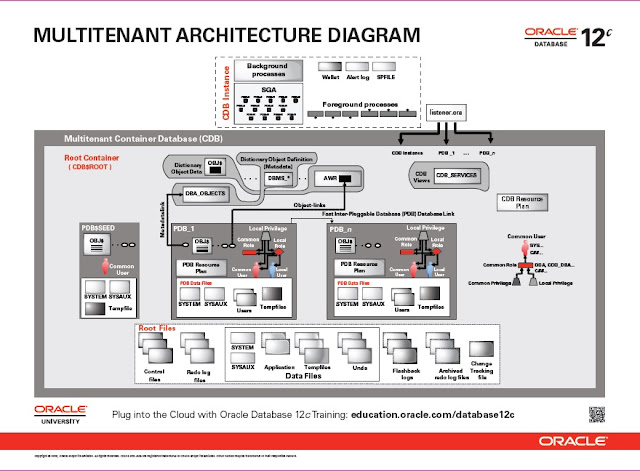
Oracle Database 12: Architecture Diagram
I found the following Database Architecture Diagram for Oracle Database 12c on Oracle Education's website. It lists all the processes and the relationship between processes and other database components. I recommend you to take a print on A3 paper.

And below is a YouTube link which gives database architecture overview.
Oracle Database 12c Architecture Overview
Update - 1 (11-Jul-2013):
Below is Oracle Database 12c Multi-Tenant Architecture Diagram:

And below is a YouTube link which gives database architecture overview.
Oracle Database 12c Architecture Overview
Update - 1 (11-Jul-2013):
Below is Oracle Database 12c Multi-Tenant Architecture Diagram:

Upgrading Oracle Database 11.2.0.3 to 12.1.0 (Oracle 12c)
There are different ways of upgrading to the latest release
of Oracle database and Oracle provides multiple methods to upgrade. Few are
listed below:
- Database Upgrade Assistant (DBUA)
- Manual Upgrade
- Transportable Tablespaces
- Datapump export/import
- Oracle Streams
- Oracle GoldenGate
I chose DBUA to upgrade my test database as it was the
simplest and quickest of all. Below are the database environment details prior
to upgrade:
Oracle Database Version: Oracle
Database 11gR2 (11.2.0.3) (64-bit)
Operating System: Oracle
Enterprise Linux 6.1 (64-bit)
To begin the upgrade process, I copied Oracle 12c software to
the database server and did the following
- Backup Oracle database
- Stop the database
- Stop listener
- Change ORACLE_HOME environment variable in the bash profile of “oracle” user
- Launch Oracle 12c Installer (./runInstaller)
You will see the following screen:

Click "Next" and chose "Skip software updates".

Click "Next" and select "Upgrade an existing database". When you select this option Oracle will install Oracle 12cR1 software and then automatically launch DBUA to upgrade the databases.

Click "Next" and continue as shown in the screenshots below:


Make sure all the warnings are resolved before proceeding with the next step. In my case, I ignored the warning as this is a test database and the swap size is almost closer to the expected value.

Installation of Oracle 12 software begins as shown below:


After installing the software and completing Net configuration, Oracle Universal Installer will launch DBUA to upgrade existing databases.
Below are the screenshots from DBUA:


I ignored the warnings as this is our test database. You would like to resolve these warning for your production, development, testing, etc databases.


Well, it took more than 90 minutes to upgrade my test database. DBUA generates log files under "/u01/app/oracle/cfgtoollogs/dbua//upgrade1/" location. You may monitor the logs to see the progress and scripts that DBUA executes during the upgrade process.


Well, that's it. My database is now upgraded to Oracle Database 12c.
SQL> select * from v$version;
BANNER CON_ID
---------------------------------------------------------------------------- ----------
Oracle Database 12c Enterprise Edition Release 12.1.0.1.0 - 64bit Production 0
PL/SQL Release 12.1.0.1.0 - Production 0
CORE 12.1.0.1.0 Production 0
TNS for Linux: Version 12.1.0.1.0 - Production 0
NLSRTL Version 12.1.0.1.0 - Production 0
SQL>
I am sure you would like to look for alternative and near zero downtime database upgrade approaches to upgrade your production databases. Here are few of the helpful links in this regard:
- Oracle White Paper on "Upgrading to Oracle Database 12c"
- Upgrade, Migrate, and Consolidate to Oracle Database 12c
- Complete Checklist for Manual Upgrades to Oracle Database 12c Release 1 (12.1) [ID 1503653.1]
Enjoy your Oracle Database 12c.
"An unexpected error has been detected by HotSpot Virtual Machine" Error While Launching Installer
Today while installing Oracle 11gR2 (11.2.0.3) 64-bit on RHEL 6.1 64-bit on a VMWare box, I received the mentioned error. Looking up at MOS wasn't fruitful. However, this seems to be an RHEL bug.
bash-4.1$ ./runInstaller
Starting Oracle Universal Installer...
Checking Temp space: must be greater than 120 MB. Actual 27976 MB Passed
Checking swap space: must be greater than 150 MB. Actual 4031 MB Passed
Checking monitor: must be configured to display at least 256 colors. Actual 16777216 Passed
Preparing to launch Oracle Universal Installer from /tmp/OraInstall2013-07-01_03-12-27AM. Please wait ...bash-4.1$ #
# An unexpected error has been detected by HotSpot Virtual Machine:
#
# SIGSEGV (0xb) at pc=0x00007f33a28c8d70, pid=2400, tid=139859082229520
#
# Java VM: Java HotSpot(TM) 64-Bit Server VM (1.5.0_30-b03 mixed mode)
# Problematic frame:
# C [ld-linux-x86-64.so.2+0x14d70]
#
# An error report file with more information is saved as hs_err_pid2400.log
#
# If you would like to submit a bug report, please visit:
# http://java.sun.com/webapps/bugreport/crash.jsp
#
bash-4.1$
bash-4.1$ ./runInstaller
Starting Oracle Universal Installer...
Checking Temp space: must be greater than 120 MB. Actual 27976 MB Passed
Checking swap space: must be greater than 150 MB. Actual 4031 MB Passed
Checking monitor: must be configured to display at least 256 colors. Actual 16777216 Passed
Preparing to launch Oracle Universal Installer from /tmp/OraInstall2013-07-01_03-12-27AM. Please wait ...bash-4.1$ #
# An unexpected error has been detected by HotSpot Virtual Machine:
#
# SIGSEGV (0xb) at pc=0x00007f33a28c8d70, pid=2400, tid=139859082229520
#
# Java VM: Java HotSpot(TM) 64-Bit Server VM (1.5.0_30-b03 mixed mode)
# Problematic frame:
# C [ld-linux-x86-64.so.2+0x14d70]
#
# An error report file with more information is saved as hs_err_pid2400.log
#
# If you would like to submit a bug report, please visit:
# http://java.sun.com/webapps/bugreport/crash.jsp
#
bash-4.1$
The workaround to the problem is to set "LD_BIND_NOW" environment variable to a value "1" as shown below and re-launch the installer.
bash-4.1$ export LD_BIND_NOW=1
bash-4.1$ ./runInstaller
Starting Oracle Universal Installer...
Checking Temp space: must be greater than 120 MB. Actual 27339 MB Passed
Checking swap space: must be greater than 150 MB. Actual 4031 MB Passed
Checking monitor: must be configured to display at least 256 colors. Actual 16777216 Passed
Preparing to launch Oracle Universal Installer from /tmp/OraInstall2013-07-01_03-29-40AM. Please wait ...
bash-4.1$
Starting Oracle Universal Installer...
Checking Temp space: must be greater than 120 MB. Actual 27339 MB Passed
Checking swap space: must be greater than 150 MB. Actual 4031 MB Passed
Checking monitor: must be configured to display at least 256 colors. Actual 16777216 Passed
Preparing to launch Oracle Universal Installer from /tmp/OraInstall2013-07-01_03-29-40AM. Please wait ...
bash-4.1$
According to a post on "The Gruff DBA" blog, this bug seems to have reported on 11.2.0.1 & 11.2.0.3
:)
Connecting to Oracle Database Even if Background Processes are Killed
Yesterday, I received an email update from MOS Hot Topics Email alert regarding a knowledge article which discusses how to connect to an Oracle database whose background processes are killed.
I bet every DBA must have encountered this situation at least once. When I am in this situation, I normally use "shutdown abort" to stop the database and then proceed with normal startup.
After receiving the email, I thought of reproducing the same. My database (TGTDB) is 11.2.0.3 running on RHEL-5.5. The goal is to kill all Oracle background process and try to connect to the database.
Of course you don't want to test this in your production databases.
SQL> select * from v$version;
BANNER
--------------------------------------------------------------------------------
Oracle Database 11g Enterprise Edition Release 11.2.0.3.0 - 64bit Production
PL/SQL Release 11.2.0.3.0 - Production
CORE 11.2.0.3.0 Production
TNS for Linux: Version 11.2.0.3.0 - Production
NLSRTL Version 11.2.0.3.0 - Production
SQL>
Below is the list of background processes for my test database "TGTDB":
Let us try to update a record.
SQL>
SQL> update test.emp set ename = 'test' where eno = 2;
1 row updated.
SQL>
Wow, one record was updated. But when you try to commit/rollback, the instance gets terminated. And it makes sense as the background processes responsible for carrying out the change have all died.
SQL>
SQL> commit;
commit
*
ERROR at line 1:
ORA-03113: end-of-file on communication channel
Process ID: 8917
Session ID: 87 Serial number: 7
SQL>
Following is the error message recorded in the database alert log:
Wed Mar 13 01:41:44 2013
USER (ospid: 8917): terminating the instance due to error 472
Instance terminated by USER, pid = 8917
References:
I bet every DBA must have encountered this situation at least once. When I am in this situation, I normally use "shutdown abort" to stop the database and then proceed with normal startup.
After receiving the email, I thought of reproducing the same. My database (TGTDB) is 11.2.0.3 running on RHEL-5.5. The goal is to kill all Oracle background process and try to connect to the database.
Of course you don't want to test this in your production databases.
SQL> select * from v$version;
BANNER
--------------------------------------------------------------------------------
Oracle Database 11g Enterprise Edition Release 11.2.0.3.0 - 64bit Production
PL/SQL Release 11.2.0.3.0 - Production
CORE 11.2.0.3.0 Production
TNS for Linux: Version 11.2.0.3.0 - Production
NLSRTL Version 11.2.0.3.0 - Production
SQL>
Below is the list of background processes for my test database "TGTDB":
[oracle@ogg2 ~]$ ps -ef|grep TGTDB
oracle 8249 1 0 01:35 ? 00:00:00 ora_pmon_TGTDB
oracle 8251 1 0 01:35 ? 00:00:00 ora_psp0_TGTDB
oracle 8253 1 0 01:35 ? 00:00:00 ora_vktm_TGTDB
oracle 8257 1 0 01:35 ? 00:00:00 ora_gen0_TGTDB
oracle 8259 1 0 01:35 ? 00:00:00 ora_diag_TGTDB
oracle 8261 1 0 01:35 ? 00:00:00 ora_dbrm_TGTDB
oracle 8263 1 0 01:35 ? 00:00:00 ora_dia0_TGTDB
oracle 8265 1 6 01:35 ? 00:00:02 ora_mman_TGTDB
oracle 8267 1 0 01:35 ? 00:00:00 ora_dbw0_TGTDB
oracle 8269 1 1 01:35 ? 00:00:00 ora_lgwr_TGTDB
oracle 8271 1 0 01:36 ? 00:00:00 ora_ckpt_TGTDB
oracle 8273 1 0 01:36 ? 00:00:00 ora_smon_TGTDB
oracle 8275 1 0 01:36 ? 00:00:00 ora_reco_TGTDB
oracle 8277 1 1 01:36 ? 00:00:00 ora_mmon_TGTDB
oracle 8279 1 0 01:36 ? 00:00:00 ora_mmnl_TGTDB
oracle 8281 1 0 01:36 ? 00:00:00 ora_d000_TGTDB
oracle 8283 1 0 01:36 ? 00:00:00 ora_s000_TGTDB
oracle 8319 1 0 01:36 ? 00:00:00 ora_p000_TGTDB
oracle 8321 1 0 01:36 ? 00:00:00 ora_p001_TGTDB
oracle 8333 1 0 01:36 ? 00:00:00 ora_arc0_TGTDB
oracle 8344 1 1 01:36 ? 00:00:00 ora_arc1_TGTDB
oracle 8346 1 0 01:36 ? 00:00:00 ora_arc2_TGTDB
oracle 8348 1 0 01:36 ? 00:00:00 ora_arc3_TGTDB
oracle 8351 1 0 01:36 ? 00:00:00 ora_qmnc_TGTDB
oracle 8366 1 0 01:36 ? 00:00:00 ora_cjq0_TGTDB
oracle 8368 1 0 01:36 ? 00:00:00 ora_vkrm_TGTDB
oracle 8370 1 0 01:36 ? 00:00:00 ora_j000_TGTDB
oracle 8376 1 0 01:36 ? 00:00:00 ora_q000_TGTDB
oracle 8378 1 0 01:36 ? 00:00:00 ora_q001_TGTDB
oracle 8402 4494 0 01:36 pts/1 00:00:00 grep TGTDB
[oracle@ogg2 ~]$
Let us kill all these processes at once as shown below:
[oracle@ogg2 ~]$ kill -9 `ps -ef|grep TGTDB | awk '{print ($2)}'`
bash: kill: (8476) - No such process
[oracle@ogg2 ~]$
Make sure no processes are running for our database:
[oracle@ogg2 ~]$ ps -ef|grep TGTDB
oracle 8520 4494 0 01:37 pts/1 00:00:00 grep TGTDB
[oracle@ogg2 ~]$
Now, try to connect to the database using SQL*Plus:
[oracle@ogg2 ~]$ sqlplus "/as sysdba"
SQL*Plus: Release 11.2.0.3.0 Production on Wed Mar 13 01:38:12 2013
Copyright (c) 1982, 2011, Oracle. All rights reserved.
Connected to:
Oracle Database 11g Enterprise Edition Release 11.2.0.3.0 - 64bit Production
With the Partitioning, OLAP, Data Mining and Real Application Testing options
SQL>
Voila, I am connected. Not only you get connected to the database but you can query V$*, DBA* and other application schema views/tables. Let's give a try:
SQL> select name from v$database;
Voila, I am connected. Not only you get connected to the database but you can query V$*, DBA* and other application schema views/tables. Let's give a try:
SQL> select name from v$database;
NAME
---------
TGTDB
SQL> select name from v$tablespace;
NAME
------------------------------
SYSTEM
SYSAUX
UNDOTBS1
USERS
TEMP
TEST_TS
6 rows selected.
SQL>
SQL> select count(*) from dba_tables;
COUNT(*)
----------
2787
SQL>
SQL> select count(*) from test.emp;
COUNT(*)
----------
3333
SQL>
Let us try to update a record.
SQL>
SQL> update test.emp set ename = 'test' where eno = 2;
1 row updated.
SQL>
SQL>
SQL> commit;
commit
*
ERROR at line 1:
ORA-03113: end-of-file on communication channel
Process ID: 8917
Session ID: 87 Serial number: 7
SQL>
Following is the error message recorded in the database alert log:
Wed Mar 13 01:41:44 2013
USER (ospid: 8917): terminating the instance due to error 472
Instance terminated by USER, pid = 8917
The user (client) session was able to retrieve data from the database as the shared memory was still available and the client session does not need background processes for this task.
Below mentioned MOS article discusses on how to identify and kill the shared memory segment(s) allocated to "oracle" user through UNIX/Linux commands.
References:
- Successfully Connect to Database Even if Background Processes are Killed [ID 166409.1]
Oracle Linux 6.4 Announced
The Oracle Linux team has announced the availability of Oracle Enterprise Linux (OL) 6.4. You can download OEL-6.4 from Oracle's EDelivery website (the link is below):
https://edelivery.oracle.com/EPD/Search/handle_go
To learn more about OL-6.4 click on the below link.
http://docs.oracle.com/cd/E37670_01/E39522/html/
Happy downloading!!!
https://edelivery.oracle.com/EPD/Search/handle_go
To learn more about OL-6.4 click on the below link.
http://docs.oracle.com/cd/E37670_01/E39522/html/
Happy downloading!!!
Exporting Multiple Tables on a Common Filter
To be frank, I consider myself novice when it comes to
advanced export/import requirements. This is because I don’t deal with these
utilities on a day-to-day basis.
A simple requirement came across my desk to export selected
tables from a schema based on a common filter.
Requirement:
Say, you have 5 tables T1, T2, T3, T4, and T5. All have “ID”
as the primary key column and you have to export data from these tables only if
it is found in COMMON_TABLE. The COMMON_TABLE stores “ID” to be exported.
Solution:
The first place that I look for solution is “Oracle
Documentation”. I knew we can filter a table using “QUERY” parameter of Data Pump
Export but did not know how to apply it on multiple tables.
The syntax of the QUERY parameter is:
QUERY = [schema.][table_name:] query_clause
If you omit [schema.][table_name:] then the query is applied
to all the tables in the export job.
So, here’s my export command:
Thanks for reading!!!
RACcheck for Single Instance Databases
Starting with RACcheck 2.2.0, RACcheck support is extended to Oracle Single Instance Databases, Oracle Restart and RAC One Node configurations.
I downloaded the latest version of the tool and tested it against my play database. Below is a sample RACcheck output from a single instance database:
Refer to the MOS document mentioned below to learn more about RACcheck tool. You may download the latest version of RACcheck from My Oracle Support (MOS).
References:
RACcheck - RAC Configuration Audit Tool [ID 1268927.1]
I downloaded the latest version of the tool and tested it against my play database. Below is a sample RACcheck output from a single instance database:
[oracle@localhost raccheck]$ ./raccheck -v
RACCHECK VERSION: 2.2.0_20121109
[oracle@localhost raccheck]$
[oracle@localhost raccheck]$
[oracle@localhost raccheck]$
./raccheck -a
List of running databases
1. testdb
2. None of above
Select databases from list for
checking best practices. For multiple databases, select 1 for All or comma
separated number like 1,2 etc [1-2][1].
. .
Checking Status of Oracle Software
Stack - Clusterware, ASM, RDBMS
. . . . . . . . . . . . . . .
-------------------------------------------------------------------------------------------------------
Oracle Stack Status
-------------------------------------------------------------------------------------------------------
Host Name CRS Installed
ASM HOME RDBMS
Installed CRS UP ASM UP
RDBMS UP DB Instance Name
-------------------------------------------------------------------------------------------------------
localhost No No Yes No No Yes
testdb
-------------------------------------------------------------------------------------------------------
Refer to the MOS document mentioned below to learn more about RACcheck tool. You may download the latest version of RACcheck from My Oracle Support (MOS).
References:
RACcheck - RAC Configuration Audit Tool [ID 1268927.1]
Bug: ORA-00979: not a GROUP BY expression
Bugs and performance degradation are part of database upgrade stories and we have witnessed yet another post-upgrade bug after upgrading our database from Oracle 10gR2 (10.2.0.5) to Oracle 11gR2 (11.2.0.2).
Following query (I have simplified the query for the demonstration purpose) was running happily within Oracle 10gR2:
SQL>
SQL> select * from ( select TRUNC(dt,'MM')
2 from test
3 group by TRUNC(dt,'mm'));
TRUNC(DT,
---------
01-JAN-13
SQL>
However, the same query started to throws an error (ORA-00979) when executed in Oracle 11gR2 (11.2.0.2):
SQL> select * from v$version;
BANNER
--------------------------------------------------------------------------------
Oracle Database 11g Enterprise Edition Release 11.2.0.2.0 - 64bit Production
PL/SQL Release 11.2.0.2.0 - Production
CORE 11.2.0.2.0 Production
TNS for Linux: Version 11.2.0.2.0 - Production
NLSRTL Version 11.2.0.2.0 - Production
SQL>
SQL> select * from ( select TRUNC(dt,'MM')
from test
group by TRUNC(dt,'mm'));
2 3 select * from ( select TRUNC(dt,'MM')
*
ERROR at line 1:
ORA-00979: not a GROUP BY expression
SQL>
Bug 11067251 - False ORA-979 with TRUNC(date, format) or ROUND(date, format) - superceded [ID 11067251.8]
Apparently, you hit the bug when you use either TRUNC or ROUND functions in an inline view. Executing the same query with little modification (removing inline view) in 11.2.0.2 was however successful.
SQL> select TRUNC(dt,'MM')
from test
group by TRUNC(dt,'mm');
2 3
TRUNC(DT,
---------
01-JAN-13
SQL>
The above bug confirms that 11.2.0.2 is affected and proposes following two workarounds:
1) Use NO_MERGE hint or
2) Disable view merging "_simple_view_merging=false"
As it was not possible to rewrite the application at this point, so we disabled view merging at the system level. Well, disabling view merging at the system level might appear as a bad choice but I think it is a right decision at this time. We will soon be upgrading this database to 11.2.0.3. This will kill two birds with one stone, a) bug fix and b) upgrading to the latest patch level (who knows what new bugs are waiting for us ???).
References:
Following query (I have simplified the query for the demonstration purpose) was running happily within Oracle 10gR2:
SQL>
SQL> select * from ( select TRUNC(dt,'MM')
2 from test
3 group by TRUNC(dt,'mm'));
TRUNC(DT,
---------
01-JAN-13
SQL>
However, the same query started to throws an error (ORA-00979) when executed in Oracle 11gR2 (11.2.0.2):
SQL> select * from v$version;
BANNER
--------------------------------------------------------------------------------
Oracle Database 11g Enterprise Edition Release 11.2.0.2.0 - 64bit Production
PL/SQL Release 11.2.0.2.0 - Production
CORE 11.2.0.2.0 Production
TNS for Linux: Version 11.2.0.2.0 - Production
NLSRTL Version 11.2.0.2.0 - Production
SQL>
SQL> select * from ( select TRUNC(dt,'MM')
from test
group by TRUNC(dt,'mm'));
2 3 select * from ( select TRUNC(dt,'MM')
*
ERROR at line 1:
ORA-00979: not a GROUP BY expression
SQL>
At this point I normally do a search on My Oracle Support (MOS) to see if I get some hits pertaining to this problem and found the following bug information:
Bug 11067251 - False ORA-979 with TRUNC(date, format) or ROUND(date, format) - superceded [ID 11067251.8]
Apparently, you hit the bug when you use either TRUNC or ROUND functions in an inline view. Executing the same query with little modification (removing inline view) in 11.2.0.2 was however successful.
SQL> select TRUNC(dt,'MM')
from test
group by TRUNC(dt,'mm');
2 3
TRUNC(DT,
---------
01-JAN-13
SQL>
The above bug confirms that 11.2.0.2 is affected and proposes following two workarounds:
1) Use NO_MERGE hint or
2) Disable view merging "_simple_view_merging=false"
As it was not possible to rewrite the application at this point, so we disabled view merging at the system level. Well, disabling view merging at the system level might appear as a bad choice but I think it is a right decision at this time. We will soon be upgrading this database to 11.2.0.3. This will kill two birds with one stone, a) bug fix and b) upgrading to the latest patch level (who knows what new bugs are waiting for us ???).
References:
- My Oracle Support: Bug 11067251 - False ORA-979 with TRUNC(date, format) or ROUND(date, format) - superceded [ID 11067251.8]
Online Free Courses from World's Best Universities
Coursera is offering courses free online. The courses are delivered from faculty members of top universities in the world. You may find more information on the courses at:
https://www.coursera.org/
Happy learning !!!
OOW-2012: Oracle 12c New Features
Blogging right from Tom's session "database new features". Here are the new features as they are discussed:
1. Identity Columns
Remember I blogged on this topic earlier.
2. Default on null
A default value is inserted into the column When it's null.
3. Improved defaults - metadata only defaults
Now add new default columns to a table on the fly. 12c does that for you.
4. Increased size limit for Varchar2 and NVarchar2
The column types can be upto 32k.
5. Row Pattern Matching
Efficient SQL functionality for reporting row patterns like identifying V and W patterns for your stock
6. Partitioning Improvements
Online partition movement without using DBMS_REDEFINITION. Efficient global index management during DROP and TRUNCATE partition operation.
7. Hybrid Histograms
Jonathan Lewis spoke on this topic. I think more information on this is available on his blog.
8. Session private statistics for GTTs
Table and index statistics are held private for each session.
9. Temporary UNDO
Undo for temporary tables can now be managed in TEMP. Reduces the amount of undo generated in undo tablespace and redo generation.
10. Pluggable databases
Read Roels blog for this one. He has a good blog post on this
http://roelhartman.blogspot.com/
1. Identity Columns
Remember I blogged on this topic earlier.
2. Default on null
A default value is inserted into the column When it's null.
3. Improved defaults - metadata only defaults
Now add new default columns to a table on the fly. 12c does that for you.
4. Increased size limit for Varchar2 and NVarchar2
The column types can be upto 32k.
5. Row Pattern Matching
Efficient SQL functionality for reporting row patterns like identifying V and W patterns for your stock
6. Partitioning Improvements
Online partition movement without using DBMS_REDEFINITION. Efficient global index management during DROP and TRUNCATE partition operation.
7. Hybrid Histograms
Jonathan Lewis spoke on this topic. I think more information on this is available on his blog.
8. Session private statistics for GTTs
Table and index statistics are held private for each session.
9. Temporary UNDO
Undo for temporary tables can now be managed in TEMP. Reduces the amount of undo generated in undo tablespace and redo generation.
10. Pluggable databases
Read Roels blog for this one. He has a good blog post on this
http://roelhartman.blogspot.com/
Oracle RAC 12c: New Features
Blogging live from OOW session on "Enhancements in Oracle RAC". Following are few Oracle RAC 12c new features being discussed in this session as I post:
1. Application Continuity
2. Oracle Flex ASM
With this feature, database instances use remote ASM instances.
3. Oracle ASM Disk Scrubbing
Checks for logical data corruptions and repair them automatically.
4. Enhancements to Policy-based Databases
Actively utilizes different sized servers
5. What - if analysis for server pool management
6. Standardized deployment and patching
Introducing GHS, rapid home provisioning and gold images
7. A new "ghctl" command for better patching
8. Oracle Utility Cluster
9. Dynamic IP Management and name resolution made easy
10. IPv6 Based IP Addresses Support for client connectivity
11. Multi-purpose Installation
12. Oracle installer will run Fix-up scripts & "root.sh" scripts across nodes. You don't have to run the scripts manually on RAC nodes.
Exciting new features !!!
1. Application Continuity
2. Oracle Flex ASM
With this feature, database instances use remote ASM instances.
3. Oracle ASM Disk Scrubbing
Checks for logical data corruptions and repair them automatically.
4. Enhancements to Policy-based Databases
Actively utilizes different sized servers
5. What - if analysis for server pool management
6. Standardized deployment and patching
Introducing GHS, rapid home provisioning and gold images
7. A new "ghctl" command for better patching
8. Oracle Utility Cluster
9. Dynamic IP Management and name resolution made easy
10. IPv6 Based IP Addresses Support for client connectivity
11. Multi-purpose Installation
12. Oracle installer will run Fix-up scripts & "root.sh" scripts across nodes. You don't have to run the scripts manually on RAC nodes.
Exciting new features !!!
OOW-2012: Very Large Databases (VLDB): Challenges and Opportunities
I would like to thank all the attendees for attending my session "Very Large Databases (VLDB): Challenges and Opportunities". I am glad, the hall was full to it's capacity. :)
You may download the presentation by logging into OOW-2012 schedule builder.
I request all the attendees to kindly rate my session by logging into OOW: Schedule Builder.
See you all !!!
You may download the presentation by logging into OOW-2012 schedule builder.
I request all the attendees to kindly rate my session by logging into OOW: Schedule Builder.
See you all !!!