


Chet Justice

Real World SQL and PL/SQL: Advice from the Experts
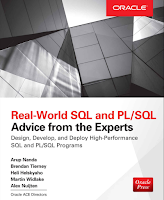
Because my hero is Cary Millsap, I'm going to do what he did and publish my foreword Preface. All joking aside, I consider myself incredibly fortunate to have been included in this project. I learned...a lot, by simply trying to find the author's mistakes (and there were not many). There was a lot more work than I expected, as well. (Technical) Editing is lot easier than writing, to be sure.
Brendan Tierney and Heli Helskyaho approached me in March 2015 about being an author on this book, along with Arup Nanda and Alex Nuijten. Soon after, we picked up Martin Widlake. To say that I was honored to be asked would be a gross understatement. Rather quickly though, I realized that I did not have the mental energy to devote to the project and didn’t want to put the other authors at risk. Still wanting to be part of the book, I suggested that I be the Technical Editor and they graciously accepted my new role.
This is my first official role as Technical Editor, but I’ve been doing it for years through work; checking my work, checking others work, etc. Having a touch of Obsessive Compulsive Disorder (OCD) helps greatly.
All testing was done with the pre-built Database App Development VM provided by OTN/Oracle which made things easy. Configuration for testing was simple with the instructions provided in those chapters that required it.
One of my biggest challenges was the multi-tenant architecture of Oracle 12c. I haven’t done DBA type work in a few years, so trying to figure out if I should be doing something in the root container (CDB) or the pluggable database (PDB) was fun. Other than that though, the instructions provided by the authors were pretty easy to follow.
Design (data modeling, Edition Based Redefinition, VPD), Security (Redaction/Masking, Encryption/Hashing), Coding (Reg Ex, PL/SQL, SQL), Instrumentation, and “Reporting” or turning that raw data into actionable information (Data Mining, Oracle R, Predictive Queries). These topics are covered in detail throughout this book. Everything a developer would need to build an application from scratch.
Probably my favorite part of this endeavor is that I was forced to do more than simply see if it works. Typically when reading a book, or blog entry, I’ll grab the technical solution and move on often skipping the Why, When, and Where. How, to me, is relatively easy. I read AskTom daily for many years, it was my way of taking a break without getting in trouble. At first, it was to see how particular solutions were solved, occasionally using it for my own problems. After a year or two, I wanted to understand the Why of doing it a certain way and would look for those responses where Tom provided insight into his approach.
That’s what I got reviewing this book. I was allowed into their minds, to not only see How they solved technical problems, but Why. This is invaluable for developer’s and DBAs. Most of us can figure out How to solve specific technical issues, but to reach that next level we need to understand the Why, When and Where. This book provides that.
Categories: BI & Warehousing
Kscope15 - It's a Wrap, Part II
Another fantastic Kscope in the can.
This was my final year in an official capacity which was a lot more difficult to deal with than I had anticipated. Here's my record of service:
This has been a wonderful time for me both professionally and, more importantly to me, personally. Obviously I had a big voice in the direction of content. Also and maybe hard to believe, I actually presented for the first time. Slotted against Mr. Kyte. I reminded everyone of that too. Multiple times. It seemed to go well though. Only a few made fun of me.
I was constantly recruiting too. "Did you submit an abstract?" "No, why not?" and I'd go into my own personal diatribe (ignoring my own lack of presenting) into why they should present. Sarah Craynon Zumbrum summed it up pretty well in a recent article.
But it was the connections I made, the people I met, the stories I shared (#ampm, #cupcakeshirt, etc), and the friends that I made, that's what has had the most impact on me. Kscope is unique in that way because of it's size...at Collaborate or OOW, you'll be lucky to see someone more than once or twice, at Kscope you're running into everyone constantly.
How could I forget? #tadasforkate! This year was even more special. For those that don't know, Katezilla is my profoundly delayed but equally profoundly happy 10 y/o daughter. Just prior to the conference her physical therapist taught her "tada!" and Kate would hold her hands up high in the air and everyone around would yell, Tada! I got this crazy idea to ask others to do it and I would film it. Thirty or forty videos and hundreds of participants later...
So a gigantic thank you to everyone who made this possible for me.
Here's a short list of those that had a direct impact on me...
What's the future hold?
I have no idea. My people are in talks with Helen J. Sander's people to do one or more presentations next year, so there's that. Speaking of which...it's in Chicago. Abstract submissions start soon, I hope you plan on submitting. If you're not ready to submit, I hope you take try to take part in shaping the content by finding one of about 10 abstract review committees. Who knows where they may lead you?
Finally, here's the It's a Wrap video from Kscope15 (see Helen's story there). Here's Kscope16's site. Go sign up.
This was my final year in an official capacity which was a lot more difficult to deal with than I had anticipated. Here's my record of service:
- 2010 (2011, Long Beach) - I was on the database abstract review committee run by Lewis Cunningham. I ended up volunteering to help put together the Sunday Symposium and with the help of Dominic Delmolino, Cary Millsap and Kris Rice, I felt I did a pretty decent job.
- 2011 (2012, San Antonio) - Database track lead. I believe this is the year that Oracle started running the Sunday Symposiums. Kris again led the charge with some input from those other two from the year before, i.e. DevOps oriented
- 2012 (2013, New Orleans) Content co-chair for the traditional stuff (Database, APEX, ADF), Interview Monkey (Tom Kyte OMFG!), OOW/ODTUG Coordinator, etc.
- 2013 (2014, Seattle) Content co-chair for the traditional stuff (Database, APEX, ADF), Interview Monkey, OOW/ODTUG Coordinator, etc.
- 2014 (2015, Hollywood, FL) Content co-chair for the traditional stuff (Database, APEX, ADF)
This has been a wonderful time for me both professionally and, more importantly to me, personally. Obviously I had a big voice in the direction of content. Also and maybe hard to believe, I actually presented for the first time. Slotted against Mr. Kyte. I reminded everyone of that too. Multiple times. It seemed to go well though. Only a few made fun of me.
I was constantly recruiting too. "Did you submit an abstract?" "No, why not?" and I'd go into my own personal diatribe (ignoring my own lack of presenting) into why they should present. Sarah Craynon Zumbrum summed it up pretty well in a recent article.
But it was the connections I made, the people I met, the stories I shared (#ampm, #cupcakeshirt, etc), and the friends that I made, that's what has had the most impact on me. Kscope is unique in that way because of it's size...at Collaborate or OOW, you'll be lucky to see someone more than once or twice, at Kscope you're running into everyone constantly.
How could I forget? #tadasforkate! This year was even more special. For those that don't know, Katezilla is my profoundly delayed but equally profoundly happy 10 y/o daughter. Just prior to the conference her physical therapist taught her "tada!" and Kate would hold her hands up high in the air and everyone around would yell, Tada! I got this crazy idea to ask others to do it and I would film it. Thirty or forty videos and hundreds of participants later...
So a gigantic thank you to everyone who made this possible for me.
Here's a short list of those that had a direct impact on me...
- Lewis Cunningham - he asked me to be a reviewer which started all of this off.
- Mike Riley - can't really say enough about Mike. After turning me away a long time ago (jerk), he was probably my biggest supporter over the years. (Remind me next year to you tell you about "The Hug."). Mike, and his family, are very dear to me.
- Monty Latiolais (rhymes with Frito Lay I would tell myself) - How can you not love this guy?
- Natalie Delemar - Co-chair for EPM/BI and then boss as Conference Chair.
- Opal Alapat - Co-chair for EPM/BI and one of my favorite humans ever invented. I aspire to be more organized, assertive, and bad-ass like Opal.
What's the future hold?
I have no idea. My people are in talks with Helen J. Sander's people to do one or more presentations next year, so there's that. Speaking of which...it's in Chicago. Abstract submissions start soon, I hope you plan on submitting. If you're not ready to submit, I hope you take try to take part in shaping the content by finding one of about 10 abstract review committees. Who knows where they may lead you?
Finally, here's the It's a Wrap video from Kscope15 (see Helen's story there). Here's Kscope16's site. Go sign up.
Categories: BI & Warehousing
Is MERGE a bug?
A few years back I pondered whether DISTINCT was a bug.
My premise was that if you are depending on DISTINCT to return a correct result set, something is seriously wrong with your table design. I was reminded of this again recently when I ran across Kent Graziano's post on Better Data Modeling: Are you making these 3 beginner mistakes in your data models?. Specifically:
Instead of that, you should be defining a natural, or business, key for every table in your system. A natural key is a an attribute or set of attributes (that occur naturally in the data set) required to uniquely identify a row in that table. In addition you should define a Unique Key Constraint on those attributes in the database. Then you can be sure you will not get any duplicate data into the tables.
CLARIFICATION: This point has caused a lot of questions and comments. To be clear, the mistake here is to have ONLY defined a surrogate key. i believe that even if using surrogate keys is the best solution for your design, you should ALSO define an alternate unique natural key. So why MERGE?
I learned about the MERGE statement in 2008. During an interview, Frank Davis asked me about when I would use it. I didn't even know what it was (and admitted that) but I went home that night and...wait...I think he asked me about multi table inserts. Whatever, credit is still going to Mr. Davis. Where was I? OK, so I had been working with Oracle for about 6 years at that point and I didn't know about it. My initial reaction was to use it everywhere (not really)! You know, shiny object and all. Look! Squirrel!
Why am I considering MERGE a bug? Let me be more specific. I was working with a couple of tables and had not written the API for them yet and a developer was writing some PL/SQL to update the records from APEX. In his loop he had a MERGE. I realized at that moment there was 1, no surrogate key and 2, no natural key defined (which ties in with Kent's comments up above). Upon realizing the developer was doing this, I knew immediately what the problem was (besides not using a PL/SQL API to nicely encapsulate the business logic). The table was poorly designed.
Easy fix. Update the table with a surrogate key and define a natural key. I was thankful for the reminder, I hadn't added the unique constraint yet. Of course had I written the API already I probably would have noticed the design error, either way, a win for design.
Now, there are perfectly good occasions to use the MERGE statement. Most of those, to me anyway, relate to legacy systems where you don't have the ability to change the underlying table structures (or it's just cost prohibitive) or ETL, where you want to load/update a dimension table in your data warehouse.
Noons, how's that? First time out in 10 months. Thanks for the push.
My premise was that if you are depending on DISTINCT to return a correct result set, something is seriously wrong with your table design. I was reminded of this again recently when I ran across Kent Graziano's post on Better Data Modeling: Are you making these 3 beginner mistakes in your data models?. Specifically:
Instead of that, you should be defining a natural, or business, key for every table in your system. A natural key is a an attribute or set of attributes (that occur naturally in the data set) required to uniquely identify a row in that table. In addition you should define a Unique Key Constraint on those attributes in the database. Then you can be sure you will not get any duplicate data into the tables.
CLARIFICATION: This point has caused a lot of questions and comments. To be clear, the mistake here is to have ONLY defined a surrogate key. i believe that even if using surrogate keys is the best solution for your design, you should ALSO define an alternate unique natural key. So why MERGE?
I learned about the MERGE statement in 2008. During an interview, Frank Davis asked me about when I would use it. I didn't even know what it was (and admitted that) but I went home that night and...wait...I think he asked me about multi table inserts. Whatever, credit is still going to Mr. Davis. Where was I? OK, so I had been working with Oracle for about 6 years at that point and I didn't know about it. My initial reaction was to use it everywhere (not really)! You know, shiny object and all. Look! Squirrel!
Why am I considering MERGE a bug? Let me be more specific. I was working with a couple of tables and had not written the API for them yet and a developer was writing some PL/SQL to update the records from APEX. In his loop he had a MERGE. I realized at that moment there was 1, no surrogate key and 2, no natural key defined (which ties in with Kent's comments up above). Upon realizing the developer was doing this, I knew immediately what the problem was (besides not using a PL/SQL API to nicely encapsulate the business logic). The table was poorly designed.
Easy fix. Update the table with a surrogate key and define a natural key. I was thankful for the reminder, I hadn't added the unique constraint yet. Of course had I written the API already I probably would have noticed the design error, either way, a win for design.
Now, there are perfectly good occasions to use the MERGE statement. Most of those, to me anyway, relate to legacy systems where you don't have the ability to change the underlying table structures (or it's just cost prohibitive) or ETL, where you want to load/update a dimension table in your data warehouse.
Noons, how's that? First time out in 10 months. Thanks for the push.
Categories: BI & Warehousing
Fun with SQL - Silver Pockets Full
Silver Pockets Full, send this message to your friends and in four days the money will surprise you. If you don't, well, a pox on your house. Or something like that. I didn't know what it was, I just saw this in my FB feed:

Back in November, I checked to see the frequency of having incremental numbers in the date, like 11/12/13 (my birthday) and 12/13/14 (kate's birthday). I don't want to hear how the rest of the world does their dates either, I know (I now write my dates like YYYY/MM/DD on everything, just so you know, that way I can sort it...or something).
Anyway, SQL to test out the claim of once every 823 years. Yay SQL.
OK, I'm not going to go into the steps necessary because I'm lazy (and I'm just lucky to be writing here), so here it is:
Back in November, I checked to see the frequency of having incremental numbers in the date, like 11/12/13 (my birthday) and 12/13/14 (kate's birthday). I don't want to hear how the rest of the world does their dates either, I know (I now write my dates like YYYY/MM/DD on everything, just so you know, that way I can sort it...or something).
Anyway, SQL to test out the claim of once every 823 years. Yay SQL.
OK, I'm not going to go into the steps necessary because I'm lazy (and I'm just lucky to be writing here), so here it is:
select *So over the next 50,000 days, this happens 138 times. I'm fairly certain that doesn't rise to the once every 823 years claim. But it's cool, maybe.
from
(
select
to_char( d, 'yyyymm' ) year_month,
count( case
when to_char( d, 'fmDay' ) = 'Saturday' then 1
else null
end ) sats,
count( case
when to_char( d, 'fmDay' ) = 'Sunday' then 1
else null
end ) suns,
count( case
when to_char( d, 'fmDay' ) = 'Friday' then 1
else null
end ) fris
from
(
select to_date( 20131231, 'yyyymmdd' ) + rownum d
from dual
connect by level <= 50000
)
group by
to_char( d, 'yyyymm' )
)
where fris = 5
and sats = 5
and suns = 5
YEAR_MONTH SATS SUNS FRISI'm not the only dork that does this either, here's one in perl. I'm sure there are others, but again, I'm lazy.
---------- ---------- ---------- ----------
201408 5 5 5
201505 5 5 5
201601 5 5 5
201607 5 5 5
201712 5 5 5
128 more occurrences...
214607 5 5 5
214712 5 5 5
214803 5 5 5
214908 5 5 5
215005 5 5 5
138 rows selected
Categories: BI & Warehousing
The Riley Family, Part III

That's Mike and Lisa, hanging out at the hospital. Mike's in his awesome cookie monster pajamas and robe...must be nice, right? Oh wait, it's not. You probably remember why he's there, Stage 3 cancer. The joys.
In October, we helped to send the entire family to Game 5 of the World Series (Cards lost, thanks Red Sox for ruining their night).
In November I started a GoFundMe campaign, to date, with your help, we've raised $10,999. We've paid over 9 thousand dollars to the Riley family (another check to be cut shortly).
In December, Mike had surgery. Details can be found here. Shorter: things went fairly well, then they didn't. Mike spent 22 days in the hospital and lost 40 lbs. He missed Christmas and New Years at home with his family. But, as I've learned over the last 6 months, the Riley family really knows how to take things in stride.
About 6 weeks ago Mike started round 2 of chemo, he's halfway through that one now. He complains (daily, ugh) about numbness, dizziness, feeling cold (he lives in St. Louis, are you sure it's not the weather?), and priapism (that's a lie...I hope).
Mike being Mike though, barely a complaint (I'll let you figure out where I'm telling a lie).
Four weeks ago, a chilly (65) Saturday night, Mike and Lisa call. "Hey, I've got some news for you."
"Sweet," I think to myself. Gotta be good news.
"Lisa was just diagnosed with breast cancer."
WTF?
ARE YOU KIDDING ME? (Given Mike's gallows humor, it's possible).
"Nope. Stage 1. Surgery on April 2nd."
FFS
(Surgery was last week. It went well. No news on that front yet.)
Talking to them two of them that evening you would have no idea they BOTH have cancer. Actually, one of my favorite stories of the year...the hashtag for Riley Family campaign was #fmcuta. Fuck Mike's Cancer (up the ass). I thought that was hilarious, but I didn't think the Riley's would appreciate it. They did. They loved it. I still remember Lisa's laugh when I first suggested it. They've dropped the latest bad news and Lisa is like, "Oh, wait until you hear this. I have a hashtag for you."
"What is it?" (I'm thinking something very...conservative. Not sure why, I should know better by now).
#tna
I think about that for about .06 seconds. Holy shit! Did you just say tna? Like "tits and ass?"
(sounds of Lisa howling in the background).
Awesome. See what I mean? Handling it in stride.
"We're going to need a bigger boat." All I can think about now is, "what can we do now?"
First, I raised the campaign goal to 50k. This might be ambitious, that's OK, cancer treatments are expensive enough for one person, and 10K (the original amount) was on the low side. So...50K.
Second, Scott Spendolini created a very cool APEX app, ostensibly called the Riley Support Group (website? gah). It's a calendar/scheduling app that allows friends and family coordinate things like meals, young human (children) care and other things that most of us probably take for granted. Pretty cool stuff. For instance, Tim Gorman provides pizza on Monday nights (Dinner from pizza hut...1 - large hand-tossed cheese lovers, 1 - large thin-crispy pepperoni, 1 - 4xpepperoni rolls, 1 - cheesesticks).
Third. There is no third.
So many of you have donated your hard earned cash to the Riley family, they are incredibly humbled by, and grateful for, everyone's generosity. They aren't out of the woods yet. Donate more. Please. If you can't donate, see if there's something you can help out with (hit me up for details, Tim lives in CO, he's not really close). If you can't do either of those things, send them your prayers or your good thoughts. Any and all help will be greatly appreciated.
Categories: BI & Warehousing
The Riley Family, Part II
You didn't miss Part I, at least not here you didn't.
Many of you know Mike Riley. If you don't, here's a little history. He's the past president of ODTUG (for like 37 years or something) and for the last two years, he's served as Conference Chair for Kscope. Yeah, that doesn't really follow, but you know I'm a bit...scattered.
Did you read the link above? OK, well, here's the skinny. Mike has rectal cancer. Stage III. If it weren't for the stupid cancer part, the jokes would abound. Oh wait, they do anyway. Mike was diagnosed shortly after #kscope13, right around his 50th birthday (Happy Birthday Mike, Love, Cancer!). Ugh. (I want to say, "are you shittin' me?" see what I mean about the jokes? I can't help myself, I'm 14). Needless to say, cancer isn't really a joke. We all know someone affected by it. It is...well, it's not fun.
Go read his post if you haven't already. I'm going to give my version of that story. I'll wait...
So, Sunday morning, Game 3 of the World Series went to the Cardinals in a very bizarre way. I was watching highlights that morning as I had missed the end of the game (doesn't everyone know that I'm old and can't stay up that late to watch baseball?). Highlights. Mike lives in St. Louis. He's a Cardinal's fan. Wouldn't it be cool if he and his family could go to the game (mostly just his family, I don't like Mike that much). So I make some phone calls to see what people think of my idea. My idea is met with resistance. OK, I'll skip the people. Let's call Lisa (Mike's wife).
Apparently Sunday's are technology free days in the Riley household, no response. I go for a bike ride, but I take my phone, just in case Lisa calls me back. After the halfway point, my phone rings, I jump off the bike to answer.
So I talked to Lisa about my idea, can Mike handle the chaos of a World Series game?
We hang up and she goes to work. BTW, I asked her to keep my name out of it, but she didn't. We'll have words about that in the future.
She calls back (I think, it may have been over text, 2 weeks is an eternity to me). "He doesn't think he can do it."
So I call Mike directly (Lisa had already spoiled the surprise.)
"What about Box seats? You know, where the people with top hats and monocles sit? Away from the rift-raft, much more comfortable and free food and beer."
Backstory. Mike had finished his first round of chemo less than a week before Sunday. To make things worse, he decided it was a good time to throw out his back. He wasn't in the best of shape.
Mike said he thought he could do it.
OK, nay-sayers aside, let's see what we can do. I emailed approximately 50 people, mostly ODTUG people; board members, content leads, anyone I had in my address book. "Hey, wouldn't it be great to send Mike and his family to Game 5 of the World Series? We need to do this quick, tickets will probably double in price tonight especially if the Cardinals win." (that would mean Game 5 would be a clincher for the Cardinals, at home, muy expensive).
Within about 20 minutes, a couple of people pledged $600.
Holy shit!
At the prices I had seen, I was hoping to get between $50 and $100 from 50 people, hoping. I had $600 already. Game starts. Now it's up to $1100 in pledges. Holy shit, Part II. This might just be possible. Another 30 minutes and were about an hour into Game 4. Ticket prices have already gone up by $250 a ticket. Given that maybe 4 people have responded and I have $1600 in pledges, I pull the trigger. I bought 4 box seat tickets for the Riley family. (I had to have a couple of beers because I was about to drop a significant chunk of change without actual cash in hand, I could be out a lot of money, liquid courage is awesome).
Tickets sent to the Riley family. Pretty good feeling.
Like I said, I was confident, but I was scared. Before the end of the night though, there was over $5K pledged to get Mike and family to Game 5. Holy shit, Part III.
By midday Monday, pledges were well over $7K. I'll refer you back to Mike's post for more details. Shorter: jerseys for the family and a limo to the game.
Here's the breakdown: 35 people pledged, and paid, $8,080. Holy shit, Part IV. Average donation was $230.86. Median was $200. Low was $30 and high was $1000. Six people gave $500 or more. Nineteen people gave $200 or more. The list is a veritable Who's Who in the Oracle community.
Tickets + Jerseys + Limo = $6027.76
Riley family memory = Priceless.
So, what happened to the rest? Well, they have bills. Lots of bills. With the remainder, $2052.24, we paid off some hospital bills of $1220.63. There is currently $831.61 that will be sent shortly. It doesn't stop there though. Cancer treatment is effing expensive. Mike has surgery in December. He'll be on bed rest for some time. His bed is 17 years old. He needs a new one. After that, more chemo and more bills.
"Hey Chet, I'd love to help the Riley family out, can I give you my money for them?"
Yes, absolutely. Help me help them. I started a GoFundMe campaign. Goal is $10K. Any and all donations are welcome. Gifts include a thank you card from the Riley family and the knowledge that you helped out a fellow Oracle (nerd, definitely a nerd) in need. You can find the campaign here.
If you can't donate money, I've also created a hashtag so that we can show support for Mike and his family. It's #fmcuta (I'll let you figure out what it means). Words of encouragement are welcome and appreciated.
Thank you to the 35 who have already so generously given. Thank you to the rest of you who will donate or send out (rude) tweets.
Many of you know Mike Riley. If you don't, here's a little history. He's the past president of ODTUG (for like 37 years or something) and for the last two years, he's served as Conference Chair for Kscope. Yeah, that doesn't really follow, but you know I'm a bit...scattered.
Did you read the link above? OK, well, here's the skinny. Mike has rectal cancer. Stage III. If it weren't for the stupid cancer part, the jokes would abound. Oh wait, they do anyway. Mike was diagnosed shortly after #kscope13, right around his 50th birthday (Happy Birthday Mike, Love, Cancer!). Ugh. (I want to say, "are you shittin' me?" see what I mean about the jokes? I can't help myself, I'm 14). Needless to say, cancer isn't really a joke. We all know someone affected by it. It is...well, it's not fun.
Go read his post if you haven't already. I'm going to give my version of that story. I'll wait...
So, Sunday morning, Game 3 of the World Series went to the Cardinals in a very bizarre way. I was watching highlights that morning as I had missed the end of the game (doesn't everyone know that I'm old and can't stay up that late to watch baseball?). Highlights. Mike lives in St. Louis. He's a Cardinal's fan. Wouldn't it be cool if he and his family could go to the game (mostly just his family, I don't like Mike that much). So I make some phone calls to see what people think of my idea. My idea is met with resistance. OK, I'll skip the people. Let's call Lisa (Mike's wife).
Apparently Sunday's are technology free days in the Riley household, no response. I go for a bike ride, but I take my phone, just in case Lisa calls me back. After the halfway point, my phone rings, I jump off the bike to answer.
So I talked to Lisa about my idea, can Mike handle the chaos of a World Series game?
We hang up and she goes to work. BTW, I asked her to keep my name out of it, but she didn't. We'll have words about that in the future.
She calls back (I think, it may have been over text, 2 weeks is an eternity to me). "He doesn't think he can do it."
So I call Mike directly (Lisa had already spoiled the surprise.)
"What about Box seats? You know, where the people with top hats and monocles sit? Away from the rift-raft, much more comfortable and free food and beer."
Backstory. Mike had finished his first round of chemo less than a week before Sunday. To make things worse, he decided it was a good time to throw out his back. He wasn't in the best of shape.
Mike said he thought he could do it.
OK, nay-sayers aside, let's see what we can do. I emailed approximately 50 people, mostly ODTUG people; board members, content leads, anyone I had in my address book. "Hey, wouldn't it be great to send Mike and his family to Game 5 of the World Series? We need to do this quick, tickets will probably double in price tonight especially if the Cardinals win." (that would mean Game 5 would be a clincher for the Cardinals, at home, muy expensive).
Within about 20 minutes, a couple of people pledged $600.
Holy shit!
At the prices I had seen, I was hoping to get between $50 and $100 from 50 people, hoping. I had $600 already. Game starts. Now it's up to $1100 in pledges. Holy shit, Part II. This might just be possible. Another 30 minutes and were about an hour into Game 4. Ticket prices have already gone up by $250 a ticket. Given that maybe 4 people have responded and I have $1600 in pledges, I pull the trigger. I bought 4 box seat tickets for the Riley family. (I had to have a couple of beers because I was about to drop a significant chunk of change without actual cash in hand, I could be out a lot of money, liquid courage is awesome).
Tickets sent to the Riley family. Pretty good feeling.
Like I said, I was confident, but I was scared. Before the end of the night though, there was over $5K pledged to get Mike and family to Game 5. Holy shit, Part III.
By midday Monday, pledges were well over $7K. I'll refer you back to Mike's post for more details. Shorter: jerseys for the family and a limo to the game.
Here's the breakdown: 35 people pledged, and paid, $8,080. Holy shit, Part IV. Average donation was $230.86. Median was $200. Low was $30 and high was $1000. Six people gave $500 or more. Nineteen people gave $200 or more. The list is a veritable Who's Who in the Oracle community.
Tickets + Jerseys + Limo = $6027.76
Riley family memory = Priceless.
So, what happened to the rest? Well, they have bills. Lots of bills. With the remainder, $2052.24, we paid off some hospital bills of $1220.63. There is currently $831.61 that will be sent shortly. It doesn't stop there though. Cancer treatment is effing expensive. Mike has surgery in December. He'll be on bed rest for some time. His bed is 17 years old. He needs a new one. After that, more chemo and more bills.
"Hey Chet, I'd love to help the Riley family out, can I give you my money for them?"
Yes, absolutely. Help me help them. I started a GoFundMe campaign. Goal is $10K. Any and all donations are welcome. Gifts include a thank you card from the Riley family and the knowledge that you helped out a fellow Oracle (nerd, definitely a nerd) in need. You can find the campaign here.
If you can't donate money, I've also created a hashtag so that we can show support for Mike and his family. It's #fmcuta (I'll let you figure out what it means). Words of encouragement are welcome and appreciated.
Thank you to the 35 who have already so generously given. Thank you to the rest of you who will donate or send out (rude) tweets.
Categories: BI & Warehousing
Fun with SQL - My Birthday
This year is kind of fun, my birthday is on November 12th (next Tuesday, if you want to send gifts). That means it will fall on 11/12/13. Even better perhaps, katezilla's birthday is December 13th. 12/13/14. What does this have to do with SQL?
Someone mentioned to me last night that this wouldn't happen again for 990 years. I was thinking, "wow, I'm super special now (along with the other 1/365 * 6 billion people)!" Or am I? I had to do the math. Since date math is hard, and math is hard, and I'm good at neither, SQL to the rescue.
That query gives me this:
Someone mentioned to me last night that this wouldn't happen again for 990 years. I was thinking, "wow, I'm super special now (along with the other 1/365 * 6 billion people)!" Or am I? I had to do the math. Since date math is hard, and math is hard, and I'm good at neither, SQL to the rescue.
select(In case you were wondering, 100,000 days is just shy of 274 years. 273.972602739726027397260273972602739726 to be more precise.)
to_number( to_char( sysdate + ( rownum - 1 ), 'mm' ) ) month_of,
to_number( to_char( sysdate + ( rownum - 1 ), 'dd' ) ) day_of,
to_number( to_char( sysdate + ( rownum - 1 ), 'yy' ) ) year_of,
sysdate + ( rownum - 1 ) actual
from dual
connect by level <= 100000
That query gives me this:
MONTH_OF DAY_OF YEAR_OF ACTUALSo how can I figure out where DAY_OF is equal to MONTH_OF + 1 and YEAR_OF is equal to DAY_OF + 1? In my head, I thought it would be far more complicated, but it's not.
-------- ------ ------- ----------
11 06 13 2013/11/06
11 07 13 2013/11/07
11 08 13 2013/11/08
11 09 13 2013/11/09
11 10 13 2013/11/10
11 11 13 2013/11/11
...
select *Which gives me:
from
(
select
  to_number( to_char( sysdate + ( rownum - 1 ), 'mm' ) ) month_of,
  to_number( to_char( sysdate + ( rownum - 1 ), 'dd' ) ) day_of,
  to_number( to_char( sysdate + ( rownum - 1 ), 'yy' ) ) year_of,
  sysdate + ( rownum - 1 ) actual
from dual
  connect by level <= 100000
)
where month_of + 1 = day_of
and day_of + 1 = year_of
order by actual asc
MONTH_OF DAY_OF YEAR_OF ACTUALOK, so it looks closer to 100 years, not 990. Let's subtract. LAG to the rescue.
-------- ------ ------- ----------
11 12 13 2013/11/12
12 13 14 2014/12/13
01 02 03 2103/01/02
02 03 04 2104/02/03
03 04 05 2105/03/04
04 05 06 2106/04/05
05 06 07 2107/05/06
...
selectWhich gives me:
actual,
lag( actual, 1 ) over ( partition by 1 order by 2 ) previous_actual,
actual - ( lag( actual, 1 ) over ( partition by 1 order by 2 ) ) time_between
from
(
select
to_number( to_char( sysdate + ( rownum - 1 ), 'mm' ) ) month_of,
to_number( to_char( sysdate + ( rownum - 1 ), 'dd' ) ) day_of,
to_number( to_char( sysdate + ( rownum - 1 ), 'yy' ) ) year_of,
sysdate + ( rownum - 1 ) actual
from dual
connect by level <= 100000
)
where month_of + 1 = day_of
and day_of + 1 = year_of
order by actual asc
ACTUAL PREVIOUS_ACTUAL TIME_BETWEENSo, it looks like every 88 years it occurs and is followed by 11 consecutive years of matching numbers. The next time 11/12/13 and 12/13/14 will appear is in 2113 and 2114. Yay for SQL!
---------- --------------- ------------
2013/11/12
2014/12/13 396
2103/01/02 32161
2104/02/03 397
2105/03/04 395
2106/04/05 397
2107/05/06 396
2108/06/07 398
2109/07/08 396
2110/08/09 397
2111/09/10 397
2112/10/11 397
2113/11/12 397
2114/12/13 396
2203/01/02 32161
Categories: BI & Warehousing
Why I'm voting for Danny Bryant and You Should Too
I'm talking about the ODTUG Board of Directors.
This.

That's really all you need isn't it?
Fine.
Today wraps up the voting period for the ODTUG Board of Directors. If you're asking me what ODTUG is, stop reading now. If you are a member of ODTUG, then please give me a few minutes to pontificate (that's a word I heard Jeff Smith use once, hopefully it makes sense here).
Your favorite Oracle conference, KScope, is largely successful based on the efforts of the Board, along with the expert advice of the YCC group. In addition, if you think ODTUG should "do more with Essbase" or "charge more for memberships" these decisions are made and carried out by the board.
So if you like being in ODTUG, and you want to help it get better and grow, and be as awesome as possible, you only need to do one thing today. Go vote. Midnight tonight (10/29) is the deadline. Do it.
You get to vote for several people. I suggest you read their bios. I'll save you the time for at least one vote, and that's for Danny Bryant.
Besides that awesome photo (#kscope12 in San Antonio) up above, here are several more reasons.
1. He's into everything. OBIEE. EBS. Essbase. SQL Developer. Database. Not very many people have their hands in everything, he does. He will be able to represent the entire spectrum of ODTUG members.
2. He's a fantastic human being. It's not just because he takes pictures of himself wearing ORACLENERD gear everywhere (doesn't hurt though), he's just, awesome.
3. This (Part II)
4. He also always answers the phone, tweets, and emails I send him. He might be sick, or he might just be that responsive. The ODTUG Board member responsibilities will fit nicely on his shoulders I believe.
So go vote. Now.
This.
That's really all you need isn't it?
Fine.
Today wraps up the voting period for the ODTUG Board of Directors. If you're asking me what ODTUG is, stop reading now. If you are a member of ODTUG, then please give me a few minutes to pontificate (that's a word I heard Jeff Smith use once, hopefully it makes sense here).
Your favorite Oracle conference, KScope, is largely successful based on the efforts of the Board, along with the expert advice of the YCC group. In addition, if you think ODTUG should "do more with Essbase" or "charge more for memberships" these decisions are made and carried out by the board.
So if you like being in ODTUG, and you want to help it get better and grow, and be as awesome as possible, you only need to do one thing today. Go vote. Midnight tonight (10/29) is the deadline. Do it.
You get to vote for several people. I suggest you read their bios. I'll save you the time for at least one vote, and that's for Danny Bryant.
Besides that awesome photo (#kscope12 in San Antonio) up above, here are several more reasons.
1. He's into everything. OBIEE. EBS. Essbase. SQL Developer. Database. Not very many people have their hands in everything, he does. He will be able to represent the entire spectrum of ODTUG members.
2. He's a fantastic human being. It's not just because he takes pictures of himself wearing ORACLENERD gear everywhere (doesn't hurt though), he's just, awesome.
3. This (Part II)
4. He also always answers the phone, tweets, and emails I send him. He might be sick, or he might just be that responsive. The ODTUG Board member responsibilities will fit nicely on his shoulders I believe.
So go vote. Now.
Categories: BI & Warehousing
Excel VS BI in Financial Analysis: why the fight was over before it started
by Victor Fagundo
The argument over why Businesses should abandon Excel in favor of more structured tools has been raging for as long as I have had more than a casual exposure to Oracle products. From the standpoint of an IT user Excel appears to be a simplistic, flat-file-based, error-prone tool that careless people use, despite its obvious flaws. Petabytes of duplicative Excel spreadsheets clog network drives across the globe; we as IT users know it, and it drives us crazy. Why, oh why, can’t these analysts, project managers, and accountants not grasp the elegant beauty of a centralized database solution that ensures data integrity, security, and has the chops to handle gobs of data, and abandon their silly Excel sheets?
I’ll tell you why: Excel is better. Excel the most flexible and feature-rich tool for organizing and analyzing data. Ever. Period.
For the past few years I have lived in a hybrid Finance/IT role, and in coming from IT, I was shocked at how much Excel was used, for everything. But after working with Excel on a daily basis for several years, I am a convert. An adept Excel user can out-develop any tool ( BI, Apex, Hyperion, Crystal Reports ) handily. (when dataset size is not an issue). Microsoft has done too much work on Excel, made it too extendable, too intuitive, built in so much, that no structured tool like BI, APEX, SAP, Hyperion will EVER catch up to its usability/flexibility.
Take this real-world example that came across my desk a few months ago: for a retail chain define a by-week, by-unit sales target, and create a report that compares actual sales to this target. Oh, and the weekly sales targets get adjusted each quarter based on current financial outlook.
How quickly could you turn around a DW/BI solution to this problem? What would it involve?
• Create table to house targets
• Create ETL process to load new targets
• Define BMM/Presentation Layers to expose targets
• Develop / test / publish report.
A day? Maybe? If one person handled all steps (unlikely, since the DB layers and RPD layers are probably handled by different people.)
I can tell you how long it took me in Excel: 3 hours (OBIEE driven data-dump, married with target sheet supplied to me). I love OBIEE, but Excel was still miles faster/more efficient for this task. And I could regurgitate 6 other examples like this one off at a moment’s notice.
Case in point: 95% of the data that C-level executives use to make strategic decisions is Excel based.
If you’ve ever sat in on a presentation to a CEO or other C-level executive at any medium to large sized company, you know that people are not bringing up dashboards, or any other applications. They are presenting PowerPoints with a few (less than 7) carefully massaged facts on them. If you trace the source of these numbers back down the rabbit hole, your first stop is always Excel. Within these Excel workbooks you will find “guesses” and “plugs” that fill gaps in solid data, to arrive at an actionable bit of information. It’s these “guesses” and “plugs” that are very hard to code for in an environment like OBIEE (or any other application). Can it be done? Yes, of course, with gobs of time and money. And during the fitful and tense development, the creditably of the application is going to take major hits.
Given the above, the usefulness of OBIEE might seem bleak. But I strongly feel that applications such as OBIEE do have a proper place in the upper organizational layers of modern business: Facilitating the Tactical business layers, and providing data-dumps to the Strategic Business layers.
Since this post is mainly about Excel, I will focus on how OBIEE can support the analyses that are inevitably going to be done in Excel.
Data Formatting, Data Formatting, FORMATTING!! I can’t stress this enough. For an analyst, having to re-format numbers that come out of an export so that you can properly display them or drive calcs off them in Excel is infuriating, and wasteful. My favorite examples: in a BI environment I worked with percentages were exported as TEXT, so while they looked fine in the application, as soon as you exported them to Excel and built calcs off them, your answer was overstated by a factor of 100 (Excel understood “75%” to be the number 75 with a text character appended, not the number 0.75).
Ask your users how they would like to SEE a fact in Excel: with decimals or not? With commas or not? Ensure that when exported to Excel, facts and attributes function correctly.
“Pull” refreshes of information sources in Excel. In the finance world, most Excel workbooks are low to medium complexity financial models, based off a data-dump from a reporting system. When the user wants to refresh the model, they refresh the data-dump, and the Excel calculations do the rest. OBIEE currently forces a user to “push” a new data-dump by manually running/exporting from OBIEE and then pasting the data into the data-dump tab in the workbook. What an Excel user really desires is to have a data dump that can be refreshed automatedly, using values that exist on other parts of the workbook to define filters of data-dump. Then all the user needs to do is trigger a “pull” and everything else is automated. Currently OBIEE has no solution to this problem that is elegant enough for the common Excel user. (Smartview must have its filters defined explicitly in the Smartview UI each time an analysis is pulled.)
The important part to take away from these 2 suggestions, and this entire post, is that to maximize the audience of OBIEE, we must acknowledge that Excel is the preferred tool of the Finance department, due to its flexibility, and support friendly exports to Excel as a best practice. We must also understand that accounting for this flexibility in OBIEE is daunting, and probably not the best use of the tool. If your users are asking for a highly complex attribute or fact, that is fraught with exceptions and estimations, chances are they are going to be much happier if what you give them is reliable information in a data-dump form, and allow them to handle the exceptions and estimations in Excel.
The argument over why Businesses should abandon Excel in favor of more structured tools has been raging for as long as I have had more than a casual exposure to Oracle products. From the standpoint of an IT user Excel appears to be a simplistic, flat-file-based, error-prone tool that careless people use, despite its obvious flaws. Petabytes of duplicative Excel spreadsheets clog network drives across the globe; we as IT users know it, and it drives us crazy. Why, oh why, can’t these analysts, project managers, and accountants not grasp the elegant beauty of a centralized database solution that ensures data integrity, security, and has the chops to handle gobs of data, and abandon their silly Excel sheets?
I’ll tell you why: Excel is better. Excel the most flexible and feature-rich tool for organizing and analyzing data. Ever. Period.
For the past few years I have lived in a hybrid Finance/IT role, and in coming from IT, I was shocked at how much Excel was used, for everything. But after working with Excel on a daily basis for several years, I am a convert. An adept Excel user can out-develop any tool ( BI, Apex, Hyperion, Crystal Reports ) handily. (when dataset size is not an issue). Microsoft has done too much work on Excel, made it too extendable, too intuitive, built in so much, that no structured tool like BI, APEX, SAP, Hyperion will EVER catch up to its usability/flexibility.
Take this real-world example that came across my desk a few months ago: for a retail chain define a by-week, by-unit sales target, and create a report that compares actual sales to this target. Oh, and the weekly sales targets get adjusted each quarter based on current financial outlook.
How quickly could you turn around a DW/BI solution to this problem? What would it involve?
• Create table to house targets
• Create ETL process to load new targets
• Define BMM/Presentation Layers to expose targets
• Develop / test / publish report.
A day? Maybe? If one person handled all steps (unlikely, since the DB layers and RPD layers are probably handled by different people.)
I can tell you how long it took me in Excel: 3 hours (OBIEE driven data-dump, married with target sheet supplied to me). I love OBIEE, but Excel was still miles faster/more efficient for this task. And I could regurgitate 6 other examples like this one off at a moment’s notice.
Case in point: 95% of the data that C-level executives use to make strategic decisions is Excel based.
If you’ve ever sat in on a presentation to a CEO or other C-level executive at any medium to large sized company, you know that people are not bringing up dashboards, or any other applications. They are presenting PowerPoints with a few (less than 7) carefully massaged facts on them. If you trace the source of these numbers back down the rabbit hole, your first stop is always Excel. Within these Excel workbooks you will find “guesses” and “plugs” that fill gaps in solid data, to arrive at an actionable bit of information. It’s these “guesses” and “plugs” that are very hard to code for in an environment like OBIEE (or any other application). Can it be done? Yes, of course, with gobs of time and money. And during the fitful and tense development, the creditably of the application is going to take major hits.
Given the above, the usefulness of OBIEE might seem bleak. But I strongly feel that applications such as OBIEE do have a proper place in the upper organizational layers of modern business: Facilitating the Tactical business layers, and providing data-dumps to the Strategic Business layers.
Since this post is mainly about Excel, I will focus on how OBIEE can support the analyses that are inevitably going to be done in Excel.
Data Formatting, Data Formatting, FORMATTING!! I can’t stress this enough. For an analyst, having to re-format numbers that come out of an export so that you can properly display them or drive calcs off them in Excel is infuriating, and wasteful. My favorite examples: in a BI environment I worked with percentages were exported as TEXT, so while they looked fine in the application, as soon as you exported them to Excel and built calcs off them, your answer was overstated by a factor of 100 (Excel understood “75%” to be the number 75 with a text character appended, not the number 0.75).
Ask your users how they would like to SEE a fact in Excel: with decimals or not? With commas or not? Ensure that when exported to Excel, facts and attributes function correctly.
“Pull” refreshes of information sources in Excel. In the finance world, most Excel workbooks are low to medium complexity financial models, based off a data-dump from a reporting system. When the user wants to refresh the model, they refresh the data-dump, and the Excel calculations do the rest. OBIEE currently forces a user to “push” a new data-dump by manually running/exporting from OBIEE and then pasting the data into the data-dump tab in the workbook. What an Excel user really desires is to have a data dump that can be refreshed automatedly, using values that exist on other parts of the workbook to define filters of data-dump. Then all the user needs to do is trigger a “pull” and everything else is automated. Currently OBIEE has no solution to this problem that is elegant enough for the common Excel user. (Smartview must have its filters defined explicitly in the Smartview UI each time an analysis is pulled.)
The important part to take away from these 2 suggestions, and this entire post, is that to maximize the audience of OBIEE, we must acknowledge that Excel is the preferred tool of the Finance department, due to its flexibility, and support friendly exports to Excel as a best practice. We must also understand that accounting for this flexibility in OBIEE is daunting, and probably not the best use of the tool. If your users are asking for a highly complex attribute or fact, that is fraught with exceptions and estimations, chances are they are going to be much happier if what you give them is reliable information in a data-dump form, and allow them to handle the exceptions and estimations in Excel.
Categories: BI & Warehousing
#OOW13
I'm going to be busy.
Here's my list of events:
Here's my list of events:
- Saturday
- I arrive in San Francisco on Saturday around 1 PM. If you're arriving at around the same time, let me know, we can share a cab into the city.
- Beer. After arriving I plan on finding a very cold Pliny the Elder. Or three.
- ODTUG Dinner. I'm crashing this one. It's Board members only to my knowledge and until someone says I cannot go (especially if fueled by more than one Pliny the Elder), I'm going.
- Sunday
- Open World Bridge Run. Not sure if I can make it, but I'm going to try. I'm presenting at 10:15 so it will be a tough decision.
- 10:30 to 11:30. Thinking Clearly About Performance. Somehow I managed to con Cary Millsap into a duet of sorts. I have him convinced it is the other way around. Either way, it should be fun (I am not nervous!).
- 2:15 to 4:30, Software Development in the Oracle Ecosystem, Part I and Part II. I'm moderating the aforementioned Mr. Millsap, Sten Vesterli, Markus Eisele and Jerry Brenner (My first boss was scheduled to speak as well, but he had a last minute change of plans, jerk).
- Oracle ACE Dinner. Evening.
- Post Oracle ACE Dinner drinks...wherever the night takes me.
- Monday
- Oracle OpenWorld - San Francisco Bay Swim - Part II, 7:30 AM. We had almost 20 last year, 33 have signed up (on the page anyway) this year. Come along. Cool t-shirts too, sponsored by Oracle Technology Network and designed by Lauren Prezby.

Let's not forget the swim caps! Sponsored by the encouragable Bjoern Rost of The portrix group (he's like me, afraid of capital letters) (designed by Lauren Prezby).

- Oaktable World. You'll most likely catch me here after the swim and before the...
- Wear Your ORACLENERD Gear Day, 3 PM to 4:30 PM. We'll be taking a group photo around 4:30 PM. If you can't make it for that, come by when you can and get a picture with me. You know I like that sh...stuff. You don't have a shirt/hat/sticker/random-item? OTN Lounge is giving away one hundred cool red t-shirts (Lauren Prezby, again).

This picture is coinciding with the APEX Developer Challenge which goes from 3 - 7:30 that afternoon/evening. I might even give it a go (fueled, hopefully, by Pliny the Elder).
- Oracle OpenWorld - San Francisco Bay Swim - Part II, 7:30 AM. We had almost 20 last year, 33 have signed up (on the page anyway) this year. Come along. Cool t-shirts too, sponsored by Oracle Technology Network and designed by Lauren Prezby.
- Tuesday
- Oaktable World.
- Leave at noon.


Categories: BI & Warehousing
DBA or Developer?
I've always considered myself a developer and a LOWER(DBA). I may have recovered perhaps one database and that was just a sandbox, nothing production worthy. I've built out instances for development and testing and I've installed the software a few hundred times, at least. I've done DBA-like duties, but I just don't think of myself that way. I'm a power developer maybe? Whatevs.
I'm sure it would be nearly impossible to come up with One True Definition of The DBA ™. So I won't.
I've read that Tom Kyte does not consider himself a DBA, but I'm not sure most people know that. From Mr. Kyte himself:
At the same conference, I asked Cary Millsap the same question:
I read Cary for years and always assumed he was a DBA. I mean, have you read his papers? Have you read Optimizing Oracle Performance? Performance? That's what DBAs do (or so I used to think)!
It was only after working with him at #kscope11 on the Building Better Software track that I learned otherwise.
Perhaps I'll make this a standard interview question in the future...
Semi-related discussions:
1. Application Developers vs. Database Developers
2. Application Developers vs. Database Developers: Part II
I'm sure it would be nearly impossible to come up with One True Definition of The DBA ™. So I won't.
I've read that Tom Kyte does not consider himself a DBA, but I'm not sure most people know that. From Mr. Kyte himself:
At the same conference, I asked Cary Millsap the same question:
I read Cary for years and always assumed he was a DBA. I mean, have you read his papers? Have you read Optimizing Oracle Performance? Performance? That's what DBAs do (or so I used to think)!
It was only after working with him at #kscope11 on the Building Better Software track that I learned otherwise.
Perhaps I'll make this a standard interview question in the future...
Semi-related discussions:
1. Application Developers vs. Database Developers
2. Application Developers vs. Database Developers: Part II
Categories: BI & Warehousing
Conditional Formatting of Calculated Items in OBIEE 11g
By Victor Fagundo
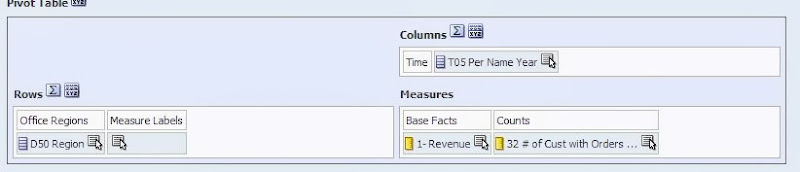 Figure 1 - Pivot Table
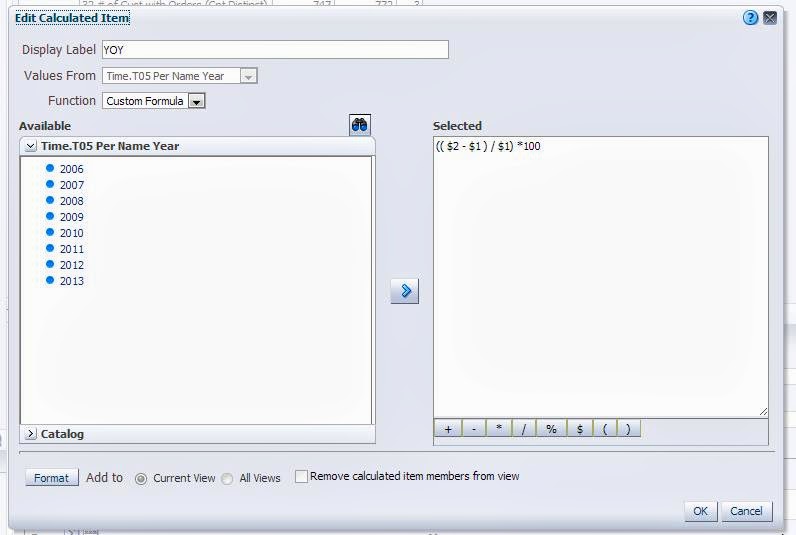 Figure 2 - Calculated item
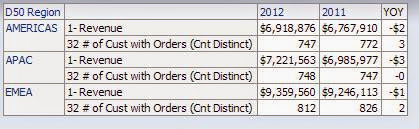
As people searched for a work around to this problem 3 common solutions have arisen:
* Note that this would also allow you to apply visual formatting if you wanted to distinguish this row/column as a total.
Why it worksThe use of conditional formatting that applies a data type as part of the format is a straightforward leap of logic, but what to use as the trigger? Most people will try to use the dimension they have setup the calculation in. However, if you try to use the text description given to the calculated item you will find that the condition is never applied:
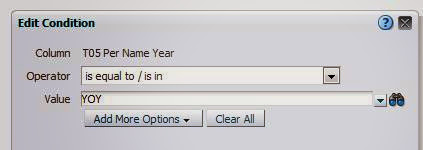 Figure 8 - Condition on dimension
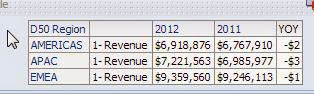 Figure 9 - Condition never met, format never applied
If you try to setup a filter that is true when the dimension is not in reasonable range of values ( in this example we try to format off all years not in the 2000s ) you will find that your calculated item is skipped as well (this has the added vulnerability of being very explicit):
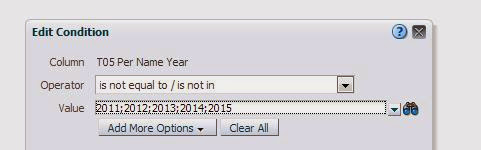 Figure 10 - Condition on dimension values
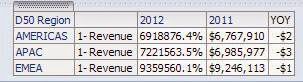 Figure 11- Condition never met, format never applied
The reason for all this is that the calculated item “borrows” EACH of the dimension values it operates against. Hence, no matter how inventive your filter is, as long as you are trying to somehow separate the calculated member away from the members it is operating on, you will never succeed. This member “borrowing” is apparent if you add the dimension it operates against to the query a 2nd time, and look at the table view.
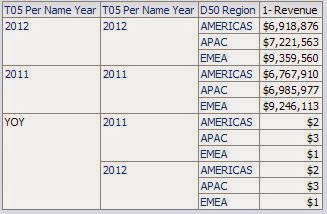 Figure 12 - Calculated item "borrows" members
But since the “member value” given to the calculated item does not actually exist in the dimension, if you try to perform a count distinct against it, you will always get zero.
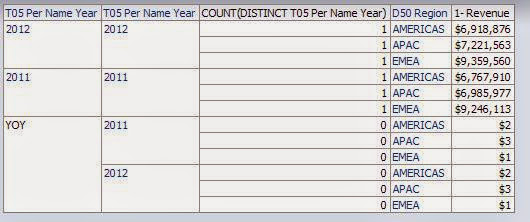 Figure 13 - Count distinct against dimension
There is your difference; there is your “trigger.” The rest is basic formatting.
1: You might suggest that this requirement is better served using column(s) with time series calculations, and you might be right. However, more often than not the user will want to SEE the time periods being compared ( 2012 vs 2011, or 08/07/2012 vs 08/07/2011). When using facts with time series calculations you will only be able to show “this year” vs “last year” since the column heading of the time series calculated fact will always be static. In these cases you will need to use the base fact and a time dimension, along with the solution provided here.
2: All screen shots, and examples used in this post are performed in Sample App V305. An XML of the final correctly formatted report can be downloaded here.
Calculated items in OBIEE Pivot tables can be very useful in certain reporting circumstances, either for ease of development, or to meet specific report requirements. While calculated items in OBIEE are easy, and flexible, they do have one important drawback: they take on the data and display formatting of the fact column they are calculated against.
The most common case is the calculation of a % change across a time dimension in financial reporting ( Year over Year, Quarter over Quarter, etc.). 1 This type of calculation usually takes the form of a percent change calculation similar to below:
(( $2 - $1 ) / $1) *100 By default, if you perform this calculation against a numerical fact ( sales, customers) you will run into the problem of how to display the % change in the correct format, since the calculated % will want to take the form of the fact it is calculated against, as can be seen in the example 2 below:
Figure 1 - Pivot TableFigure 2 - Calculated item Figure 3 - Results
Not very pretty at all.
- Use HTML formatting tricks to “hide” trigger text in the results, then conditionally format off those triggers. While inventive, as the comments note, this solution falls flat if the report is ever printed, as the PDF engine will pick up and display all of the hidden characters.
- Convert the pivot table to a regular table with some complex column formulas. Very time consuming and cumbersome, would also not solve the requirement of showing the dimension values noted as noted in Footnote1.
- Convert the calculated result to text and manually add your formatting characters. I don’t think this actually works since the calculated fields won’t accept logical SQL functions, and this would be very cumbersome.
Now with 11g providing conditional formatting that allows you to override the default data format, this is possible via the following steps:
- Add a column that is a COUNT DISTINCT on the dimension that you are calculating across ( in the displayed example, “Time T05 Per Name Year”. This column will serve as your “trigger” to apply your conditional formatting.
 Figure 4 - Column Formula
- For each of your facts, apply a conditional format that is triggered when the above column value is zero. In the formatting, apply whatever visual and data formats you desire. In this example we will format the data as a percent, with one decimal place.
 Figure 5 - Condition
 Figure 6 - Format when condition is met
 - Exclude the “trigger” column from your pivot view. View your results and be satisfied:
 Figure 7 - Correct formatting of calculated item.
* Note that this would also allow you to apply visual formatting if you wanted to distinguish this row/column as a total.
Why it worksThe use of conditional formatting that applies a data type as part of the format is a straightforward leap of logic, but what to use as the trigger? Most people will try to use the dimension they have setup the calculation in. However, if you try to use the text description given to the calculated item you will find that the condition is never applied:
Figure 8 - Condition on dimensionFigure 9 - Condition never met, format never appliedIf you try to setup a filter that is true when the dimension is not in reasonable range of values ( in this example we try to format off all years not in the 2000s ) you will find that your calculated item is skipped as well (this has the added vulnerability of being very explicit):
Figure 10 - Condition on dimension valuesFigure 11- Condition never met, format never appliedThe reason for all this is that the calculated item “borrows” EACH of the dimension values it operates against. Hence, no matter how inventive your filter is, as long as you are trying to somehow separate the calculated member away from the members it is operating on, you will never succeed. This member “borrowing” is apparent if you add the dimension it operates against to the query a 2nd time, and look at the table view.
Figure 12 - Calculated item "borrows" membersBut since the “member value” given to the calculated item does not actually exist in the dimension, if you try to perform a count distinct against it, you will always get zero.
Figure 13 - Count distinct against dimensionThere is your difference; there is your “trigger.” The rest is basic formatting.
1: You might suggest that this requirement is better served using column(s) with time series calculations, and you might be right. However, more often than not the user will want to SEE the time periods being compared ( 2012 vs 2011, or 08/07/2012 vs 08/07/2011). When using facts with time series calculations you will only be able to show “this year” vs “last year” since the column heading of the time series calculated fact will always be static. In these cases you will need to use the base fact and a time dimension, along with the solution provided here.
2: All screen shots, and examples used in this post are performed in Sample App V305. An XML of the final correctly formatted report can be downloaded here.
Categories: BI & Warehousing
Learn To ______ In A Year
It started at The Talent Code blog by Daniel Coyle a few weeks back, What's Your LQ (Learning Quotient)?. That led me to Diamondbacks’ Goldschmidt Has Little Ego and Few Limits. I like baseball stories. I especially like this passage:
I identify with that. I believe part of my success is because I ask questions.
Back to the original article. Then I end up here, Can Everyone Be Smart at Everything? I seem to lack the ability to focus for extended periods of time. Well, not quite true. I have the ability to focus, but I like to focus on a million different things. Does that count? I don't know.
I'm often envious of my friends who have been DBAs for 20 years, or worked with OBIEE for 10 years (don't argue with me...I know Oracle hasn't owned it for 10 years, I'm looking at you Christian), or APEX for 10 years (that's safe to say). I've flirted with all of those, but I've never committed...See how I get distracted easily? Wow.
and then...
OMFG. Focus!
Back to the original article and I'm reading through the comments. Someone links up to this young lady who taught herself how to dance in a year. Watch it.
Which finally brings me back to The Talent Code, To Improve Faster, Think Like a Startup. Staying with me? How about this?
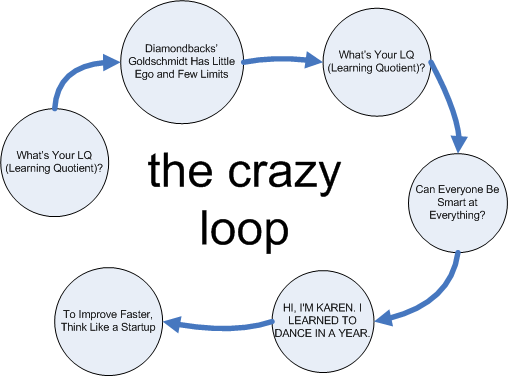
Finally, there's a point. I want to do this. Maybe not dance (as much fun as that may be), but something else. Krav Maga? Algebra? Calculus (I'm pursuing my physics or engineering degree in 2035, I need to study my math). I want to test out her technique. Small, discrete steps practiced daily towards some end goal (pass a calc test, take a real estate licensing test, whatever). The problem for me, if you haven't noticed, is focus. This method may help.
If you were to try something like this, what would you set out to learn?
“A lot of kids have so much pride that they want to show the coaches and the front office that they know what they’re doing, and they don’t need the help,” Zinter said. “They don’t absorb the information because they want us to think they know it already. Goldy didn’t have an ego. He didn’t have that illusion of knowledge. He’s O.K. with wanting to learn.”
I identify with that. I believe part of my success is because I ask questions.
Back to the original article. Then I end up here, Can Everyone Be Smart at Everything? I seem to lack the ability to focus for extended periods of time. Well, not quite true. I have the ability to focus, but I like to focus on a million different things. Does that count? I don't know.
I'm often envious of my friends who have been DBAs for 20 years, or worked with OBIEE for 10 years (don't argue with me...I know Oracle hasn't owned it for 10 years, I'm looking at you Christian), or APEX for 10 years (that's safe to say). I've flirted with all of those, but I've never committed...See how I get distracted easily? Wow.
And just as importantly, that mistakes are part of good learning. As a Wired article recently reported about why some are more effective at learning from mistakes, “the important part is what happens next.” People with a “growth mindset” — those who “believe that we can get better at almost anything, provided we invest the necessary time and energy” — were significantly better at learning from their mistakes.
and then...
“The meaning of difficulty changes. Difficulty means trying harder, trying a different strategy. They understand that change is possible, and progress occurs over time.”
OMFG. Focus!
Back to the original article and I'm reading through the comments. Someone links up to this young lady who taught herself how to dance in a year. Watch it.
Which finally brings me back to The Talent Code, To Improve Faster, Think Like a Startup. Staying with me? How about this?
Finally, there's a point. I want to do this. Maybe not dance (as much fun as that may be), but something else. Krav Maga? Algebra? Calculus (I'm pursuing my physics or engineering degree in 2035, I need to study my math). I want to test out her technique. Small, discrete steps practiced daily towards some end goal (pass a calc test, take a real estate licensing test, whatever). The problem for me, if you haven't noticed, is focus. This method may help.
If you were to try something like this, what would you set out to learn?
Categories: BI & Warehousing
Write It Out
This one was sitting in the drafts folder for a week or two, then I saw this post on Twitter:
Years ago I had a boss who was my technical superior (he may still be). I used to pop in and out of his office, or try to, and ask questions. Most of them were silly, n00b questions.
He was nice, but busy. It didn't take me very long to "read" that. So I slowed down my pace of questions. I began to write things up via email so that he could respond when he the had time. I started to use forums as well. Then I found was directed to How To Ask Questions The Smart Way.
One of the things that became evident quickly is that I didn't always have to hit Send (email) or Submit (forum post), just the act of writing it out forced me to think through the issue and more often than not, I would figure out the answer on my own.
Flash forward five or six years and I started to receive all these questions, either in person or via chat. "Send me an email" was usually my response, especially if I was in the middle of something (see: Context Switching). I was happy to help, just not at that moment. With email, I could get to it when I got a break (or needed one).
One of my favorite people, Jason Baer, who has worked for RittmanMead for the last couple of years, took this to heart. We started working together in December of 2009 and he would pepper me with questions constantly. I could never keep up. "Email the question Jason."
I didn't realize it, but I started getting fewer and fewer emails/questions from him. He began to figure them out on his own. It seemed most of the time he had just missed something, other times he just figured out another way to do something.
Jason is a smart guy. I think I'm smart. Sometimes it's just easier to ask the question without thinking it through. In fact, I do that quite a bit on The Twitter Machine ™, especially those errors that I seem to know but just don't have the bandwidth to research (think DBA type questions). I believe the types of questions that should must be written down are those that deal with Approach (design, architecture, etc). Any of those ORA errors better come along with a link to the error code in the documentation and some proof that you've researched it a bit yourself...but then that's getting into How To Ask Questions The Smart Way.
Go out and practice. Next time you have a (technical) question for someone, anyone, write it down and see what happens.
I wonder what percentage of people ask a question and figure it out on their own before you help them. What about in your experience?
— Amy Caldwell (@amyccaldwell) July 8, 2013Years ago I had a boss who was my technical superior (he may still be). I used to pop in and out of his office, or try to, and ask questions. Most of them were silly, n00b questions.
He was nice, but busy. It didn't take me very long to "read" that. So I slowed down my pace of questions. I began to write things up via email so that he could respond when he the had time. I started to use forums as well. Then I found was directed to How To Ask Questions The Smart Way.
One of the things that became evident quickly is that I didn't always have to hit Send (email) or Submit (forum post), just the act of writing it out forced me to think through the issue and more often than not, I would figure out the answer on my own.
Flash forward five or six years and I started to receive all these questions, either in person or via chat. "Send me an email" was usually my response, especially if I was in the middle of something (see: Context Switching). I was happy to help, just not at that moment. With email, I could get to it when I got a break (or needed one).
One of my favorite people, Jason Baer, who has worked for RittmanMead for the last couple of years, took this to heart. We started working together in December of 2009 and he would pepper me with questions constantly. I could never keep up. "Email the question Jason."
I didn't realize it, but I started getting fewer and fewer emails/questions from him. He began to figure them out on his own. It seemed most of the time he had just missed something, other times he just figured out another way to do something.
Jason is a smart guy. I think I'm smart. Sometimes it's just easier to ask the question without thinking it through. In fact, I do that quite a bit on The Twitter Machine ™, especially those errors that I seem to know but just don't have the bandwidth to research (think DBA type questions). I believe the types of questions that should must be written down are those that deal with Approach (design, architecture, etc). Any of those ORA errors better come along with a link to the error code in the documentation and some proof that you've researched it a bit yourself...but then that's getting into How To Ask Questions The Smart Way.
Go out and practice. Next time you have a (technical) question for someone, anyone, write it down and see what happens.
Categories: BI & Warehousing
Context Switching: An Example
Last week at #kscope13 I saw an outstanding example of context switching. If you don't know what it is, Tom Kyte explains it here.
The session was Using Kanban and Scrum to Increase Your Development Throughput presented by Stew Stryker (not to be confused with Ted Striker) of Dartmouth College (Stew gave me a gallon of Vermont Maple Syrup which exploded in my bag on the flight home, a gift for sharing my hotel room. Thanks Stew! ;)). So here's the example he gave to demonstrate context switching.
Take a list of names and time yourself writing out the first letter of each name, then the second, until you are finished.

Now, same list of names and write them out the way you normally would, left to right.
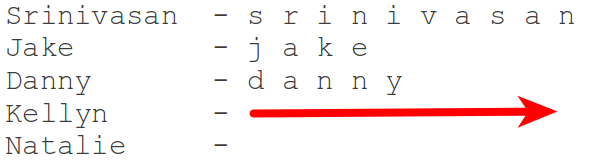
If the first method was faster, you are a freak of nature.
The two environments are just "different", separate and distinct. You can do plsql without SQL, you can do SQL (and many times do) without invoking plsql. There is a call overhead to go from SQL to PLSQL (the "hit" is most evident when SQL invokes PLSQL - not so much the other way, when SQL is embedded in PLSQL). Even if this hit is very very small (say 1/1000th of a second) - if you do it enough, it adds up. So, if it can be avoided - it should be.
The session was Using Kanban and Scrum to Increase Your Development Throughput presented by Stew Stryker (not to be confused with Ted Striker) of Dartmouth College (Stew gave me a gallon of Vermont Maple Syrup which exploded in my bag on the flight home, a gift for sharing my hotel room. Thanks Stew! ;)). So here's the example he gave to demonstrate context switching.
Take a list of names and time yourself writing out the first letter of each name, then the second, until you are finished.
Now, same list of names and write them out the way you normally would, left to right.
If the first method was faster, you are a freak of nature.
Categories: BI & Warehousing
Required Reading
It's not often that I run across articles that really resonate with me. Last night was one of those rare occasions. What follows is a sampling of what I consider to be required reading for any IT professional with a slant towards database development.
That led me to Bad CaRMa by Tim Gorman. This was an entry in Oracle Insights: Tales of the Oak Table, which I have not read, yet.
A snippet:
This is from 2006 (the book was published in 2004). Not sure how I missed that story, but I did. Big Ball of Mud I've read this one, and sent it out, many times over the years. I can't remember when I first encountered it, but I read this once every couple of months. I send it out to colleagues about as often. You can find the article here.
Read it. Remember it. How To Ask Questions The Smart WayEver been in a forum? Has anyone ever given you the "RTFM" answer? Here's how you can avoid it. How To Ask Questions The Smart Way. I read this originally about 9 or 10 years ago. I've sent it out countless times.
I'm don't believe this is the one that I would read just about every day during my first few years working with Oracle, but it's representative (I'll link up the original when I find it). I cut my teeth in the Oracle world by reading AskTom every single day for years. Some of my work at the time included working with java server pages (jsp) - at least until I found APEX. I monkeyed around with BC4J for awhile as well, but I believe these types of threads on AskTom kept me from going off the cliff. In fact, I got to a point where I would go to an interview and then debate the interviewer about this same topic. Fun times.
I'll continue to add to this list as time goes on. If you have any suggestions, leave a comment and I'll add them to the list.
- Bad CaRMa
- Big Ball of Mud
- How To Ask Questions The Smart Way
- Business Logic - PL/SQL Vs Java - Reg
- Thinking Clearly About Performance
- The Complicator's Gloves
how NOT to design a database schema - super classic article. Every data architect should read this ! simple-talk.com/opinion/opinio… @timothyjgorman
— Kyle Hailey (@dboptimizer) June 11, 2013That led me to Bad CaRMa by Tim Gorman. This was an entry in Oracle Insights: Tales of the Oak Table, which I have not read, yet.
A snippet:
...The basic premise was that just about all of the features of the relational database were eschewed, and instead it was used like a filing system for great big plastic bags of data. Why bother with other containers for the data—just jam it into a generic black plastic garbage bag. If all of those bags full of different types of data all look the same and are heaped into the same pile, don't worry! We'll be able to differentiate the data after we pull it off the big pile and look inside.
Amazingly, Randy and his crew thought this was incredibly clever. Database engineer after database engineer were struck dumb by the realization of what Vision was doing, but the builders of the one-table database were blissfully aware that they were ushering in a new dawn in database design...
Amazingly, Randy and his crew thought this was incredibly clever. Database engineer after database engineer were struck dumb by the realization of what Vision was doing, but the builders of the one-table database were blissfully aware that they were ushering in a new dawn in database design...
This is from 2006 (the book was published in 2004). Not sure how I missed that story, but I did. Big Ball of Mud I've read this one, and sent it out, many times over the years. I can't remember when I first encountered it, but I read this once every couple of months. I send it out to colleagues about as often. You can find the article here.
A BIG BALL OF MUD is haphazardly structured, sprawling, sloppy, duct-tape and bailing wire, spaghetti code jungle. We’ve all seen them. These systems show unmistakable signs of unregulated growth, and repeated, expedient repair. Information is shared promiscuously among distant elements of the system, often to the point where nearly all the important information becomes global or duplicated. The overall structure of the system may never have been well defined. If it was, it may have eroded beyond recognition. Programmers with a shred of architectural sensibility shun these quagmires. Only those who are unconcerned about architecture, and, perhaps, are comfortable with the inertia of the day-to-day chore of patching the holes in these failing dikes, are content to work on such systems.
Read it. Remember it. How To Ask Questions The Smart WayEver been in a forum? Has anyone ever given you the "RTFM" answer? Here's how you can avoid it. How To Ask Questions The Smart Way. I read this originally about 9 or 10 years ago. I've sent it out countless times.
The first thing to understand is that hackers actually like hard problems and good, thought-provoking questions about them. If we didn't, we wouldn't be here. If you give us an interesting question to chew on we'll be grateful to you; good questions are a stimulus and a gift. Good questions help us develop our understanding, and often reveal problems we might not have noticed or thought about otherwise. Among hackers, “Good question!” is a strong and sincere compliment.
Despite this, hackers have a reputation for meeting simple questions with what looks like hostility or arrogance. It sometimes looks like we're reflexively rude to newbies and the ignorant. But this isn't really true.
What we are, unapologetically, is hostile to people who seem to be unwilling to think or to do their own homework before asking questions. People like that are time sinks — they take without giving back, and they waste time we could have spent on another question more interesting and another person more worthy of an answer. We call people like this “losers” (and for historical reasons we sometimes spell it “lusers”).
Business Logic - PL/SQL Vs Java - Reg The article can be found here. Despite this, hackers have a reputation for meeting simple questions with what looks like hostility or arrogance. It sometimes looks like we're reflexively rude to newbies and the ignorant. But this isn't really true.
What we are, unapologetically, is hostile to people who seem to be unwilling to think or to do their own homework before asking questions. People like that are time sinks — they take without giving back, and they waste time we could have spent on another question more interesting and another person more worthy of an answer. We call people like this “losers” (and for historical reasons we sometimes spell it “lusers”).
I'm don't believe this is the one that I would read just about every day during my first few years working with Oracle, but it's representative (I'll link up the original when I find it). I cut my teeth in the Oracle world by reading AskTom every single day for years. Some of my work at the time included working with java server pages (jsp) - at least until I found APEX. I monkeyed around with BC4J for awhile as well, but I believe these types of threads on AskTom kept me from going off the cliff. In fact, I got to a point where I would go to an interview and then debate the interviewer about this same topic. Fun times.
if it touches data -- plsql.
If it is computing a fourier transformation -- java.
If it is processing data -- plsql.
If it is generating a graph -- java.
If it is doing a transaction of any size, shape or form against data -- plsql.
Thinking Clearly About Performance Cary Millsap. Most of the people seem to know Cary from Optimizing Oracle Performance, I didn't. I first "met" Cary virtually and he was gracious enough to help me understand my questions around Logging, Debugging, Instrumentation and Profiling. Anyway, what I've learned over that time, is that Cary doesn't think of himself as a DBA, he's a Developer. That was shocking for me to hear...I wonder how many others know that. So I've read this paper about 20 times over the last couple of years (mostly because I'm a little slow). I organize events around this topic (instrumentation, writing better software, etc) and this fits in perfectly. My goal is to one day co-present with Cary, while playing catch, on this topic (I don't think he knows that, so don't tell him). Link to his paper can be found here. Enjoy! The Complicator's Gloves One of my favorite articles from The Daily WTF of all time. Find the article here. The gist of the story is this: an internal forum where people were discussing how to warm a given individuals hands on his bike ride to work. The engineers then proceeded to come up with all kinds of solutions...they spent all day doing this. Finally, someone posts, "wear gloves." End of discussion. Love it. I wrote about it years ago in Keeping it Simple. For a few years I considered buying up thecomplicatorsgloves.com and try to gather related stories, but I got lazy. You should read this often, or better, send it out to colleagues on a regular basis to remind them of their craziness. If it is computing a fourier transformation -- java.
If it is processing data -- plsql.
If it is generating a graph -- java.
If it is doing a transaction of any size, shape or form against data -- plsql.
I'll continue to add to this list as time goes on. If you have any suggestions, leave a comment and I'll add them to the list.
Categories: BI & Warehousing
caveats
I always find myself putting an asterisk (if only mentally) next to certain statements. I shall now put all those statements here and link back.
- I don't know everything
- I'm not the best developer in the world, but I constantly work at getting better...
- If I make a statement about something, that's been my experience. Your results may vary.
- I am not a salesman.
- I do not work for <insert company name which I just pitched here>
Categories: BI & Warehousing
Ubuntu 12.10 + nvidia
I updated my host OS a few months back after getting repeated notifications (yes, I know, I can shut them off) that 10.04 (I think) was moving out of support.
Since then, I've had an issue with my Nvidia drivers. Basically, I get video on a single monitor (dual set up) and that single monitor resolution is like 200 x 400 (no, it's not really that, but it is gigantic). Thank goodness for The Google Machine™. That originally led me here on StackOverflow. (Another reason to do things from the command line, you can remember things with history | grep nvidia).
I'm on the 4th time of going through this exercise. Each time the kernel is updated, nvidia breaks. Fortunately for me, that guy on StackOverflow gave me all the information I needed. This time after reboot and the gigantic screen, I removed the nvidia drivers and then reinstalled them. No go. uname -r gave me the following: 3.5.0-26-generic and dpkg -l|grep headers showed an older version of the kernel headers. So I updated those, reinstalled nvidia-current and rebooted. Yay.
Many "small" issues like this recently have me pondering a move back to, gasp, Windows or perhaps even a Mac. The Mac ecosystem scares me because it is expensive...but it's difficult to square when so many of my friends (technical and otherwise) swear by Macs. Something for another day I guess...
Since then, I've had an issue with my Nvidia drivers. Basically, I get video on a single monitor (dual set up) and that single monitor resolution is like 200 x 400 (no, it's not really that, but it is gigantic). Thank goodness for The Google Machine™. That originally led me here on StackOverflow. (Another reason to do things from the command line, you can remember things with history | grep nvidia).
I'm on the 4th time of going through this exercise. Each time the kernel is updated, nvidia breaks. Fortunately for me, that guy on StackOverflow gave me all the information I needed. This time after reboot and the gigantic screen, I removed the nvidia drivers and then reinstalled them. No go. uname -r gave me the following: 3.5.0-26-generic and dpkg -l|grep headers showed an older version of the kernel headers. So I updated those, reinstalled nvidia-current and rebooted. Yay.
Many "small" issues like this recently have me pondering a move back to, gasp, Windows or perhaps even a Mac. The Mac ecosystem scares me because it is expensive...but it's difficult to square when so many of my friends (technical and otherwise) swear by Macs. Something for another day I guess...
Categories: BI & Warehousing
Fun with CHAR
I'm busy deriving file layouts from PL/SQL. Probably close to 100 file definitions...each of them slightly different, each of them defined in the code. Fun!
There are a mixture of types too, fixed width, csv, etc. Thankfully, I've read enough of the code now that it's relatively easy to figure out. The fixed width variety is what this is about though.
In much of the code, there's a type that's defined, something like this:
Then I started to think about it...it's a CHAR. CHAR is already fixed width. To wit:
So what's the purpose of those RPAD( ' ', 10 ) calls? I'm not sure.
The only reason I even began to think about it was that I ran across one type set up with VARCHAR data types. There it makes sense, using RPAD I mean. With the CHAR field, it's a waste of typing IMO. Perhaps it was just for readability...who knows?
There are a mixture of types too, fixed width, csv, etc. Thankfully, I've read enough of the code now that it's relatively easy to figure out. The fixed width variety is what this is about though.
In much of the code, there's a type that's defined, something like this:
type my_record is recordThat's then used to receive assignments from incoming variables. I'll hardcode my variables for this exercise.
(
column_01 CHAR(10),
column_02 CHAR(10),
column_03 CHAR(10)
);
declareLittered throughout those assignments though, are things like LPAD and RPAD. You're going to say, "well, yeah, if it's a number, you may want it right aligned or something." Fair enough. But I'm not talking about those, I'm talking about this:
type my_record is record
(
  column_01 CHAR(10),
  column_02 CHAR(10),
  column_03 CHAR(10)
);
l_rec my_record;
begin
l_rec.column_01 := '1';
l_rec.column_02 := '3';
l_rec.column_03 := '6';
end;
l_rec.column_01 := rpad( ' ', 10 );Ostensibly, these columns once held data. Instead of forcing the client (application, business, whatever) to change their processing bit, the file was left the same. Makes sense.
l_rec.column_02 := '3';
l_rec.column_03 := RPAD( ' ', 10 );
Then I started to think about it...it's a CHAR. CHAR is already fixed width. To wit:
drop table t purge;I inserted a single space in the first record. It has a length of 10 despite only inserting a single character there.
create table t
(
x CHAR(10)
);
insert into t ( x ) values ( ' ' );
insert into t ( x ) values ( null );
select
rownum,
length( x ),
x
from t;
ROWNUM LENGTH(X) X
---------- ---------- ----------
1 10
2
So what's the purpose of those RPAD( ' ', 10 ) calls? I'm not sure.
The only reason I even began to think about it was that I ran across one type set up with VARCHAR data types. There it makes sense, using RPAD I mean. With the CHAR field, it's a waste of typing IMO. Perhaps it was just for readability...who knows?
Categories: BI & Warehousing
On Work/Life Balance
Nolan Bushnell, founder of Atari, had this to say via his new book, Find the Next Steve Jobs.
I've struggled with the work/balance thing. I'm better now than I was a year ago, but it takes a lot of work. That quote definitely illustrates one aspect of how it could get so out of balance...I thoroughly enjoy what I do.
(It’s been said that many people in high tech cannot balance their personal and work lives. Here’s another way to look at it: Their jobs are so interesting that it’s difficult to figure out what is work and what is play. Creative projects produce this kind of excitement.)
I've struggled with the work/balance thing. I'm better now than I was a year ago, but it takes a lot of work. That quote definitely illustrates one aspect of how it could get so out of balance...I thoroughly enjoy what I do.
Categories: BI & Warehousing